

03-24-2026, 09:49 PM
(This post was last modified: 03-24-2026, 10:17 PM by Hugh Wallington.)
Do you have your VOICES set up as POLYPHONIC or MONOPHONIC?
You may not think it would make any difference which option you chose, but thinking about the instrument(s) you are playing on your keyboard goes a long way to deciding how you are going to play them.
I came across this video by Tom Horton, who does a superb job of getting a SOLO instrument to sound really authentic by the way in which he plays it. On my AR80 organ you could choose VOICES to be MONO by selecting them from the ‘LEAD VOICE’ section .. which he mentions.
On my Tyros 4 I have a button I can press to switch a voice from POLY to MONO, ...

... but it all depends on how the voice has been sampled as to whether this button actally does anything or not. Super Articulation 2 (SA2) voices are designed to work in stereo so Yamaha prevents them from being switched to MONO. If you did want to play a particular instrument in MONO then look for an older version of it eg. from Legacy.
But if you watch the Peter Baartmans video below you will soon realise that its the way you play these SA2 instruments that gives them their authenticity
One tune I tried to play on my Yamaha AR80 organ was Stranger On The Shore with something approaching an Acker Bilk sounding clarinet, but the only clarinet I had could only be described as having a ‘woody’ sound which in no way sounded like a clarinet. But I have found on my Tyros 4 an SA2 voice that will hopefully give me the timbre of a clarinet .. Romance Clarinet. As an SA2 voice I am hoping that the way I play it will give me the sounds that I want to hear. Holding a bottom note and playing the note an octave higher before releasing the bottom note will give me a glissando; playing ‘smoothly’ between notes will give a smooth transition from one note to the next; and playing ‘jerkily’ between notes will bring out that strong ‘woody’ clarinet sound.
To set up a REGISTRATION BANK to play this song I first have to find a STYLE that will suit the song. 12-8 Ballad from BALLAD seems a good place to start .. but I will have to make some changes to get everything that I want.
For starters, listen below to the RHYTHM section of the 12-8 Ballad STYLE. It’s that ‘block’ on the ‘off beat’ that I don’t want to hear every bar from beginning to end of the song ... so I shall remove that drum sound from the mix. I shall then have one style with the block and one without.
https://app.box.com/s/o0hkx4d1jc6xhnft04737t69j7hung4u
You can do that as the RHYTHM section is the one section where one does not have to DELETE any Yamaha content before making adjustments to it. You can add or remove drum beats into/from the mix.
Here’s a brief reminder on how to do this.
First set the 12-8Ballad STYLE up as MAIN VARIATION B; then load it into STYLE CREATOR.

The ‘default’ is REC in RHYTHM 2.

Note that STYLE CREATOR has the style NAME at the top (12-8Ballad) and SECTION: MAIN B is showing. First turn all the PARTS to OFF (as indicated by the blue arrows) .. just leaving RHY1 and RHY2. To listen to this STYLE you press the START/STOP button. You will only hear the RHYTHM as all the other PARTS have been turned to OFF.

Whilst the Rhythm is playing, do not press any keys as the program is in RECording mode and any key you press will add a drum beat into the mix (this is how you create a drum pattern of your own). What we are aiming to do is to identify which key is the ‘block’ sound we are trying to remove. You do this by listening to the Rhythm playing .. STOPPING it playing (press the START/STOP again) .. and then pressing those keys until you find the sound you are looking for (each key has a different drum sound). If you are having difficulty identifying the sound, press the START/STOP and listen again. STOP it playing again before continuing to press keys to try to ascertain which key it is.
I reckon it’s C#2 ie. second C# from the left hand side of the keyboard.
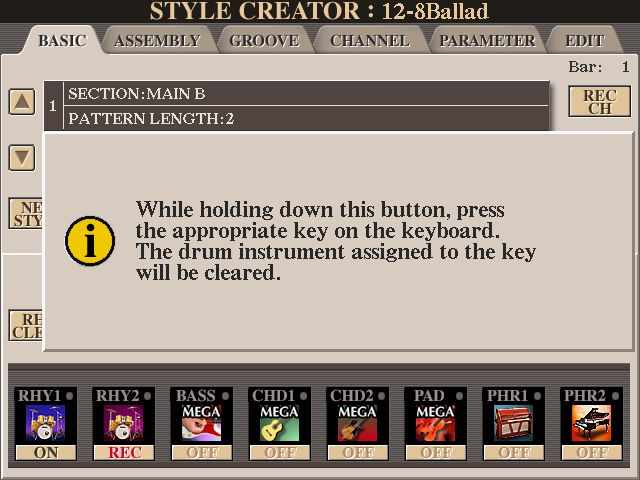
To REMOVE that drum sound from the mix, press and HOLD RHY CLEAR (indicated by the green arrow) and at the same time press the key that contains the sound you wish to remove .. in this case C#2. Instructions do pop up telling you to do this.
This ‘changed’ STYLE now has to be SAVED, so move across to another tab where there is a SAVE. Save it to USER giving it a name eg. StrangerShore3 in my case.

If you want to read more about removing drum sounds, click this LINK.
https://chellos-keyboard-players-club.co...7#pid25667
There are also two changes I wish to make to the 12-8Ballad STYLE to use for the second part of this song .. the BASS part; and adding a ‘repeating piano’ into PHRASE2. I shall SAVE this in USER as StrangerShore2.
Starting again with 12-8Ballad, MAIN VARIATION B and loading this into STYLE CREATOR (note once again that the ‘default’ is to be RECording into RHY2), I need to move the REC across to the BASS PART, so click and HOLD REC CH (top right) whilst pressing on the bottom of the BASS channel (indicated by the blue arrow). Of course this time I have to DELETE the existing Yamaha PART before I can insert one of my own, so when the message comes up I click YES.

We now get this screen with the REC at the bottom of the BASS channel ready to record into.

Note: All the PARTS (Channels) are ON, except for PHRASE 2, which means that when I start recording my BASS PART all those other Channels will be ‘playing along’ .. and that certainly helps when trying to ‘keep to the beat’.
I can see from the above that Yamaha had used a MEGA voice to record this part and MEGA voices are not suitable for doing recordings by pressing keys ‘live’. By pressing the top of the BASS channel I am taken to the selected BASS VOICE. This has already been set up in RIGHT 1 (R1) ready for me to do my recording.

I have chosen a more suitable Bass Voice to use for my recording, as below.

Press the EXIT button to get back to the STYLE CREATOR screen (you may have to do this twice).

Before doing a recording it’s always a good idea to check the VOLUME of RIGHT 1 using the BALANCE button.

R1 is where VOICES you are using for recording into STYLES are set up ready to go by ‘default’. I have set my VOLUME to 74. As this is part of the STYLE, I can always alter the Volume UP or DOWN using the MIXING CONSOLE afterwards (press the button twice) if I don’t feel the Bass Part Volume is as I want it .. and SAVE that to a REGISTRATION MEMORY.
To make my recording I set the METRONOME going so I can ‘keep to the beat’. At this point I can set the TEMPO to whatever suits me for making the recording. It is not necessary to have the TEMPO set to that of the song.

To record into a STYLE PART we don’t use the MIDI or the AUDIO recorder. We set up the SYNC START .. as a ‘trigger’ to get the recording going.

If the SYNC START is ‘flashing’ then the recording will start as soon as you play a note ie. ON the first beat of the bar .. so listen to the Metronome to determine when you should play your first note .. remembering too that the VOICE being used has already been set up in R1.
Patterns of notes should be based in the key of C, so my BASS ‘pattern’ of C, E and G, with a little ‘skip’ in it has to be recorded for two bars, as the PATTERN LENGTH is 2.
Have a listen to the below. First is the original BASS PATTERN of the 12-8 Ballad STYLE, and following on after is the BASS PATTERN I am programming in .. followed by the original once again so you can compare what I am programming in with the original.
https://app.box.com/s/fq2gtaswkn7xsyzp9nltnwvajmv0rsne
The above is only showing you the notes played. When you actually do the recording all the STYLE PARTS will be playing along (those that are ON anyway). When you reach the end of the STYLE PATTERN LENGTH of 2 ie. 2 bars (and don’t play any notes on the first beat of the next bar) you do not ‘stop’ the recording. The STYLE PATTERN will repeat itself ie. ‘loop round and round’ .. so just listen and decide if what you hear is OK. Yes, you do have to stop it playing at some point, and you do this by pressing the START/STOP at any time. If you’re not happy with what you recorded you’ll have to DELETE what you have just done and record it again. ie. Press and HOLD the DELETE button and at the same time, the top of the BASS Channel where DELETE is showing.


You can then record that BASS PART again.
When you are happy with it, press the EXIT button.
This will take you back to the BASIC screen in STYLE CREATOR. This screen is a second BASIC screen and has a SAVE.

But I don’t want to SAVE what I have done this far as I also want to put a REPEATING PIANO into PHRASE 2. To get back to the original BASIC screen showing PHRASE 2, click REC CH (as indicated by the blue arrow) and your original BASIC screen will be back
Next, press and HOLD REC CH .. and at the same time press PHR2 at the bottom.
You will now have the PHR2 Channel set up for you ready to RECord into.

I can see the VOICE being used is a PIANO .. but which one? Press the top of PHR2 and you will be taken to the Voice Yamaha have selected for me.

Not the one I want .. so I move down to Page 1 and select Ambient Piano.

Press the EXIT button to get back to the STYLE CREATOR page (you may have to do this twice).
As before, R1 has been set up with my chosen VOICE (Ambient Piano) .. and checking with the BALANCE button the VOLUME is set at 100.
Get the SYNC START flashing; and the METRONOME going.
Ready for the off? The notes I shall play for my REPEATING PIANO are G, B and E (together) .. starting on the first beat of the bar .. for a PATTERN LENGTH of 2 (that’s 8 beats).
Why the B? Because I am using Yamaha’s ‘default’ of M7 for recording ...

... and the B is a ‘wildcard’, picking up a C instead of a B for a Major Chord; a B for a Major 7th Chord; and a Bb for a 7th Chord.
To read more about this click this LINK below:
https://chellos-keyboard-players-club.co...-M7-option
Anyway, when used in practice this is what my REPEATING PIANO sounds like in the PHR2 slot in my STYLE when playing a Major Chord.
https://app.box.com/s/4idwx5cjiz9i3onnkmui9za6rqy5ktn7
Press the EXIT button and SAVE this ‘adjusted’ style into USER giving it a name. I have called mine StrangerShore2.
I did this using that second BASIC screen, where there is a SAVE. But then when I tried to EXIT I was told my STYLE had not been SAVED and would be lost if I proceeded. Exit or Return? Really? I’ve just SAVED it! Faulty Tyros 4? So I tabbed across to the PARAMETER tab and SAVED it again. Seemed quite happy for me to EXIT the program this time.
Having got three STYLES available for me to use I then set about creating a REGISTRATION BANK for this song .. Stranger On The Shore.
REGISTRATION MEMORY 1
STYLE: StrangerShore3 (the one with the ‘block’ sound removed).

REGISTRATION MEMORY 2
STYLE: 12-8Ballad (the original PRESET I started with .. so this has the ‘block’ sound).

REGISTRATION MEMORY 3
STYLE: StrangerShore2 (so this has the ‘skipping BASS’ and the Repeating Piano I had created). Used for the second part of the song.

REGISTRATION MEMORY 4
STYLE: StrangerShore3 (the one with the ‘block’ sound removed).
R1 & R2: Strings.

Stranger On The Shore - CHORDS
Verse
/F - - - /Gm7 - - - /F7 - - - /Bb - Bbm - /
/F - - - /G7 - - - /Gm7 - - - /C7 - - - /
/F - - - /Gm7 - - - /F7 - - - /Bb - Bbm - /
/F - - - /Am - - - /Gm7 – C7 - /F - - - /
Chorus
/Bb - - - /F - - - /Gm7 – C7 - /F – F7 - /
/Bb - - - /Am - - - /G7 - - - /Gm7 – C7 - /
Stranger On The Shore
https://app.box.com/s/tn46cyrw71a5oneidwd4f01dpn3c4mn1
Hugh
You may not think it would make any difference which option you chose, but thinking about the instrument(s) you are playing on your keyboard goes a long way to deciding how you are going to play them.
I came across this video by Tom Horton, who does a superb job of getting a SOLO instrument to sound really authentic by the way in which he plays it. On my AR80 organ you could choose VOICES to be MONO by selecting them from the ‘LEAD VOICE’ section .. which he mentions.
On my Tyros 4 I have a button I can press to switch a voice from POLY to MONO, ...
... but it all depends on how the voice has been sampled as to whether this button actally does anything or not. Super Articulation 2 (SA2) voices are designed to work in stereo so Yamaha prevents them from being switched to MONO. If you did want to play a particular instrument in MONO then look for an older version of it eg. from Legacy.
But if you watch the Peter Baartmans video below you will soon realise that its the way you play these SA2 instruments that gives them their authenticity
One tune I tried to play on my Yamaha AR80 organ was Stranger On The Shore with something approaching an Acker Bilk sounding clarinet, but the only clarinet I had could only be described as having a ‘woody’ sound which in no way sounded like a clarinet. But I have found on my Tyros 4 an SA2 voice that will hopefully give me the timbre of a clarinet .. Romance Clarinet. As an SA2 voice I am hoping that the way I play it will give me the sounds that I want to hear. Holding a bottom note and playing the note an octave higher before releasing the bottom note will give me a glissando; playing ‘smoothly’ between notes will give a smooth transition from one note to the next; and playing ‘jerkily’ between notes will bring out that strong ‘woody’ clarinet sound.
To set up a REGISTRATION BANK to play this song I first have to find a STYLE that will suit the song. 12-8 Ballad from BALLAD seems a good place to start .. but I will have to make some changes to get everything that I want.
For starters, listen below to the RHYTHM section of the 12-8 Ballad STYLE. It’s that ‘block’ on the ‘off beat’ that I don’t want to hear every bar from beginning to end of the song ... so I shall remove that drum sound from the mix. I shall then have one style with the block and one without.
https://app.box.com/s/o0hkx4d1jc6xhnft04737t69j7hung4u
You can do that as the RHYTHM section is the one section where one does not have to DELETE any Yamaha content before making adjustments to it. You can add or remove drum beats into/from the mix.
Here’s a brief reminder on how to do this.
First set the 12-8Ballad STYLE up as MAIN VARIATION B; then load it into STYLE CREATOR.
The ‘default’ is REC in RHYTHM 2.
Note that STYLE CREATOR has the style NAME at the top (12-8Ballad) and SECTION: MAIN B is showing. First turn all the PARTS to OFF (as indicated by the blue arrows) .. just leaving RHY1 and RHY2. To listen to this STYLE you press the START/STOP button. You will only hear the RHYTHM as all the other PARTS have been turned to OFF.
Whilst the Rhythm is playing, do not press any keys as the program is in RECording mode and any key you press will add a drum beat into the mix (this is how you create a drum pattern of your own). What we are aiming to do is to identify which key is the ‘block’ sound we are trying to remove. You do this by listening to the Rhythm playing .. STOPPING it playing (press the START/STOP again) .. and then pressing those keys until you find the sound you are looking for (each key has a different drum sound). If you are having difficulty identifying the sound, press the START/STOP and listen again. STOP it playing again before continuing to press keys to try to ascertain which key it is.
I reckon it’s C#2 ie. second C# from the left hand side of the keyboard.
To REMOVE that drum sound from the mix, press and HOLD RHY CLEAR (indicated by the green arrow) and at the same time press the key that contains the sound you wish to remove .. in this case C#2. Instructions do pop up telling you to do this.
This ‘changed’ STYLE now has to be SAVED, so move across to another tab where there is a SAVE. Save it to USER giving it a name eg. StrangerShore3 in my case.
If you want to read more about removing drum sounds, click this LINK.
https://chellos-keyboard-players-club.co...7#pid25667
There are also two changes I wish to make to the 12-8Ballad STYLE to use for the second part of this song .. the BASS part; and adding a ‘repeating piano’ into PHRASE2. I shall SAVE this in USER as StrangerShore2.
Starting again with 12-8Ballad, MAIN VARIATION B and loading this into STYLE CREATOR (note once again that the ‘default’ is to be RECording into RHY2), I need to move the REC across to the BASS PART, so click and HOLD REC CH (top right) whilst pressing on the bottom of the BASS channel (indicated by the blue arrow). Of course this time I have to DELETE the existing Yamaha PART before I can insert one of my own, so when the message comes up I click YES.
We now get this screen with the REC at the bottom of the BASS channel ready to record into.
Note: All the PARTS (Channels) are ON, except for PHRASE 2, which means that when I start recording my BASS PART all those other Channels will be ‘playing along’ .. and that certainly helps when trying to ‘keep to the beat’.
I can see from the above that Yamaha had used a MEGA voice to record this part and MEGA voices are not suitable for doing recordings by pressing keys ‘live’. By pressing the top of the BASS channel I am taken to the selected BASS VOICE. This has already been set up in RIGHT 1 (R1) ready for me to do my recording.
I have chosen a more suitable Bass Voice to use for my recording, as below.
Press the EXIT button to get back to the STYLE CREATOR screen (you may have to do this twice).
Before doing a recording it’s always a good idea to check the VOLUME of RIGHT 1 using the BALANCE button.
R1 is where VOICES you are using for recording into STYLES are set up ready to go by ‘default’. I have set my VOLUME to 74. As this is part of the STYLE, I can always alter the Volume UP or DOWN using the MIXING CONSOLE afterwards (press the button twice) if I don’t feel the Bass Part Volume is as I want it .. and SAVE that to a REGISTRATION MEMORY.
To make my recording I set the METRONOME going so I can ‘keep to the beat’. At this point I can set the TEMPO to whatever suits me for making the recording. It is not necessary to have the TEMPO set to that of the song.
To record into a STYLE PART we don’t use the MIDI or the AUDIO recorder. We set up the SYNC START .. as a ‘trigger’ to get the recording going.
If the SYNC START is ‘flashing’ then the recording will start as soon as you play a note ie. ON the first beat of the bar .. so listen to the Metronome to determine when you should play your first note .. remembering too that the VOICE being used has already been set up in R1.
Patterns of notes should be based in the key of C, so my BASS ‘pattern’ of C, E and G, with a little ‘skip’ in it has to be recorded for two bars, as the PATTERN LENGTH is 2.
Have a listen to the below. First is the original BASS PATTERN of the 12-8 Ballad STYLE, and following on after is the BASS PATTERN I am programming in .. followed by the original once again so you can compare what I am programming in with the original.
https://app.box.com/s/fq2gtaswkn7xsyzp9nltnwvajmv0rsne
The above is only showing you the notes played. When you actually do the recording all the STYLE PARTS will be playing along (those that are ON anyway). When you reach the end of the STYLE PATTERN LENGTH of 2 ie. 2 bars (and don’t play any notes on the first beat of the next bar) you do not ‘stop’ the recording. The STYLE PATTERN will repeat itself ie. ‘loop round and round’ .. so just listen and decide if what you hear is OK. Yes, you do have to stop it playing at some point, and you do this by pressing the START/STOP at any time. If you’re not happy with what you recorded you’ll have to DELETE what you have just done and record it again. ie. Press and HOLD the DELETE button and at the same time, the top of the BASS Channel where DELETE is showing.
You can then record that BASS PART again.
When you are happy with it, press the EXIT button.
This will take you back to the BASIC screen in STYLE CREATOR. This screen is a second BASIC screen and has a SAVE.
But I don’t want to SAVE what I have done this far as I also want to put a REPEATING PIANO into PHRASE 2. To get back to the original BASIC screen showing PHRASE 2, click REC CH (as indicated by the blue arrow) and your original BASIC screen will be back
Next, press and HOLD REC CH .. and at the same time press PHR2 at the bottom.
You will now have the PHR2 Channel set up for you ready to RECord into.
I can see the VOICE being used is a PIANO .. but which one? Press the top of PHR2 and you will be taken to the Voice Yamaha have selected for me.
Not the one I want .. so I move down to Page 1 and select Ambient Piano.
Press the EXIT button to get back to the STYLE CREATOR page (you may have to do this twice).
As before, R1 has been set up with my chosen VOICE (Ambient Piano) .. and checking with the BALANCE button the VOLUME is set at 100.
Get the SYNC START flashing; and the METRONOME going.
Ready for the off? The notes I shall play for my REPEATING PIANO are G, B and E (together) .. starting on the first beat of the bar .. for a PATTERN LENGTH of 2 (that’s 8 beats).
Why the B? Because I am using Yamaha’s ‘default’ of M7 for recording ...
... and the B is a ‘wildcard’, picking up a C instead of a B for a Major Chord; a B for a Major 7th Chord; and a Bb for a 7th Chord.
To read more about this click this LINK below:
https://chellos-keyboard-players-club.co...-M7-option
Anyway, when used in practice this is what my REPEATING PIANO sounds like in the PHR2 slot in my STYLE when playing a Major Chord.
https://app.box.com/s/4idwx5cjiz9i3onnkmui9za6rqy5ktn7
Press the EXIT button and SAVE this ‘adjusted’ style into USER giving it a name. I have called mine StrangerShore2.
I did this using that second BASIC screen, where there is a SAVE. But then when I tried to EXIT I was told my STYLE had not been SAVED and would be lost if I proceeded. Exit or Return? Really? I’ve just SAVED it! Faulty Tyros 4? So I tabbed across to the PARAMETER tab and SAVED it again. Seemed quite happy for me to EXIT the program this time.
Having got three STYLES available for me to use I then set about creating a REGISTRATION BANK for this song .. Stranger On The Shore.
REGISTRATION MEMORY 1
STYLE: StrangerShore3 (the one with the ‘block’ sound removed).
REGISTRATION MEMORY 2
STYLE: 12-8Ballad (the original PRESET I started with .. so this has the ‘block’ sound).
REGISTRATION MEMORY 3
STYLE: StrangerShore2 (so this has the ‘skipping BASS’ and the Repeating Piano I had created). Used for the second part of the song.
REGISTRATION MEMORY 4
STYLE: StrangerShore3 (the one with the ‘block’ sound removed).
R1 & R2: Strings.
Stranger On The Shore - CHORDS
Verse
/F - - - /Gm7 - - - /F7 - - - /Bb - Bbm - /
/F - - - /G7 - - - /Gm7 - - - /C7 - - - /
/F - - - /Gm7 - - - /F7 - - - /Bb - Bbm - /
/F - - - /Am - - - /Gm7 – C7 - /F - - - /
Chorus
/Bb - - - /F - - - /Gm7 – C7 - /F – F7 - /
/Bb - - - /Am - - - /G7 - - - /Gm7 – C7 - /
Stranger On The Shore
https://app.box.com/s/tn46cyrw71a5oneidwd4f01dpn3c4mn1
Hugh
It's all about the music!
![[-]](https://chellos-keyboard-players-club.com/images/collapse.png)
