

05-27-2026, 06:49 PM
(This post was last modified: 05-28-2026, 01:07 AM by Hugh Wallington.)
One genre of music I really enjoy listening to is Dixieland Jazz. The instrument that does it for me in Dixieland music is the BANJO, which plays a steady rhythm on every beat of the bar. Yamaha Keyboard STYLES seem to be hooked on using guitars for their backings, and that to me is not ‘Dixie’.
Listen out for the banjo in these YouTube clips.
New Orleans Dixieland on Street
Tuba Skinny - Jubilee Stomp - Royal Street
Streetview Dixieclub - Oh When The Saints Go Marching In
Dixieland Selection - Classic Jazz Compilation - The Most Beautiful Melodies of Traditional Jazz
(37mins)
Deep Purple (Artie Shaw)- Gunhild Carling LIVE- CARLING FAMILY
Gunhild Carling aged 9yrs
(1hr 12mins)
Comment from under the video:
Great to see this film of 9 year old Gunhild and her family in 1984. She is astonishingly good on the trombone at such a young age, what talent. That is not an easy instrument to play so well as a small child.
So, what STYLES can I find with a banjo in the backing for playing Dixieland music?
Looking in Swing & Jazz on my Tyros 4 I did find one .. Dixieland. Of the four variations, I reckoned that VARIATION D had the best sounding BANJO ‘pattern’.
With a little ‘tweaking’ of the volumes (press the MIXING CONSOLE twice) I have changed the overall sound of this STYLE so the BANJO comes through stronger. All done whilst listening (of course!).
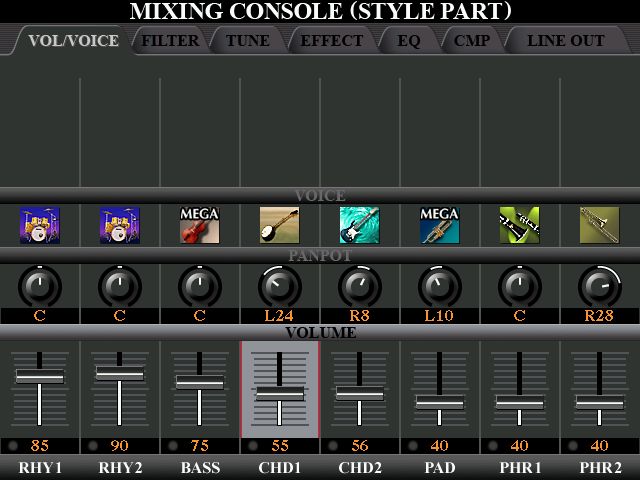
Click the below to hear (a) the original Dixieland STYLE, followed by (b) the adjustments to the BALANCE of the STYLE PARTS to make the Banjo more prominent. I have named this adjusted STYLE DixielandBanjo.
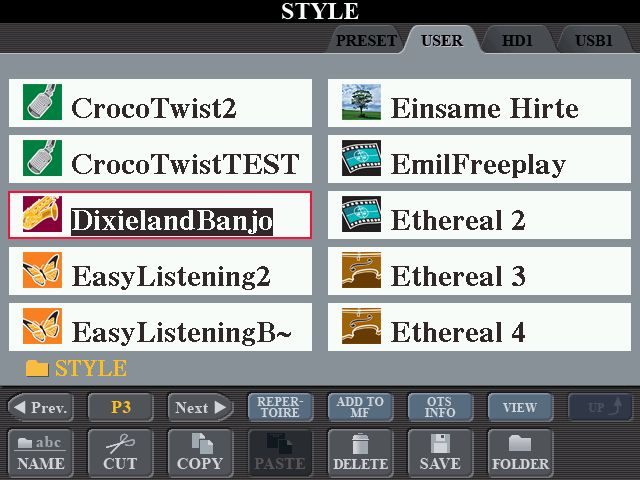
Dixieland DEMO
https://app.box.com/s/0d0m3tax35jpl32kmx1e72tv1f8tnyk4
I then asked in the Forum in REQUESTS STYLES if anyone knew of some Styles with a Banjo in them that I could work with, and whitecolin1 came up with several.
https://chellos-keyboard-players-club.co...JO-backing
Having listened to them all I was really taken with ASDixieland7. The BANJO in this is in CHD2.
I have also come across another Style somebody has sent me that has the perfect RHYTHM for what I want to play .. BigBand2 (Variation B). This has a Jazz Guitar playing on every beat .. but no Banjo.
The plan here is to add Colin’s BANJO from CHD2 in his ASDixieland7 Style into the BigBand2 Style. I have noticed that the PAD slot is empty, so this seems a good place to put it.
I have covered Copying PARTS from one STYLE into another .. here:
https://chellos-keyboard-players-club.co...to-another.
Here are the steps explaining how to do this.
You start with the STYLE you are wanting to end up with. In my case, it’s BigBand2. Find the STYLE and highlight it; selecting the VARIATION you want to work with (so it is lit up). In my case, VARIATION B.
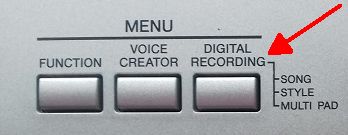
From the MENU go to STYLE CREATOR.
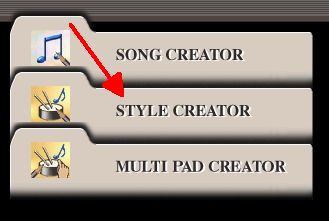
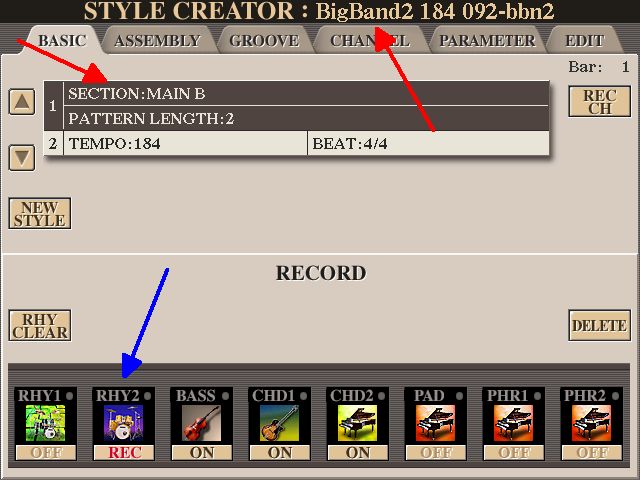
When you click on STYLE CREATOR, you will find the page you are wanting to work on is already loaded. Check out the NAME of the STYLE (at the top); and the VARIATION you will be working on (B). Whenever you go to STYLE CREATOR the ‘default’ is always to be RECORDING into RHYTHM2. Doubt you will ever want to do that! In fact, we are not even recording anything this time round .. just COPYING a PART from another STYLE into this one.
Move across to the next tab .. ASSEMBLY.
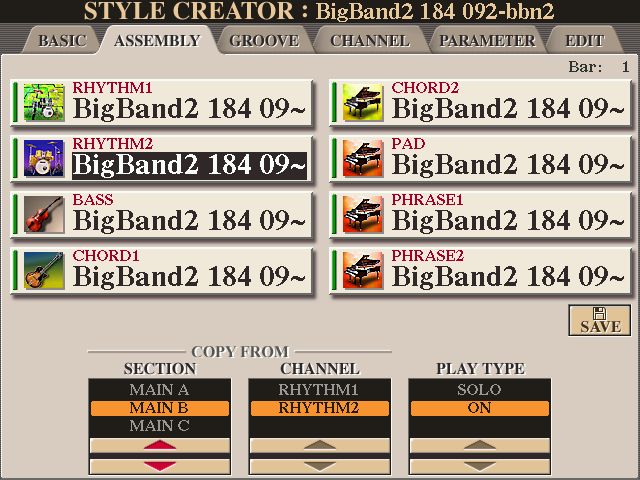
This screen is just telling you where you are at. The STYLE BigBand2 (has this at the top) consists of 8 PARTS; and ALL the PARTS are from the BigBand2 STYLE. Yes .. we know that. Ignore the COPY FROM underneath .. this will come into it’s own shortly.
We now choose the PART we want to be replaced with a PART from another STYLE (any of the PARTS from another STYLE). I had said PAD should be replaced as the PAD slot is blank. If all the slots are being used then you’ll have to decide which one you can do without.
So press the PAD slot.
The PAD slot is now highlighted. This tells the program where to put a COPY of a PART from another STYLE.
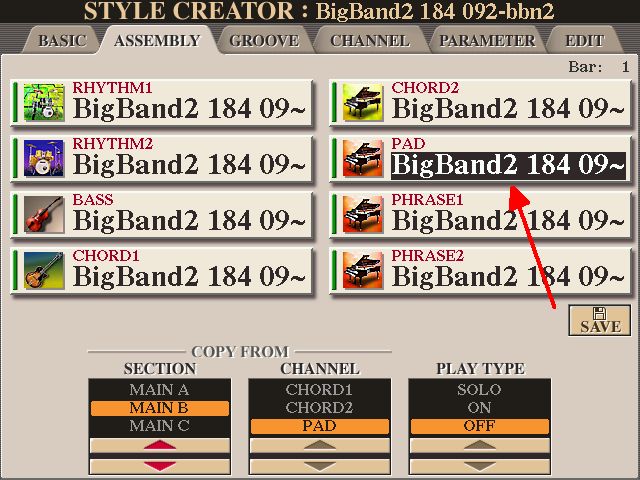
Now press that PAD slot again.
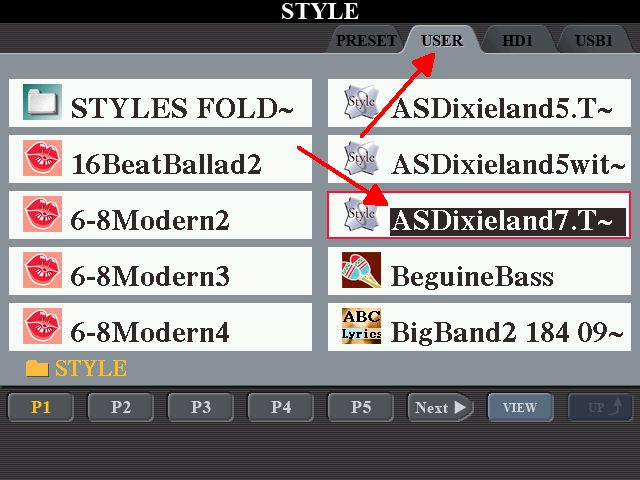
This time you are taken to find the STYLE you are wanting to COPY a PART from.
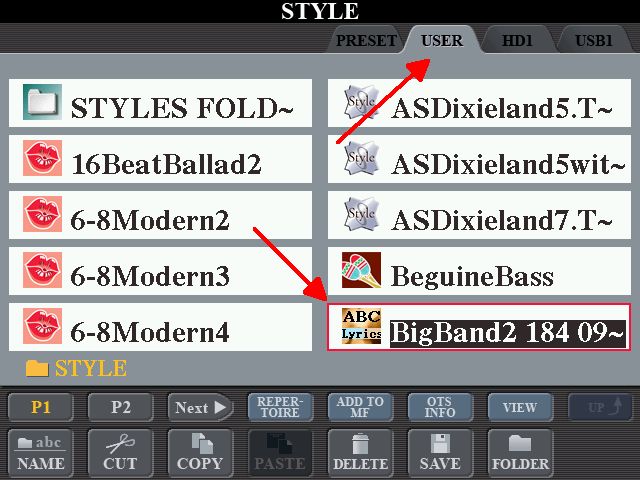
In my case I want Colin’s ASDixieland7 STYLE. It’s in USER. So I find it and highlight it.
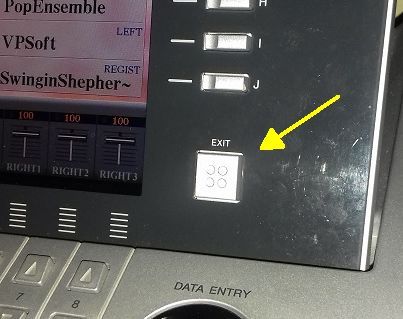
Press the EXIT.
We are taken back to the STYLE CREATOR program .. and you can see that Colin’s STYLE has been put into the PAD slot.
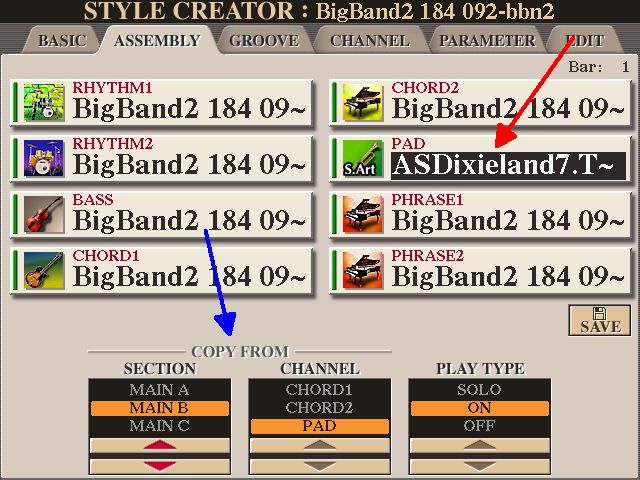
The COPY FROM (as indicated by the blue arrow) is now referring to Colin’s STYLE in PAD. We have already determined that Colin’s BANJO is in MAIN B; CHANNEL: CHORD2 .. and we want it ON. So change the COPY FROM information by moving those bars up/down.
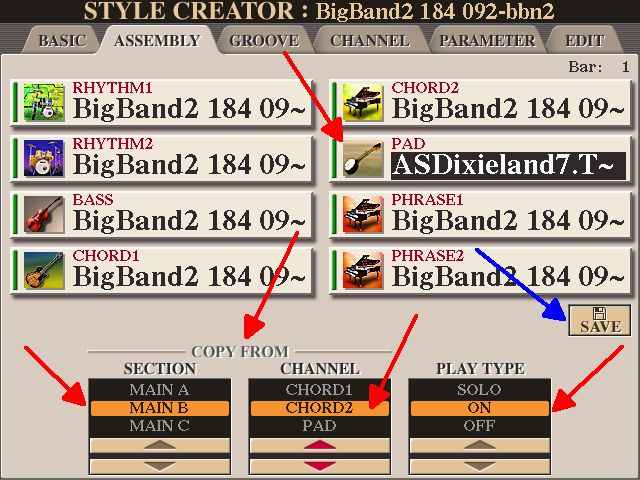
Having changed those COPY FROM, notice that in PAD now there is a BANJO icon!
If at this point you wanted to COPY another PART from another STYLE .. then you can do that. But I just wanted to get Colin’s Banjo into my BigBand2 STYLE.
Now we need to SAVE what we have done (as indicated by the blue arrow) and give this new STYLE (with the Banjo) a NAME. Normal rules for giving your file a NAME. On the Tyros 4 this will be saved in USER.
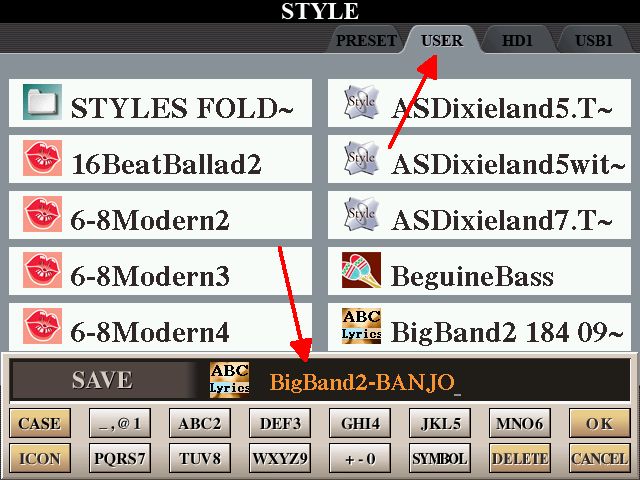
Click the below to hear (a) the original BigBand2 STYLE, followed by (b) adding the BANJO from CHD2 in Colin’s ASDixieland7 into the PAD PART of BigBand2. Now it has a BANJO in it, this makes a great STYLE to use for Dixieland music. I have called this Style BigBand2-BANJO.
BigBand2 Style DEMO
https://app.box.com/s/d8lxxhg28jl3he6bd472w92g75036aix
If anyone would like this BigBand2-BANJO STYLE, you can download it from the LINK just below.
 BigBand2-BANJO.s931.STY (Size: 28.58 KB / Downloads: 14)
Playing my Dixieland Medley on my Tyros 4 I am using 6 REGISTRATION MEMORIES.

REGISTRATION MEMORIES .. in order of play:
REGISTRATION MEMORIES 1, then 2
STYLE: DixielandBanjo
RIGHT1: Clarinet
Memory 1: No Left Hand Voice
No melody played ..
INTRO III
Memory 2: Left Hand Voice: AnalogPad
SONG: Won’t you come home, Bill Bailey
CHORDS
/G - - - /G - - - /G - - - /D7 - - - /
/D7 - - - /D7 - - - /D7 - - - /G - - - /
/G - - - /G - - - /G7 – - - /C - - - /
/C – C7 - /G – E7 - /A7 – D7 - /G - - - /
REGISTRATION MEMORY 3
Left Hand Voice: AnalogPad
STYLE: BigBand2-BANJO
RIGHT1: Trombone
SONG: Baby Face
CHORDS
/G - - - /G - - - /D7 - - - /D7 – - - /
/D7 - - - /G – E7 - /A7 - - - /D7 - - - /
/G - - - /G - - - /B7 – Em B7 /Em - - - /
/C – - - /G – E7 - /A7 – D7 - /G - - - /
REGISTRATION MEMORY 6
No Left Hand Voice
STYLE: ASDixieland7
INTRO III as an Interlude before the next Medley song
REGISTRATION MEMORY 4
Left Hand Voice: AnalogPad
STYLE: ASDixieland7
RIGHT1: Romance Clarinet
SONG: I’m looking over a four leafed clover (that I overlooked before)
CHORDS
/G - - - /G - - - /A7 - - - /A7 – - - /
/D7 - - - /G – E7 - /A7 - - - /D7 - - - /
/G - - - /G - - - /A7 – - - /A7 - - - /
/C – - - /G – E7 - /A7 – D7 - /G - - - /
REGISTRATION MEMORY 5
No Left Hand Voice
STYLE: ASDixieland7
ENDING III
Here ‘tis ...
Dixieland Medley played on my Tyros 4
https://app.box.com/s/3wwdzlnjrgjhri502xe5m47nf9rsmrzm
If anyone with a Tyros 4 would like to download the REGISTRATION BANK for this song, click on the Attachment below (zip file). The relevant files the REGISTRATION BANK needs to LINK to are all there .. and all need to be put into USER.
Hugh
Listen out for the banjo in these YouTube clips.
New Orleans Dixieland on Street
Tuba Skinny - Jubilee Stomp - Royal Street
Streetview Dixieclub - Oh When The Saints Go Marching In
Dixieland Selection - Classic Jazz Compilation - The Most Beautiful Melodies of Traditional Jazz
(37mins)
Deep Purple (Artie Shaw)- Gunhild Carling LIVE- CARLING FAMILY
Gunhild Carling aged 9yrs
(1hr 12mins)
Comment from under the video:
Great to see this film of 9 year old Gunhild and her family in 1984. She is astonishingly good on the trombone at such a young age, what talent. That is not an easy instrument to play so well as a small child.
So, what STYLES can I find with a banjo in the backing for playing Dixieland music?
Looking in Swing & Jazz on my Tyros 4 I did find one .. Dixieland. Of the four variations, I reckoned that VARIATION D had the best sounding BANJO ‘pattern’.
With a little ‘tweaking’ of the volumes (press the MIXING CONSOLE twice) I have changed the overall sound of this STYLE so the BANJO comes through stronger. All done whilst listening (of course!).
Click the below to hear (a) the original Dixieland STYLE, followed by (b) the adjustments to the BALANCE of the STYLE PARTS to make the Banjo more prominent. I have named this adjusted STYLE DixielandBanjo.
Dixieland DEMO
https://app.box.com/s/0d0m3tax35jpl32kmx1e72tv1f8tnyk4
I then asked in the Forum in REQUESTS STYLES if anyone knew of some Styles with a Banjo in them that I could work with, and whitecolin1 came up with several.
https://chellos-keyboard-players-club.co...JO-backing
Having listened to them all I was really taken with ASDixieland7. The BANJO in this is in CHD2.
I have also come across another Style somebody has sent me that has the perfect RHYTHM for what I want to play .. BigBand2 (Variation B). This has a Jazz Guitar playing on every beat .. but no Banjo.
The plan here is to add Colin’s BANJO from CHD2 in his ASDixieland7 Style into the BigBand2 Style. I have noticed that the PAD slot is empty, so this seems a good place to put it.
I have covered Copying PARTS from one STYLE into another .. here:
https://chellos-keyboard-players-club.co...to-another.
Here are the steps explaining how to do this.
You start with the STYLE you are wanting to end up with. In my case, it’s BigBand2. Find the STYLE and highlight it; selecting the VARIATION you want to work with (so it is lit up). In my case, VARIATION B.
From the MENU go to STYLE CREATOR.
When you click on STYLE CREATOR, you will find the page you are wanting to work on is already loaded. Check out the NAME of the STYLE (at the top); and the VARIATION you will be working on (B). Whenever you go to STYLE CREATOR the ‘default’ is always to be RECORDING into RHYTHM2. Doubt you will ever want to do that! In fact, we are not even recording anything this time round .. just COPYING a PART from another STYLE into this one.
Move across to the next tab .. ASSEMBLY.
This screen is just telling you where you are at. The STYLE BigBand2 (has this at the top) consists of 8 PARTS; and ALL the PARTS are from the BigBand2 STYLE. Yes .. we know that. Ignore the COPY FROM underneath .. this will come into it’s own shortly.
We now choose the PART we want to be replaced with a PART from another STYLE (any of the PARTS from another STYLE). I had said PAD should be replaced as the PAD slot is blank. If all the slots are being used then you’ll have to decide which one you can do without.
So press the PAD slot.
The PAD slot is now highlighted. This tells the program where to put a COPY of a PART from another STYLE.
Now press that PAD slot again.
This time you are taken to find the STYLE you are wanting to COPY a PART from.
In my case I want Colin’s ASDixieland7 STYLE. It’s in USER. So I find it and highlight it.
Press the EXIT.
We are taken back to the STYLE CREATOR program .. and you can see that Colin’s STYLE has been put into the PAD slot.
The COPY FROM (as indicated by the blue arrow) is now referring to Colin’s STYLE in PAD. We have already determined that Colin’s BANJO is in MAIN B; CHANNEL: CHORD2 .. and we want it ON. So change the COPY FROM information by moving those bars up/down.
Having changed those COPY FROM, notice that in PAD now there is a BANJO icon!
If at this point you wanted to COPY another PART from another STYLE .. then you can do that. But I just wanted to get Colin’s Banjo into my BigBand2 STYLE.
Now we need to SAVE what we have done (as indicated by the blue arrow) and give this new STYLE (with the Banjo) a NAME. Normal rules for giving your file a NAME. On the Tyros 4 this will be saved in USER.
Click the below to hear (a) the original BigBand2 STYLE, followed by (b) adding the BANJO from CHD2 in Colin’s ASDixieland7 into the PAD PART of BigBand2. Now it has a BANJO in it, this makes a great STYLE to use for Dixieland music. I have called this Style BigBand2-BANJO.
BigBand2 Style DEMO
https://app.box.com/s/d8lxxhg28jl3he6bd472w92g75036aix
If anyone would like this BigBand2-BANJO STYLE, you can download it from the LINK just below.
BigBand2-BANJO.s931.STY (Size: 28.58 KB / Downloads: 14)
Playing my Dixieland Medley on my Tyros 4 I am using 6 REGISTRATION MEMORIES.
REGISTRATION MEMORIES .. in order of play:
REGISTRATION MEMORIES 1, then 2
STYLE: DixielandBanjo
RIGHT1: Clarinet
Memory 1: No Left Hand Voice
No melody played ..
INTRO III
Memory 2: Left Hand Voice: AnalogPad
SONG: Won’t you come home, Bill Bailey
CHORDS
/G - - - /G - - - /G - - - /D7 - - - /
/D7 - - - /D7 - - - /D7 - - - /G - - - /
/G - - - /G - - - /G7 – - - /C - - - /
/C – C7 - /G – E7 - /A7 – D7 - /G - - - /
REGISTRATION MEMORY 3
Left Hand Voice: AnalogPad
STYLE: BigBand2-BANJO
RIGHT1: Trombone
SONG: Baby Face
CHORDS
/G - - - /G - - - /D7 - - - /D7 – - - /
/D7 - - - /G – E7 - /A7 - - - /D7 - - - /
/G - - - /G - - - /B7 – Em B7 /Em - - - /
/C – - - /G – E7 - /A7 – D7 - /G - - - /
REGISTRATION MEMORY 6
No Left Hand Voice
STYLE: ASDixieland7
INTRO III as an Interlude before the next Medley song
REGISTRATION MEMORY 4
Left Hand Voice: AnalogPad
STYLE: ASDixieland7
RIGHT1: Romance Clarinet
SONG: I’m looking over a four leafed clover (that I overlooked before)
CHORDS
/G - - - /G - - - /A7 - - - /A7 – - - /
/D7 - - - /G – E7 - /A7 - - - /D7 - - - /
/G - - - /G - - - /A7 – - - /A7 - - - /
/C – - - /G – E7 - /A7 – D7 - /G - - - /
REGISTRATION MEMORY 5
No Left Hand Voice
STYLE: ASDixieland7
ENDING III
Here ‘tis ...
Dixieland Medley played on my Tyros 4
https://app.box.com/s/3wwdzlnjrgjhri502xe5m47nf9rsmrzm
If anyone with a Tyros 4 would like to download the REGISTRATION BANK for this song, click on the Attachment below (zip file). The relevant files the REGISTRATION BANK needs to LINK to are all there .. and all need to be put into USER.
Hugh
It's all about the music!
![[-]](https://chellos-keyboard-players-club.com/images/collapse.png)


