


05-19-2026, 08:12 PM
Making the final chord in a ‘default’ ENDING last a bit longer
Don’t know about you, but when I record something for others to listen to I always make sure the final chord has faded away before turning the recorder OFF. There is nothing worse than having your song ‘chopped off’ at the end!
When I recorded Peggy Sue, the STYLE I was using had a very, very short chord at the end .. so I have used Audacity to extend the length of that final chord. The way to do that was to slow the TEMPO right down for the length of the chord, which would result in the chord sounding for much longer.
Click the below to listen to (a) the ‘default’ ending of that final chord (you hear it twice); followed by (b) how my final mp3 recording ends after using Audacity to extend that final chord (again, you hear it twice).
https://app.box.com/s/ge7azd0i87x75g0w1klp1oasv68q2ooo
These are the steps taken to do this.
1. Load the Peggy Sue mp3 track (with the short ending) into Audacity.
Click and drag a section at the end .. which will become blue.
Audacity carries out instructions on areas highlighted blue.
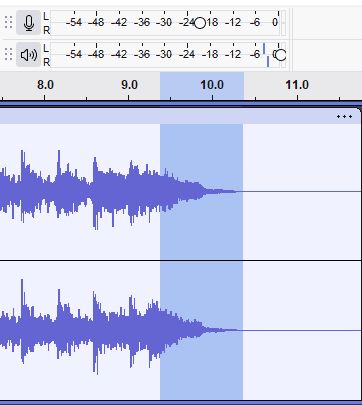
2. As that final chord is so short we need to magnify that section of track so we can pick out where the chord is.
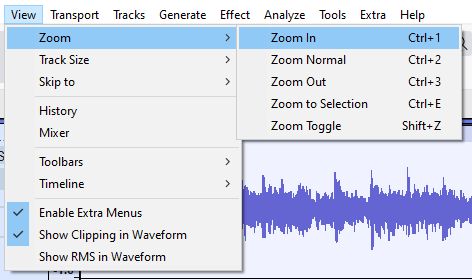
In View, click on Zoom In (shortcut is Ctrl+1).
Do this twice so the waveform is spread out, making it easier for you to pinpoint that last chord.
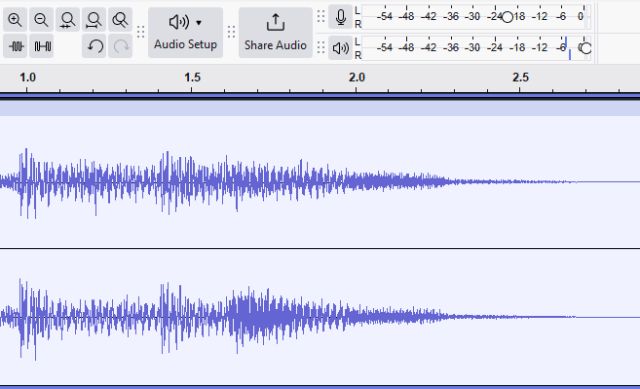
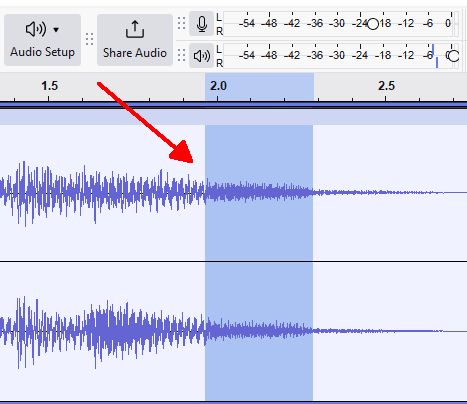
3. That final chord is the bit towards the end, so click and drag to highlight it as per the below.
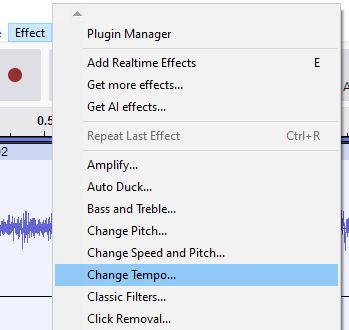
4. We now want to slow the TEMPO right down for this section so the chord lasts for longer.
In Effect click on Change Tempo...
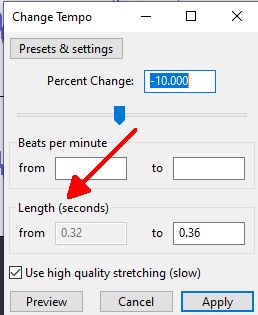
This is what you see. That chord lasts for 0.32 seconds. No wonder it sounds ‘chopped off’! Ignore the Percent Change at the top .. this will alter automatically as we change the Length (seconds).
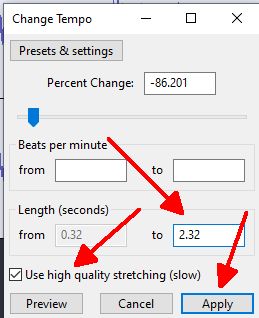
How long do you want that last chord to sound? Try 2.32 seconds, so put that in on the right. The Percent Change shows automatically at the top.
Then click Apply.
Have a listen to how extending the chord length to 2.32 seconds sounds.
The ending has been put up twice.
https://app.box.com/s/5a3zcdehcexv7ct852xte1uylftd0yzd
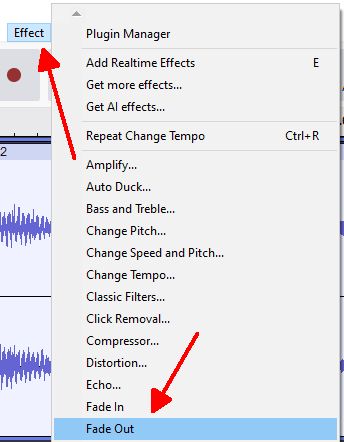
5. To tidy things up a bit I have highlighted and DELETED the end bit.
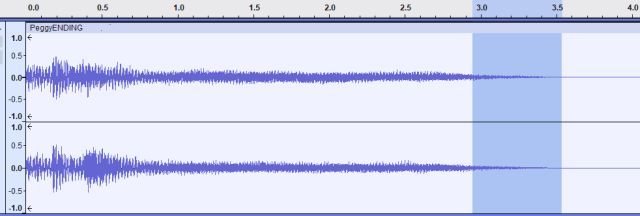
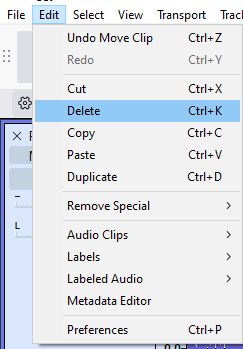
Then from the ‘cut’ have gone the other way ...
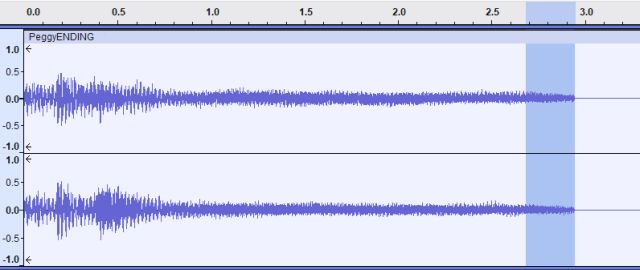
... and done a Fade Out.
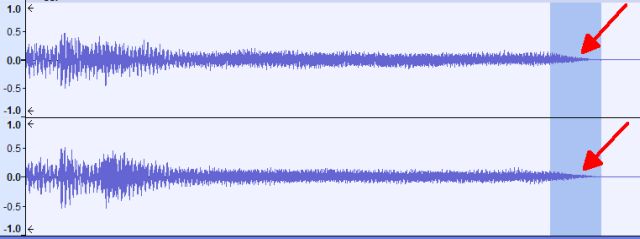
This is how that Peggy Sue ENDING sounds now.
https://app.box.com/s/qjisjn4cvjbcv2w3v91irgditdj8xjt8
Hugh
Don’t know about you, but when I record something for others to listen to I always make sure the final chord has faded away before turning the recorder OFF. There is nothing worse than having your song ‘chopped off’ at the end!
When I recorded Peggy Sue, the STYLE I was using had a very, very short chord at the end .. so I have used Audacity to extend the length of that final chord. The way to do that was to slow the TEMPO right down for the length of the chord, which would result in the chord sounding for much longer.
Click the below to listen to (a) the ‘default’ ending of that final chord (you hear it twice); followed by (b) how my final mp3 recording ends after using Audacity to extend that final chord (again, you hear it twice).
https://app.box.com/s/ge7azd0i87x75g0w1klp1oasv68q2ooo
These are the steps taken to do this.
1. Load the Peggy Sue mp3 track (with the short ending) into Audacity.
Click and drag a section at the end .. which will become blue.
Audacity carries out instructions on areas highlighted blue.
2. As that final chord is so short we need to magnify that section of track so we can pick out where the chord is.
In View, click on Zoom In (shortcut is Ctrl+1).
Do this twice so the waveform is spread out, making it easier for you to pinpoint that last chord.
3. That final chord is the bit towards the end, so click and drag to highlight it as per the below.
4. We now want to slow the TEMPO right down for this section so the chord lasts for longer.
In Effect click on Change Tempo...
This is what you see. That chord lasts for 0.32 seconds. No wonder it sounds ‘chopped off’! Ignore the Percent Change at the top .. this will alter automatically as we change the Length (seconds).
How long do you want that last chord to sound? Try 2.32 seconds, so put that in on the right. The Percent Change shows automatically at the top.
Then click Apply.
Have a listen to how extending the chord length to 2.32 seconds sounds.
The ending has been put up twice.
https://app.box.com/s/5a3zcdehcexv7ct852xte1uylftd0yzd
5. To tidy things up a bit I have highlighted and DELETED the end bit.
Then from the ‘cut’ have gone the other way ...
... and done a Fade Out.
This is how that Peggy Sue ENDING sounds now.
https://app.box.com/s/qjisjn4cvjbcv2w3v91irgditdj8xjt8
Hugh
It's all about the music!
![[-]](https://chellos-keyboard-players-club.com/images/collapse.png)