

4 hours ago
(This post was last modified: 3 hours ago by Hugh Wallington.)
Making minor changes to a STYLE and SAVING your changes
A little experiment, and for this I’m going to start with a BLANK REGISTRATION BANK as explained in this topic below ...
https://chellos-keyboard-players-club.co...%C2%A0BANK

Next, a STYLE I will be making minor changes to .. Dixieland, a PRESET Style on Page 5 in SWING & JAZZ.

Note: With the PRESET STYLES there is a COPY, but not a SAVE (as indicated by the yellow arrows).
The original STYLE you work with is not changed.
Just as well, as you wouldn’t want the STYLES that came with the keyboard when you bought it to be compromised.
The ‘default’ TEMPO for this Style is 205 beats per minute (as indicated by the blue arrow).
I can use the MIXING CONSOLE to make changes to eg. the VOLUME of the various PARTS (RHY1, RHY2, BASS, CHD1, CHD2, PAD, PHR1 and PHR2) .. and thus the overall ‘balance’ and how the Style sounds. Using the Mixing Console I could also alter the PAN of individual PARTS .. and even the actual VOICE used in a particular PART.
With Dixieland selected I am doing changes so it’s easy for us to decide whether we are listening to the PRESET Dixieland Style, or the one I have made changes to.
To get at the STYLE PARTS you press the MIXING CONSOLE button twice.

The ‘defaults’ for the Dixieland Style are as below.
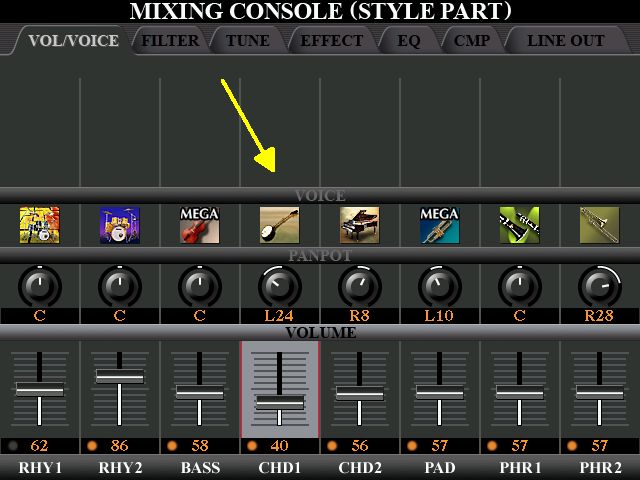
I am changing the VOLUME of CHD1 (the Banjo) from 40 to 70; and also changing the TEMPO from 205 to 160.

Also, using the CHANNEL ON/OFF button ...
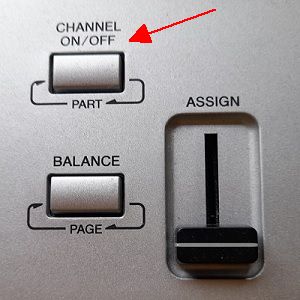
... I have turned the PARTS indicated below to OFF.

Click the below to listen to how the PRESET Dixieland sounds; followed by how it sounds with the changes above.
https://app.box.com/s/hm96vr9ghm6a63foodxjg3s30xiopwcb
Having made the above changes, the question is .. where and how can I SAVE this Style with the changes I have made so I can use them again?
I can SAVE what I have done to a REGISTRATION BANK by pressing MEMORY and then a REGISTRATION MEMORY button ....
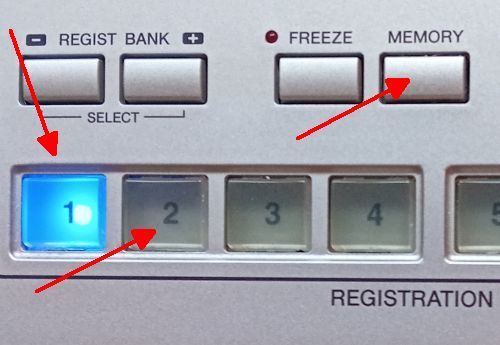
.. which will SAVE the changes I have made into that slot.
And then you can work on your REGISTRATION MEMORY BANK for the song you are playing by pressing MEMORY again and putting what you have set up into the other Memory Slots. In the other Memory Slots you can change the VOICES being used; the STYLE VARIATION .. and even the Style Volumes etc. again. When you have made your changes just press MEMORY again and SAVE to the same slot.
This is what I have in REGISTRATION MEMORY 1.

In other words, the Registration Memory is no longer BLANK. And I have to SAVE the above or I will lose all those EDITS I have done to the Dixieland Style.
So I press 0 BLANK (which brings it up in USER) ... and then press the SAVE.


Pressing the DELETE (as indicated by the blue arrow) will remove the letters showing ...

... (if you hold the DELETE button down you won’t have to remove the letters one at a time).
Then type in a name you will associate with this Registration .. and click the OK.

This REGISTRATION will now be added to the others in USER in alphabetical order .. leaving my 0 BLANK Registration as it was .. a Registration with nothing in it.
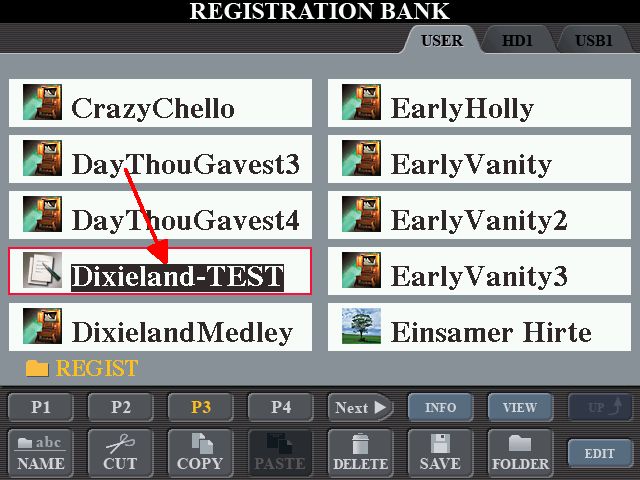
But Note: The Dixieland STYLE showing in the MAIN screen (above) is the PRESET one at 205 beats per minute; and with the VOLUME of the Banjo in CHD1 at 40. It's only when used by pressing the 1 in the REGISTRATION MEMORY that it will play with the changes made.
To be able to use this STYLE with the changes I have made (and not have to do them again) I will have to SAVE it as a STYLE in it’s own right. And we couldn’t do that from PRESET as there was no SAVE option once we had made the changes.
More to come ...
A little experiment, and for this I’m going to start with a BLANK REGISTRATION BANK as explained in this topic below ...
https://chellos-keyboard-players-club.co...%C2%A0BANK
Next, a STYLE I will be making minor changes to .. Dixieland, a PRESET Style on Page 5 in SWING & JAZZ.
Note: With the PRESET STYLES there is a COPY, but not a SAVE (as indicated by the yellow arrows).
The original STYLE you work with is not changed.
Just as well, as you wouldn’t want the STYLES that came with the keyboard when you bought it to be compromised.
The ‘default’ TEMPO for this Style is 205 beats per minute (as indicated by the blue arrow).
I can use the MIXING CONSOLE to make changes to eg. the VOLUME of the various PARTS (RHY1, RHY2, BASS, CHD1, CHD2, PAD, PHR1 and PHR2) .. and thus the overall ‘balance’ and how the Style sounds. Using the Mixing Console I could also alter the PAN of individual PARTS .. and even the actual VOICE used in a particular PART.
With Dixieland selected I am doing changes so it’s easy for us to decide whether we are listening to the PRESET Dixieland Style, or the one I have made changes to.
To get at the STYLE PARTS you press the MIXING CONSOLE button twice.
The ‘defaults’ for the Dixieland Style are as below.
I am changing the VOLUME of CHD1 (the Banjo) from 40 to 70; and also changing the TEMPO from 205 to 160.
Also, using the CHANNEL ON/OFF button ...
... I have turned the PARTS indicated below to OFF.
Click the below to listen to how the PRESET Dixieland sounds; followed by how it sounds with the changes above.
https://app.box.com/s/hm96vr9ghm6a63foodxjg3s30xiopwcb
Having made the above changes, the question is .. where and how can I SAVE this Style with the changes I have made so I can use them again?
I can SAVE what I have done to a REGISTRATION BANK by pressing MEMORY and then a REGISTRATION MEMORY button ....
.. which will SAVE the changes I have made into that slot.
And then you can work on your REGISTRATION MEMORY BANK for the song you are playing by pressing MEMORY again and putting what you have set up into the other Memory Slots. In the other Memory Slots you can change the VOICES being used; the STYLE VARIATION .. and even the Style Volumes etc. again. When you have made your changes just press MEMORY again and SAVE to the same slot.
This is what I have in REGISTRATION MEMORY 1.
In other words, the Registration Memory is no longer BLANK. And I have to SAVE the above or I will lose all those EDITS I have done to the Dixieland Style.
So I press 0 BLANK (which brings it up in USER) ... and then press the SAVE.
Pressing the DELETE (as indicated by the blue arrow) will remove the letters showing ...
... (if you hold the DELETE button down you won’t have to remove the letters one at a time).
Then type in a name you will associate with this Registration .. and click the OK.
This REGISTRATION will now be added to the others in USER in alphabetical order .. leaving my 0 BLANK Registration as it was .. a Registration with nothing in it.
But Note: The Dixieland STYLE showing in the MAIN screen (above) is the PRESET one at 205 beats per minute; and with the VOLUME of the Banjo in CHD1 at 40. It's only when used by pressing the 1 in the REGISTRATION MEMORY that it will play with the changes made.
To be able to use this STYLE with the changes I have made (and not have to do them again) I will have to SAVE it as a STYLE in it’s own right. And we couldn’t do that from PRESET as there was no SAVE option once we had made the changes.
More to come ...
It's all about the music!
![[-]](https://chellos-keyboard-players-club.com/images/collapse.png)