


12-07-2025, 08:22 PM
(This post was last modified: 06-19-2026, 07:28 PM by Hugh Wallington.)
Most of you will already know all this, but if you have just joined the Forum, read on.
Note: The things that I am explaining below only happen if you are Logged In.
First ...
When you are on the Forum Home Page, scroll down to the bottom .. and you will see here a list of the ‘latest postings’ (Recent Threads). The listings in dark blue are the ones that you haven’t yet read (click on them to read them), and the ones in light blue (indicated by the blue arrow) are ones that you have already read.
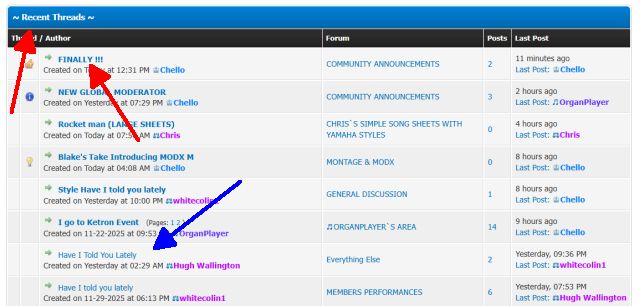
This way you can keep up to date as to what is going on.
If you want to check on which Posts you haven’t yet read, work from the top of the Home Page downwards. The ones that you haven’t yet visited have a black ‘dot’ next to them.
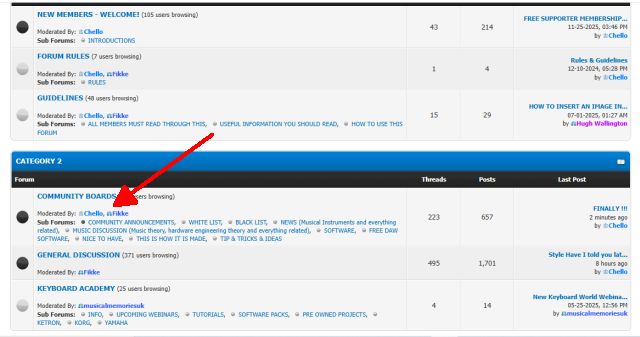
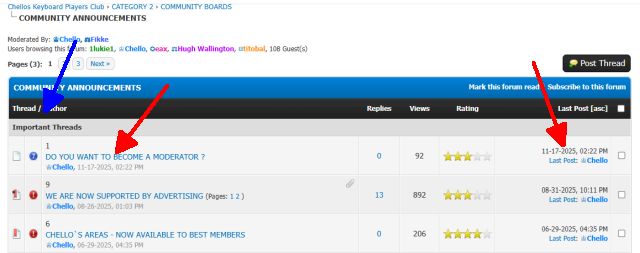
Eg: In CATEGORY 2, if I click on the words COMMUNITY ANNOUNCEMENTS (which have a black dot by them) I am taken to a screen that is split into two sections .. top and bottom.
The top section says Important Threads ...
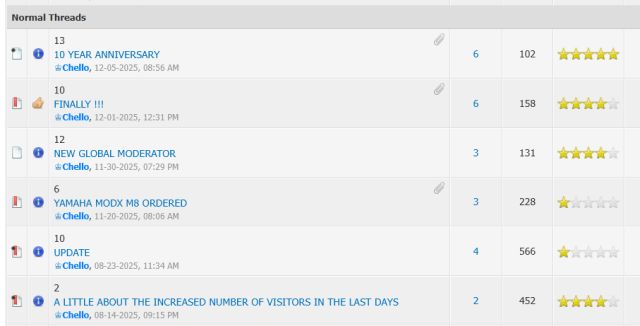
... and in the section below it says Normal Threads.
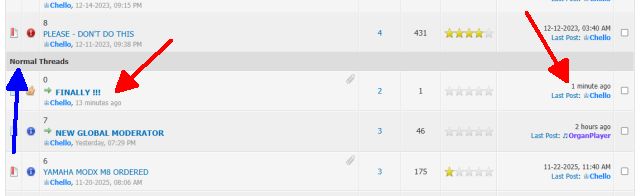
Again, it’s the Thread(s) with the dark blue that I haven’t yet read.
None in Important Threads; and two in Normal Threads .. FINALLY! and NEW GLOBAL MODERATOR.
By checking over on the right I can see the date the Last Post was posted (Note that dates are in the format Month-Day-Year) ... and who by.
Note: Most Threads just have ‘Normal Threads’.
Next ...
When you have read a Thread (or a Reply) you may feel that the poster has put up something you have found interesting .. or maybe must have spent quite some time on putting it all together. In which case, just click the LIKE button. When somebody has spent some time on finding things to share with others there is nothing like a LIKE indicating one’s efforts have been appreciated.
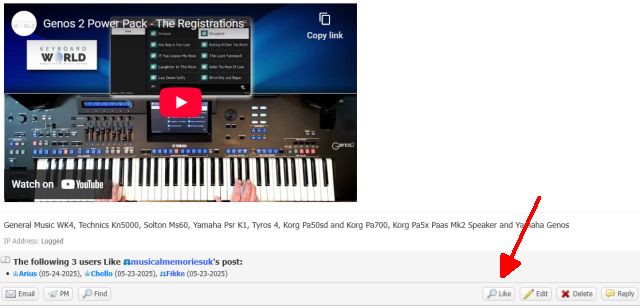
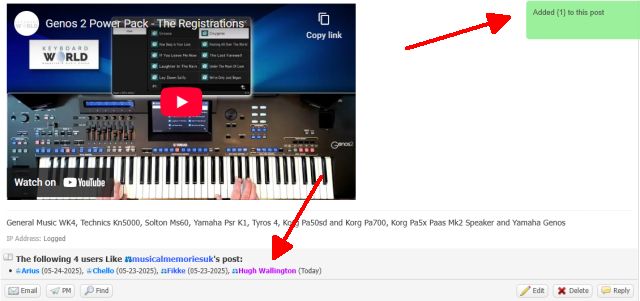
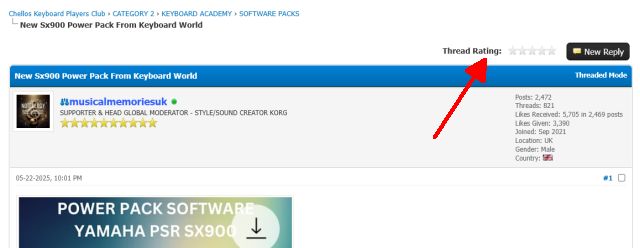
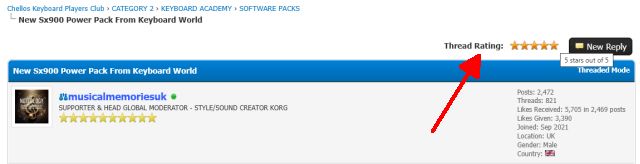
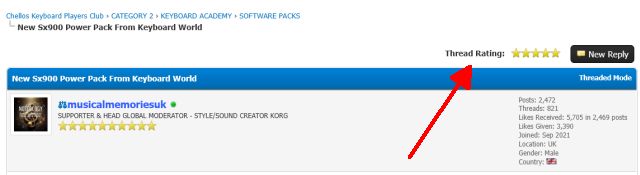
It is also appreciated when STARS are given for one’s efforts. You can give any number of STARS with just one click .. however many STARS you think the thread deserves. If the Thread already has stars, you can give more if you think the Thread deserves more. Having STARS at the top will tell prospective viewers whether or not the Thread is worth taking a look at.
Scroll down a couple of Posts to read how these STARS work; or click this LINK below to be taken there directly.
https://chellos-keyboard-players-club.co...5#pid33595
And finally ...
If you have been following a Thread and would like a ‘notification’ when something new is added, scroll down to the bottom of the Thread and you will see Subscribe.
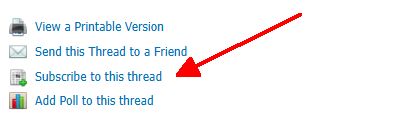
Click on Subscribe to this thread and and you get an option to be notified by email when a new Post goes up.
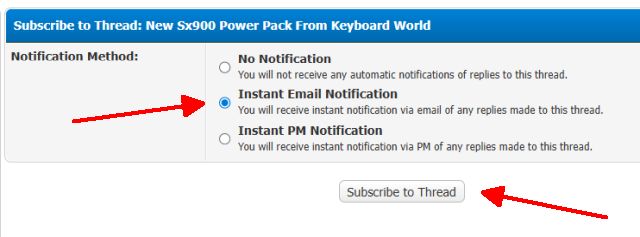
Choose Instant Email Notification, click Subscribe to Thread, and the email will be sent to the one you currently have in the system (with a LINK to click on to take you there).
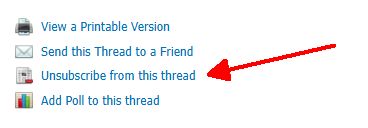
Then at any point, if you no longer wish to receive Notification Emails about a Thread, scroll down to the bottom where this time you will see an Unsubscribe to click on.
Hugh
Note: The things that I am explaining below only happen if you are Logged In.
First ...
When you are on the Forum Home Page, scroll down to the bottom .. and you will see here a list of the ‘latest postings’ (Recent Threads). The listings in dark blue are the ones that you haven’t yet read (click on them to read them), and the ones in light blue (indicated by the blue arrow) are ones that you have already read.
This way you can keep up to date as to what is going on.
If you want to check on which Posts you haven’t yet read, work from the top of the Home Page downwards. The ones that you haven’t yet visited have a black ‘dot’ next to them.
Eg: In CATEGORY 2, if I click on the words COMMUNITY ANNOUNCEMENTS (which have a black dot by them) I am taken to a screen that is split into two sections .. top and bottom.
The top section says Important Threads ...
... and in the section below it says Normal Threads.
Again, it’s the Thread(s) with the dark blue that I haven’t yet read.
None in Important Threads; and two in Normal Threads .. FINALLY! and NEW GLOBAL MODERATOR.
By checking over on the right I can see the date the Last Post was posted (Note that dates are in the format Month-Day-Year) ... and who by.
Note: Most Threads just have ‘Normal Threads’.
Next ...
When you have read a Thread (or a Reply) you may feel that the poster has put up something you have found interesting .. or maybe must have spent quite some time on putting it all together. In which case, just click the LIKE button. When somebody has spent some time on finding things to share with others there is nothing like a LIKE indicating one’s efforts have been appreciated.
It is also appreciated when STARS are given for one’s efforts. You can give any number of STARS with just one click .. however many STARS you think the thread deserves. If the Thread already has stars, you can give more if you think the Thread deserves more. Having STARS at the top will tell prospective viewers whether or not the Thread is worth taking a look at.
Scroll down a couple of Posts to read how these STARS work; or click this LINK below to be taken there directly.
https://chellos-keyboard-players-club.co...5#pid33595
And finally ...
If you have been following a Thread and would like a ‘notification’ when something new is added, scroll down to the bottom of the Thread and you will see Subscribe.
Click on Subscribe to this thread and and you get an option to be notified by email when a new Post goes up.
Choose Instant Email Notification, click Subscribe to Thread, and the email will be sent to the one you currently have in the system (with a LINK to click on to take you there).
Then at any point, if you no longer wish to receive Notification Emails about a Thread, scroll down to the bottom where this time you will see an Unsubscribe to click on.
Hugh
It's all about the music!
![[-]](https://chellos-keyboard-players-club.com/images/collapse.png)


