

08-26-2025, 11:49 PM
(This post was last modified: 06-28-2026, 08:11 PM by Hugh Wallington.)
REVERB
A Google Search for REVERB tells you this:
Reverb, short for reverberation, is a phenomenon where sound waves reflect off surfaces, creating a series of echoes that gradually fade as the sound is absorbed by the environment. It's essentially the natural "echo" or "tail" of a sound in a space. Imagine clapping your hands in a large, empty room; the sound you hear after the clap is reverb.
What is Reverb, and What Does it Sound Like?
At the end of this video he gives us an example of what a snare drum hit sounds like with different types of reverb.
At one point I had a Farfisa Balmoral organ, and this created ‘reverb’ mechanically using a ‘spring’. Sounded great, and was really effective.
With my Yamaha AR80 organ, reverb was created electronically, with a choice of ROOM, HALL, or CHURCH.
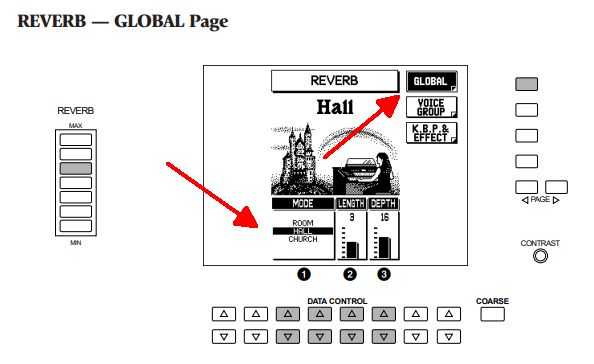
Listen to this track below, played by an organist friend of mine, Don Wherly. In the first part of the medley he has the reverb on ROOM .. and then he switches it to CHURCH. What a difference that makes!
 DW-IsItTrueWhatTheySayAboutDixie.mp3 (Size: 5.87 MB / Downloads: 7)
The REVERB on my Tyros 4 (and the other Yamaha keyboards for that matter) is found in the MIXING CONSOLE.
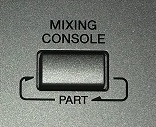
Press this once. If you press it twice it will go to STYLE PARTS .. and we don’t want that. We want the PANEL PARTS where our VOICES are allocated.
Move across to the EFFECT tab.
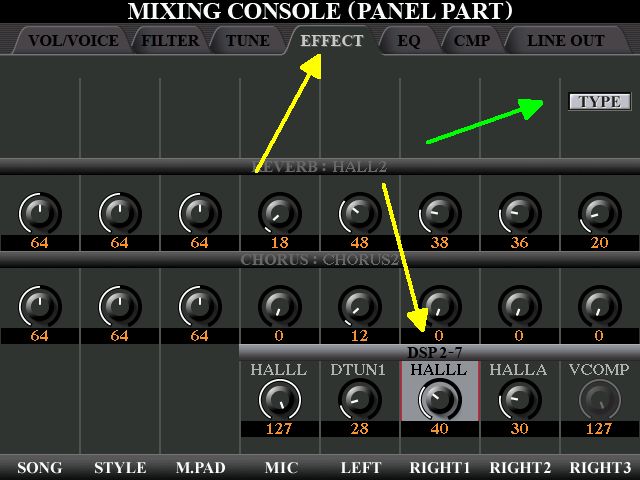
Choosing the ‘top’ band gives you the REVERB ‘across the board’ .. rather like the ‘Global’ one for the AR. This band also shows you which of the reverbs has been selected .. in this case, REVERB: BALLAD HALL. Each PANEL PART has it’s own setting.

Clicking on TYPE (shown by the green arrow) ...

... will bring up the page showing you all this.
But the most exciting bit of this EFFECTS page is undoubtedly choosing the bottom band, which will give you choices for DSP 2 – 7 (1 is already taken).
What is DSP?
On Yamaha keyboards, DSP stands for Digital Signal Processor. It refers to a computation chip and software that processes and alters audio signals to apply a wide range of on-board effects, such as delay, reverb, chorus, and distortion, to the instrument's sounds. The DSP allows users to creatively manipulate the sound to fit their performance or musical style.
Press TYPE (indicated by the green arrow) to see the page giving you the DSP choices.
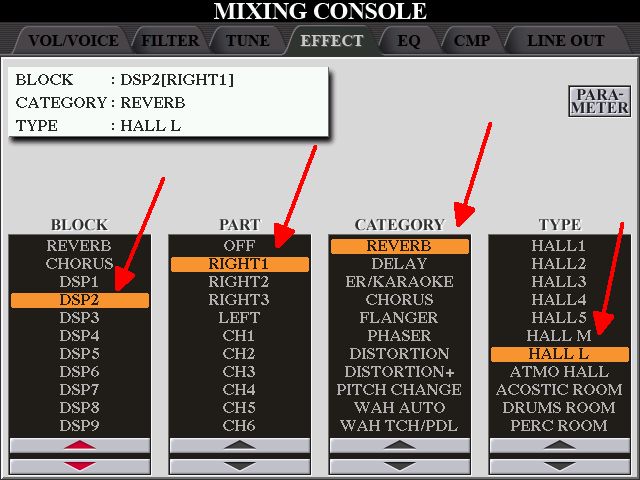
You can see the many choices there are for DSP. These can be applied individually to RIGHT 1, RIGHT 2, RIGHT 3, and LEFT. This effectively applies whatever CATEGORY and TYPE you choose to the VOICE that has been chosen to play in that PART.
In this example I have selected DSP2; the CATEGORY as REVERB; and the TYPE .. out of the many showing .. as HALL L (Hall Large). And have applied it to the PART RIGHT 1.
The VOICE I have in RIGHT1 (which will now have these attributes) is ClassicalGtr, and I have been using this for playing You Are My Sunshine.

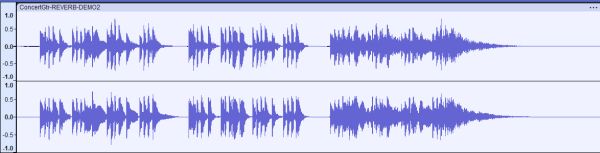
Click the below to hear how the ClassicalGtr sounds with the HALL L REVERB as set up above; followed by the default of NO extra reverb. I know which I prefer, and it was well worth the effort of using DSP to add some reverb into this voice.
https://app.box.com/s/wm2msoz7ma1gbqnkxwt4m7ghkmcy0la9
I have recorded these two again .. and then added CANYON as the reverb TYPE so you can hear what this sounds like, Reckon you would only use this last one for firing a bullet across the canyon!
https://app.box.com/s/mdoacdzgmyfp2v8wlr1khjdk46yfw90m
I have SAVED all my choices for playing You Are My Sunshine to a REGISTRATION MEMORY BANK. When selecting the REGISTRATION MEMORY with the Classical Guitar I just checked visually that the DSP button was indeed ON.
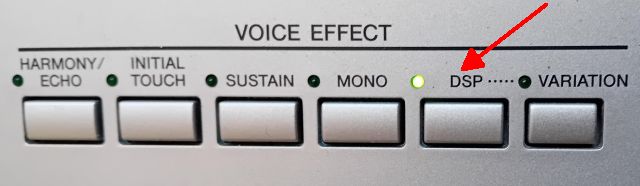
It was also ON for the Nice Sax .. but OFF for the REGISTRATION MEMORY with the Trombone (indicator light is OFF).

Below is the ‘basic’ recording I made of this piece (no added harmony at this point).
YouAreMySunshine.mp3 (Size: 2.86 MB / Downloads: 11)
Hugh
A Google Search for REVERB tells you this:
Reverb, short for reverberation, is a phenomenon where sound waves reflect off surfaces, creating a series of echoes that gradually fade as the sound is absorbed by the environment. It's essentially the natural "echo" or "tail" of a sound in a space. Imagine clapping your hands in a large, empty room; the sound you hear after the clap is reverb.
What is Reverb, and What Does it Sound Like?
At the end of this video he gives us an example of what a snare drum hit sounds like with different types of reverb.
At one point I had a Farfisa Balmoral organ, and this created ‘reverb’ mechanically using a ‘spring’. Sounded great, and was really effective.
With my Yamaha AR80 organ, reverb was created electronically, with a choice of ROOM, HALL, or CHURCH.
Listen to this track below, played by an organist friend of mine, Don Wherly. In the first part of the medley he has the reverb on ROOM .. and then he switches it to CHURCH. What a difference that makes!
DW-IsItTrueWhatTheySayAboutDixie.mp3 (Size: 5.87 MB / Downloads: 7)
The REVERB on my Tyros 4 (and the other Yamaha keyboards for that matter) is found in the MIXING CONSOLE.
Press this once. If you press it twice it will go to STYLE PARTS .. and we don’t want that. We want the PANEL PARTS where our VOICES are allocated.
Move across to the EFFECT tab.
Choosing the ‘top’ band gives you the REVERB ‘across the board’ .. rather like the ‘Global’ one for the AR. This band also shows you which of the reverbs has been selected .. in this case, REVERB: BALLAD HALL. Each PANEL PART has it’s own setting.
Clicking on TYPE (shown by the green arrow) ...
... will bring up the page showing you all this.
But the most exciting bit of this EFFECTS page is undoubtedly choosing the bottom band, which will give you choices for DSP 2 – 7 (1 is already taken).
What is DSP?
On Yamaha keyboards, DSP stands for Digital Signal Processor. It refers to a computation chip and software that processes and alters audio signals to apply a wide range of on-board effects, such as delay, reverb, chorus, and distortion, to the instrument's sounds. The DSP allows users to creatively manipulate the sound to fit their performance or musical style.
Press TYPE (indicated by the green arrow) to see the page giving you the DSP choices.
You can see the many choices there are for DSP. These can be applied individually to RIGHT 1, RIGHT 2, RIGHT 3, and LEFT. This effectively applies whatever CATEGORY and TYPE you choose to the VOICE that has been chosen to play in that PART.
In this example I have selected DSP2; the CATEGORY as REVERB; and the TYPE .. out of the many showing .. as HALL L (Hall Large). And have applied it to the PART RIGHT 1.
The VOICE I have in RIGHT1 (which will now have these attributes) is ClassicalGtr, and I have been using this for playing You Are My Sunshine.
Click the below to hear how the ClassicalGtr sounds with the HALL L REVERB as set up above; followed by the default of NO extra reverb. I know which I prefer, and it was well worth the effort of using DSP to add some reverb into this voice.
https://app.box.com/s/wm2msoz7ma1gbqnkxwt4m7ghkmcy0la9
I have recorded these two again .. and then added CANYON as the reverb TYPE so you can hear what this sounds like, Reckon you would only use this last one for firing a bullet across the canyon!
https://app.box.com/s/mdoacdzgmyfp2v8wlr1khjdk46yfw90m
I have SAVED all my choices for playing You Are My Sunshine to a REGISTRATION MEMORY BANK. When selecting the REGISTRATION MEMORY with the Classical Guitar I just checked visually that the DSP button was indeed ON.
It was also ON for the Nice Sax .. but OFF for the REGISTRATION MEMORY with the Trombone (indicator light is OFF).
Below is the ‘basic’ recording I made of this piece (no added harmony at this point).
YouAreMySunshine.mp3 (Size: 2.86 MB / Downloads: 11)
Hugh
It's all about the music!
![[-]](https://chellos-keyboard-players-club.com/images/collapse.png)