


12-17-2024, 10:26 PM
(This post was last modified: 10-10-2025, 06:47 PM by Hugh Wallington.)
2. NAMING your song.
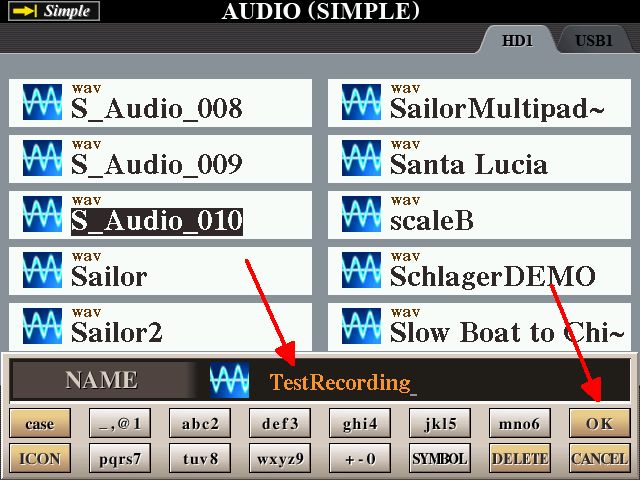
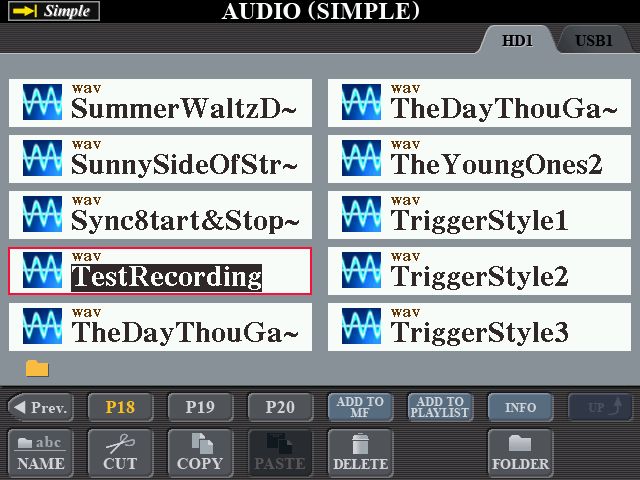
Find the list of recorded songs (as per the above), select the one you want to NAME (presumably the last one) and press NAME.

In the next screen, press the OK.

The ‘default’ name shows, ready for you to put in your own NAME.
Do not just start typing as what you type will be added to the end of what you see.

You must first delete the name showing in that box. If you press the DELETE briefly it will remove the last symbol showing. If you carry on in this way you will be pressing that DELETE 11 times! So instead, press and HOLD the DELETE .. and the whole name will be removed in one go.

Type in the name that you want using UPPER CASE, lower case etc. If you use a SYMBOL, roll the DATA ENTRY wheel until the marker is under the symbol you want, and then press ENTER.

Then press the OK.
Note about the SYMBOLS: There is no question mark (?) in the list. Anyone know why not? An upside-down question mark (¿) .. yes! From a Google search, an upside-down question mark ¿ is written before the first letter of an interrogative sentence or clause to indicate that a question follows.
More things to come.
Find the list of recorded songs (as per the above), select the one you want to NAME (presumably the last one) and press NAME.
In the next screen, press the OK.
The ‘default’ name shows, ready for you to put in your own NAME.
Do not just start typing as what you type will be added to the end of what you see.
You must first delete the name showing in that box. If you press the DELETE briefly it will remove the last symbol showing. If you carry on in this way you will be pressing that DELETE 11 times! So instead, press and HOLD the DELETE .. and the whole name will be removed in one go.
Type in the name that you want using UPPER CASE, lower case etc. If you use a SYMBOL, roll the DATA ENTRY wheel until the marker is under the symbol you want, and then press ENTER.
Then press the OK.
Note about the SYMBOLS: There is no question mark (?) in the list. Anyone know why not? An upside-down question mark (¿) .. yes! From a Google search, an upside-down question mark ¿ is written before the first letter of an interrogative sentence or clause to indicate that a question follows.
More things to come.
It's all about the music!
![[-]](https://chellos-keyboard-players-club.com/images/collapse.png)