

10-05-2024, 12:47 AM
(This post was last modified: 10-15-2025, 06:16 PM by Hugh Wallington.)
Yes, that's right.

You go into VOICE SET and then you have the option of setting your voice to POLY (the 'default') or MONO.

Switching to MONO has the same effect as pressing the MONO button I mentioned earlier.
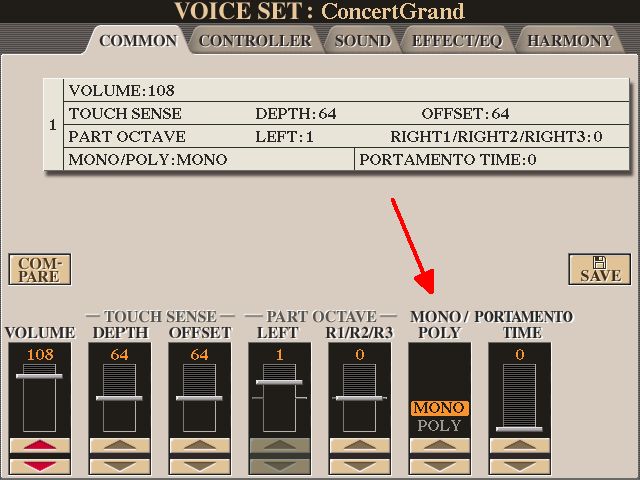
But of course this mode of playing isn't needed here, as the keyboard will play notes in POLY mode as normal and it's the HARMONY / ECHO choice that decides whether to add extra notes into R1, R2 or R3. But to get the best effect you must play the melody notes individually. It was the AR80 (old technology) where your only way of preventing all the voices selected from having extra notes added into them was to make one of them MONO.
You go into VOICE SET and then you have the option of setting your voice to POLY (the 'default') or MONO.
Switching to MONO has the same effect as pressing the MONO button I mentioned earlier.
But of course this mode of playing isn't needed here, as the keyboard will play notes in POLY mode as normal and it's the HARMONY / ECHO choice that decides whether to add extra notes into R1, R2 or R3. But to get the best effect you must play the melody notes individually. It was the AR80 (old technology) where your only way of preventing all the voices selected from having extra notes added into them was to make one of them MONO.
It's all about the music!
![[-]](https://chellos-keyboard-players-club.com/images/collapse.png)