


07-31-2025, 12:01 AM
(This post was last modified: 10-08-2025, 05:00 PM by Hugh Wallington.)
Why use a REGISTRATION BANK to play just one song?
Whenever I play something I have a REGISTRATION set up for playing it, and then move along through the Registrations by hand as I am playing. The reason for setting up a REGISTRATION BANK for a song is because it allows you to make adjustments to all the things you choose to play it. Eg. the STYLE .. whether I have switched any STYLE PARTS to OFF (I would normally turn the PAD PART to OFF if I am using a Left Hand Voice) ...

... or altered any of the STYLE PARTS using the MIXING CONSOLE (press it twice for STYLE PARTS).
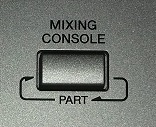
Here, you can change the VOLUMES of the various STYLE PARTS (which alters the ‘balance’ between them), the PAN (whether the sound comes from left, right or centre) .. and even change the VOICE chosen to ‘play’ that PART. All this will alter the overall sound of the band accompanying you.
You can then choose some suitable VOICES for playing the melody, putting them into R1 (Right 1) etc. ...and choose a Left Hand Voice if you want one.
By pressing the BALANCE button ...
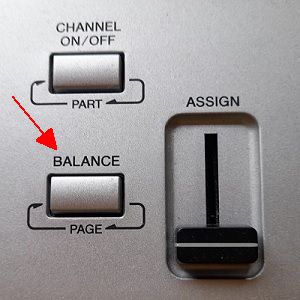
... you can alter the overall VOLUMES of what you have chosen by changing the VOLUMES underneath the MAIN screen.
I have four REGISTRATION MEMORIES set up for playing Slow Boat To China.
This is the first.

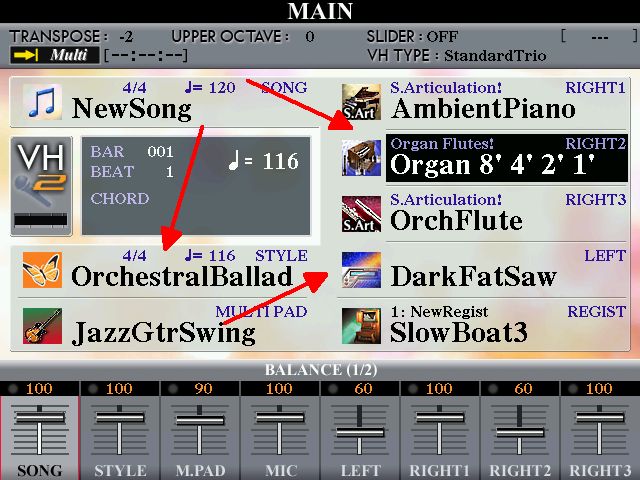
I also have the HARMONY/ECHO ON, TYPE OCTAVE .. and is the reason why you can hear a 16’ note as well. It’s not ON for the other REGISTRATION MEMORIES.
Here’s the second.

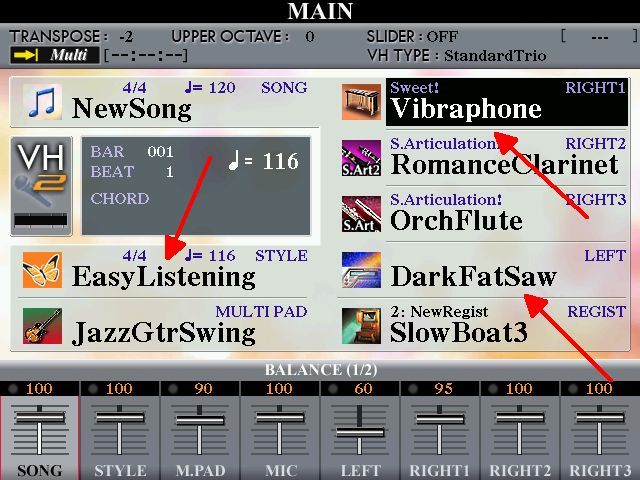
For the third REGISTRATION MEMORY ...

... I have made these choices ...
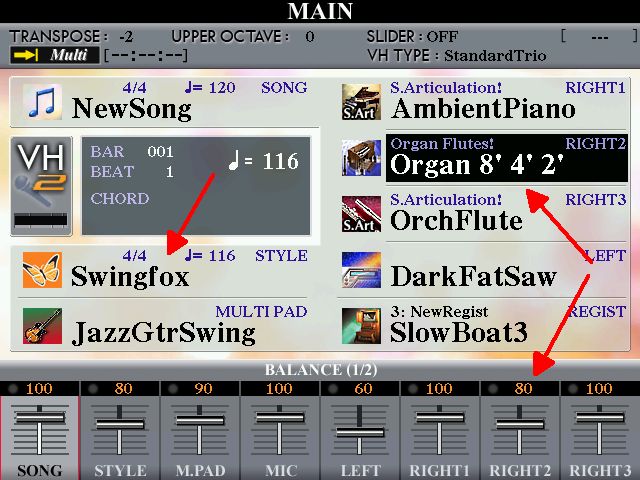
... and the fourth is the same as the third but with the 1’ flute added.
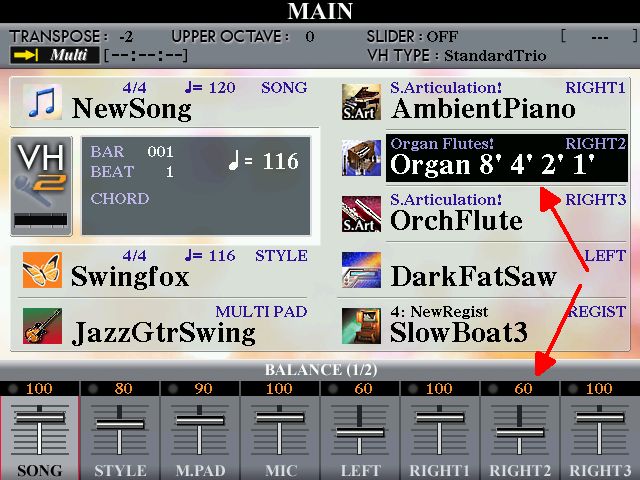
Note that in my four REGISTRATION slots I have chosen three different STYLES for my song .. OrchestralBallad (MAIN VRIATION C), EasyListening (MAIN VARIATION C), and Swingfox (MAIN VARIATION B). You can only do this if you play using REGISTRATIONS. If you play using the OTS system you can only use one STYLE, and this changes the VOICE as you move up from VARIATION A, to B, to C, to D.
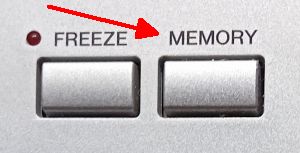
In each REGISTRATION MEMORY slot, when you have everything set up as you want to hear it, you SAVE it by pressing MEMORY ...
... and then the REGISTRATION MEMORY number where you want it saved ...
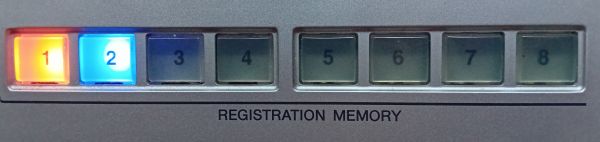
... which ‘saves’ the setup you have made into that slot.
Now I have my registrations set up, I press the first one and start playing the song .. and move through the Registration Memories by hand as the song progresses.
This is what the finished product sounds like:
https://app.box.com/s/l3bnlxxw84ssn7cwyqscc1u15e4u25cf
When songs are posted in forums, the person playing the song is often asked to list the STYLES and VOICES that have been used so they can replicate the sound they are hearing. It seems to me that this doesn’t really tell you very much as what makes the sound is the way everything has been set up. And the only way to analyse this is to check out the REGISTRATION BANK that has been used to play the song.
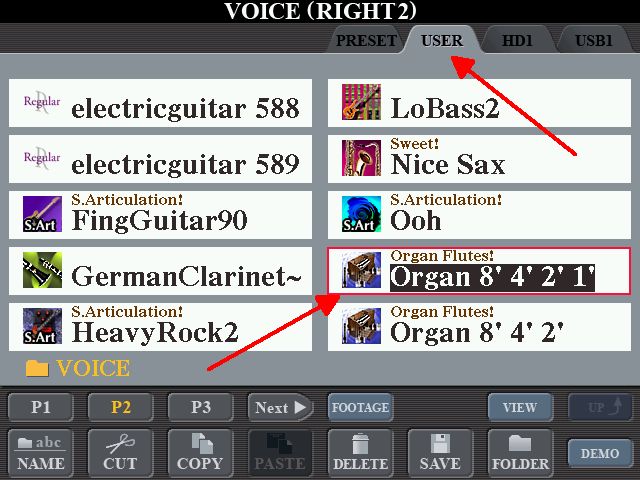
So here below is the REGISTRATION BANK I have created on my Tyros 4 for Slow Boat To China. Download it and put it on a Memory Stick. When inserted in the keyboard it can be linked to and used from the Memory Stick .. but you may need to put the Organ Flutes into USER for the REGISTRATION MEMORY BANK to LINK to as that is where I had put them (nothing else is in USER). So I have attached these as well (as a ZIP file).
 SlowBoat.S067.RGT (Size: 5.21 KB / Downloads: 61)
 Organ Voices.zip (Size: 880 bytes / Downloads: 71)
If you manage to download the REGISTRATION BANK and can play the melody ‘by ear’, here are the chords I have used to play the song.
I am playing the song in C .. but have TRANSPOSED it down two notches so you are effectively listening to it played in Bb. I thought it sounded better played a bit lower.
With the above information for starters, and the fact that I had the HARMONY/ECHO ON in REGISTRATION MEMORY 1, and the FAST/SLOW Rotating Speakers in operation (Leslie Effect) you can see why the only way to replicate the sound you are listening to is to play the song from the original REGISTRATION MEMORY BANK.
Slow Boat To China
/ C - - - / A7 - - - / Dm7 - - - / B7 - - - /
/ C - - - / E7 - - - / F – F+ - / Dm – A7 - /
/ Dm - - - / B7 - - - / C - - - / A7 - - - /
/ D7 - - - / D7 - - - / Dm7 - - - / G7 - - - /
/ C - - - / A7 - - - / Dm7 - - - / B7 - - - /
/ C - - - / E7 - - - / F – F+ - / Dm – A7 - /
/ Dm7 - - - / Fm6 - - - / C - - - / A7 - - - /
/ D7 - - - / Dm7 – G7 - / C – A7 - / Dm7 – G7 - /
It seems to me that passing REGISTRATION BANKS on to others is fraught with problems, so I really would like to hear from anyone who has succeeded in using this one. Please make a comment by clicking on New Reply.
I shall shortly be putting up my thoughts on passing REGISTRATION BANKS on to others.
Hugh
Whenever I play something I have a REGISTRATION set up for playing it, and then move along through the Registrations by hand as I am playing. The reason for setting up a REGISTRATION BANK for a song is because it allows you to make adjustments to all the things you choose to play it. Eg. the STYLE .. whether I have switched any STYLE PARTS to OFF (I would normally turn the PAD PART to OFF if I am using a Left Hand Voice) ...
... or altered any of the STYLE PARTS using the MIXING CONSOLE (press it twice for STYLE PARTS).
Here, you can change the VOLUMES of the various STYLE PARTS (which alters the ‘balance’ between them), the PAN (whether the sound comes from left, right or centre) .. and even change the VOICE chosen to ‘play’ that PART. All this will alter the overall sound of the band accompanying you.
You can then choose some suitable VOICES for playing the melody, putting them into R1 (Right 1) etc. ...and choose a Left Hand Voice if you want one.
By pressing the BALANCE button ...
... you can alter the overall VOLUMES of what you have chosen by changing the VOLUMES underneath the MAIN screen.
I have four REGISTRATION MEMORIES set up for playing Slow Boat To China.
This is the first.
I also have the HARMONY/ECHO ON, TYPE OCTAVE .. and is the reason why you can hear a 16’ note as well. It’s not ON for the other REGISTRATION MEMORIES.
Here’s the second.
For the third REGISTRATION MEMORY ...
... I have made these choices ...
... and the fourth is the same as the third but with the 1’ flute added.
Note that in my four REGISTRATION slots I have chosen three different STYLES for my song .. OrchestralBallad (MAIN VRIATION C), EasyListening (MAIN VARIATION C), and Swingfox (MAIN VARIATION B). You can only do this if you play using REGISTRATIONS. If you play using the OTS system you can only use one STYLE, and this changes the VOICE as you move up from VARIATION A, to B, to C, to D.
In each REGISTRATION MEMORY slot, when you have everything set up as you want to hear it, you SAVE it by pressing MEMORY ...
... and then the REGISTRATION MEMORY number where you want it saved ...
... which ‘saves’ the setup you have made into that slot.
Now I have my registrations set up, I press the first one and start playing the song .. and move through the Registration Memories by hand as the song progresses.
This is what the finished product sounds like:
https://app.box.com/s/l3bnlxxw84ssn7cwyqscc1u15e4u25cf
When songs are posted in forums, the person playing the song is often asked to list the STYLES and VOICES that have been used so they can replicate the sound they are hearing. It seems to me that this doesn’t really tell you very much as what makes the sound is the way everything has been set up. And the only way to analyse this is to check out the REGISTRATION BANK that has been used to play the song.
So here below is the REGISTRATION BANK I have created on my Tyros 4 for Slow Boat To China. Download it and put it on a Memory Stick. When inserted in the keyboard it can be linked to and used from the Memory Stick .. but you may need to put the Organ Flutes into USER for the REGISTRATION MEMORY BANK to LINK to as that is where I had put them (nothing else is in USER). So I have attached these as well (as a ZIP file).
SlowBoat.S067.RGT (Size: 5.21 KB / Downloads: 61)
Organ Voices.zip (Size: 880 bytes / Downloads: 71)
If you manage to download the REGISTRATION BANK and can play the melody ‘by ear’, here are the chords I have used to play the song.
I am playing the song in C .. but have TRANSPOSED it down two notches so you are effectively listening to it played in Bb. I thought it sounded better played a bit lower.
With the above information for starters, and the fact that I had the HARMONY/ECHO ON in REGISTRATION MEMORY 1, and the FAST/SLOW Rotating Speakers in operation (Leslie Effect) you can see why the only way to replicate the sound you are listening to is to play the song from the original REGISTRATION MEMORY BANK.
Slow Boat To China
/ C - - - / A7 - - - / Dm7 - - - / B7 - - - /
/ C - - - / E7 - - - / F – F+ - / Dm – A7 - /
/ Dm - - - / B7 - - - / C - - - / A7 - - - /
/ D7 - - - / D7 - - - / Dm7 - - - / G7 - - - /
/ C - - - / A7 - - - / Dm7 - - - / B7 - - - /
/ C - - - / E7 - - - / F – F+ - / Dm – A7 - /
/ Dm7 - - - / Fm6 - - - / C - - - / A7 - - - /
/ D7 - - - / Dm7 – G7 - / C – A7 - / Dm7 – G7 - /
It seems to me that passing REGISTRATION BANKS on to others is fraught with problems, so I really would like to hear from anyone who has succeeded in using this one. Please make a comment by clicking on New Reply.
I shall shortly be putting up my thoughts on passing REGISTRATION BANKS on to others.
Hugh
It's all about the music!
![[-]](https://chellos-keyboard-players-club.com/images/collapse.png)

