

11-30-2024, 07:56 PM
(This post was last modified: 10-15-2025, 07:17 PM by Hugh Wallington.)
When can you trigger a Registration Change?
Remember those early keyboards? When you changed a REGISTRATION whilst playing you had to trigger the change exactly on the first beat of the bar. This is OK to do if the last chord of the previous and the first chord of the next are the same chord (eg. C at the end of the first; and C at the beginning of the second). You can take your hand off and press the Registration change exactly on the first beat of the bar .. assuming that you have your keyboard set up to continue playing the backing when you take your left hand off the keys. But if, say, the VERSE ends on C and the CHORUS starts on F .. then on that first beat of the bar you have to use your left hand to play an F chord and your right hand to play a melody note!! No hands left to change the REGISTRATION! The only solution was to use a footswitch to change the Registration on the first beat of the bar.
But on our (newer) Yamaha keyboards Yamaha have fixed it so that when you change a REGISTRATION the change doesn't actually happen with the STYLE until the first beat of the next bar. Have you noticed this? So when I am playing something, when I get about half way through the last bar before a Registration Change I take my left hand off the chord I am playing and trigger the next REGISTRATION MEMORY. The current STYLE keeps playing until the end of the bar .. so my left hand can now play a new chord; my right hand can play a melody note; and the STYLE automatically changes on the first beat of the bar.
You can check out what happens using the A, B, C and D of one particular Style and pressing the MAIN VARIATION buttons in turn rather than the REGISTRATION MEMORY buttons.
I have chosen Slowfox from BALLROOM and will be pressing buttons MAIN VARIATION buttons B and D to illustrate my point.
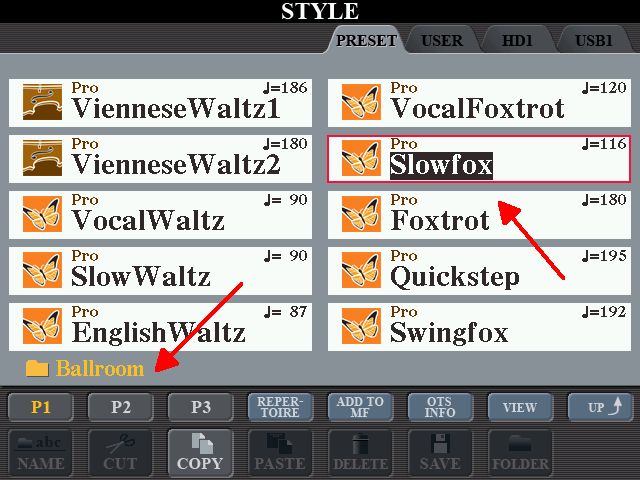
With Slowfox selected, make sure the ACMP button is ON and the OTS button is OFF.

Press the SYNC START so it is flashing.

Press MAIN VARIATION B (if it isn’t already lit up) and play a C chord. As you hit the C chord, count 1, 2, 3, 4 .. and then 1, 2, 3, 4 again, following the beat as you are listening. If you like, you can follow this beat by looking at the numbers counting through 1 - 4 on the MAIN screen.


The idea here is to count through the first four, then any time after the second ‘2’ press MAIN VARIATION D. You will not hear the STYLE change until the first beat of the next bar (ie. on the 1).
Try this again, but this time press the D just after the second ‘1’, but before the second ‘2’. This time the STYLE changes to D immediately you press the button.
Listen to the DEMO of what happens, below. First, pressing the D after beat ‘2’; followed by pressing the D after beat ‘1’. I have deliberately slowed the TEMPO of the STYLE down to 90bpm so you can hear what is happening more easily.
https://app.box.com/s/o4a60q2692qb1kc6uqx2wv9awwjpgqbn
If you count the beat and listen carefully, when pressing the D after beat ‘2’ the STYLE continues playing the first VARIATION and then cuts in to the next VARIATION on the first beat of the next bar. When pressing the D after beat ‘1’ the STYLE cuts in to the next VARIATION as soon as you press the button.
If you had put these two into a REGISTRATION MEMORY BANK the same thing would have happened as you went from REGISTRATION MEMORY 1 to REGISTRATION MEMORY 2.
Now I am going to try doing this with two different STYLES. As the Styles are different I will have to set them up in REGISTRATION MEMORIES. I am putting Slowfox VARIATION B into MEMORY 1; and TheatreQuickstep VARIATION D into MEMORY 2. Two very different STYLES, and I have set the TEMPO at 90bpm so you can hear easily when it changes.
Listen to the demo.
https://app.box.com/s/dk7jxtphlu43bnw2wsptvnj3rsjgehmh
This time, it makes no difference whether I switch from the first Style to the second after beat 2 .. or beat 1. The STYLE continues to the end of the bar and changes on the first beat of the next bar.
The title of this Topic was “When can you trigger a Registration Change?“.
The answer to this is any time after the second beat if you are switching from A, to B, or C, or D using the same STYLE; or any time after the first beat if you are using two different Styles.
Why is it important to know this?
1. When you set up a REGISTRATION BANK, when you change the REGISTRATION to another one, the current STYLE must continue until the end of the bar. Your song would sound really stange if it changed as soon as you hit the button!
2. When you do change your REGISTRATION, your next REGISTRATION will no doubt have a change of VOICE. VOICES always change as soon as you hit the button .. but the ‘old’ voice will continue playing until you take your finger off (at the volume set for the ‘new’ Voice). This means you can use your NEW VOICE to play a note or two with the previous STYLE before it switches to the new eg. when the melody comes in just before the first beat of the bar.
Listen to the below. This is a few bars of The Story Of My Life in the bit where it changes from VERSE to CHORUS. Two different STYLES; two different VOICES (Guitar and Vibraphone). The Vibraphone plays a couple of notes before the first beat of the bar when the ‘old’ STYLE is still playing .. and then carries on with the change of STYLE.
https://app.box.com/s/eaaxigtpd5htqvipmfm68xzcwcg4tpy7
The reason for explaining the above is because the STYLE I created by ‘copying’ PARTS from other Styles to make my OverRainbow Style just would not continue playing to the end of the bar when I changed the REGISTRATION I had set up. So I shall be referring to this Topic.
https://chellos-keyboard-players-club.co...18395.html
It's all about getting a smooth change from one part of your song to another.
Hugh
Remember those early keyboards? When you changed a REGISTRATION whilst playing you had to trigger the change exactly on the first beat of the bar. This is OK to do if the last chord of the previous and the first chord of the next are the same chord (eg. C at the end of the first; and C at the beginning of the second). You can take your hand off and press the Registration change exactly on the first beat of the bar .. assuming that you have your keyboard set up to continue playing the backing when you take your left hand off the keys. But if, say, the VERSE ends on C and the CHORUS starts on F .. then on that first beat of the bar you have to use your left hand to play an F chord and your right hand to play a melody note!! No hands left to change the REGISTRATION! The only solution was to use a footswitch to change the Registration on the first beat of the bar.
But on our (newer) Yamaha keyboards Yamaha have fixed it so that when you change a REGISTRATION the change doesn't actually happen with the STYLE until the first beat of the next bar. Have you noticed this? So when I am playing something, when I get about half way through the last bar before a Registration Change I take my left hand off the chord I am playing and trigger the next REGISTRATION MEMORY. The current STYLE keeps playing until the end of the bar .. so my left hand can now play a new chord; my right hand can play a melody note; and the STYLE automatically changes on the first beat of the bar.
You can check out what happens using the A, B, C and D of one particular Style and pressing the MAIN VARIATION buttons in turn rather than the REGISTRATION MEMORY buttons.
I have chosen Slowfox from BALLROOM and will be pressing buttons MAIN VARIATION buttons B and D to illustrate my point.
With Slowfox selected, make sure the ACMP button is ON and the OTS button is OFF.
Press the SYNC START so it is flashing.
Press MAIN VARIATION B (if it isn’t already lit up) and play a C chord. As you hit the C chord, count 1, 2, 3, 4 .. and then 1, 2, 3, 4 again, following the beat as you are listening. If you like, you can follow this beat by looking at the numbers counting through 1 - 4 on the MAIN screen.
The idea here is to count through the first four, then any time after the second ‘2’ press MAIN VARIATION D. You will not hear the STYLE change until the first beat of the next bar (ie. on the 1).
Try this again, but this time press the D just after the second ‘1’, but before the second ‘2’. This time the STYLE changes to D immediately you press the button.
Listen to the DEMO of what happens, below. First, pressing the D after beat ‘2’; followed by pressing the D after beat ‘1’. I have deliberately slowed the TEMPO of the STYLE down to 90bpm so you can hear what is happening more easily.
https://app.box.com/s/o4a60q2692qb1kc6uqx2wv9awwjpgqbn
If you count the beat and listen carefully, when pressing the D after beat ‘2’ the STYLE continues playing the first VARIATION and then cuts in to the next VARIATION on the first beat of the next bar. When pressing the D after beat ‘1’ the STYLE cuts in to the next VARIATION as soon as you press the button.
If you had put these two into a REGISTRATION MEMORY BANK the same thing would have happened as you went from REGISTRATION MEMORY 1 to REGISTRATION MEMORY 2.
Now I am going to try doing this with two different STYLES. As the Styles are different I will have to set them up in REGISTRATION MEMORIES. I am putting Slowfox VARIATION B into MEMORY 1; and TheatreQuickstep VARIATION D into MEMORY 2. Two very different STYLES, and I have set the TEMPO at 90bpm so you can hear easily when it changes.
Listen to the demo.
https://app.box.com/s/dk7jxtphlu43bnw2wsptvnj3rsjgehmh
This time, it makes no difference whether I switch from the first Style to the second after beat 2 .. or beat 1. The STYLE continues to the end of the bar and changes on the first beat of the next bar.
The title of this Topic was “When can you trigger a Registration Change?“.
The answer to this is any time after the second beat if you are switching from A, to B, or C, or D using the same STYLE; or any time after the first beat if you are using two different Styles.
Why is it important to know this?
1. When you set up a REGISTRATION BANK, when you change the REGISTRATION to another one, the current STYLE must continue until the end of the bar. Your song would sound really stange if it changed as soon as you hit the button!
2. When you do change your REGISTRATION, your next REGISTRATION will no doubt have a change of VOICE. VOICES always change as soon as you hit the button .. but the ‘old’ voice will continue playing until you take your finger off (at the volume set for the ‘new’ Voice). This means you can use your NEW VOICE to play a note or two with the previous STYLE before it switches to the new eg. when the melody comes in just before the first beat of the bar.
Listen to the below. This is a few bars of The Story Of My Life in the bit where it changes from VERSE to CHORUS. Two different STYLES; two different VOICES (Guitar and Vibraphone). The Vibraphone plays a couple of notes before the first beat of the bar when the ‘old’ STYLE is still playing .. and then carries on with the change of STYLE.
https://app.box.com/s/eaaxigtpd5htqvipmfm68xzcwcg4tpy7
The reason for explaining the above is because the STYLE I created by ‘copying’ PARTS from other Styles to make my OverRainbow Style just would not continue playing to the end of the bar when I changed the REGISTRATION I had set up. So I shall be referring to this Topic.
https://chellos-keyboard-players-club.co...18395.html
It's all about getting a smooth change from one part of your song to another.
Hugh
It's all about the music!
![[-]](https://chellos-keyboard-players-club.com/images/collapse.png)