Posts: 325
Threads: 83
Likes Received: 1,258 in 325 posts
Likes Given: 519
Joined: Apr 2024
What keyboard model(s) do you have ?: Tyros 4
Location: Weston-super-Mare
Bio: I am a 'self taught' home organ and keyboard player. Many years ago I played piano in a couple of 'bands' (one a Scottish Country Dance Band). We all had the chords of the piece we were playing written out in front of us, and as a result I have never felt the need to 'read music'. People say I 'play by ear', but a better description would be that I 'play by chords'.
Gender: Male
Country: 
12-17-2024, 07:27 PM
(This post was last modified: 10-10-2025, 06:32 PM by Hugh Wallington.)
Things we all know how to do with our keyboards
Things we all know how to do with our keyboards! ??
1. DELETING (or COPYING) multiple files.
Don’t know about you, but when I do an AUDIO recording I make such a mess of it I usually end up with several ‘takes’. I NAME the final one as that is the one I want to keep, and then have to DELETE all the others.
To DELETE the recording files you no longer wish to keep, bring up the page showing them in a list ie. click the SELECT button (the one at the end). To show the SIMPLE recording list you may have to press that button more than once.

Look for the files you wish to delete ...

... select the first one and press the DELETE.

Next screen is below.
Do not press the OK!
If you do, you’ll delete just the one file you’ve highlighted.

It also says, “ Select files and/or folders to be deleted” .. so do that, individually, one at a time.

You can even continue onto another page .. in this case Page 15.

Once you have selected all the files you wish to delete, press the OK.

In the next screen, if you just press the YES it will go through all the files, one at a time, asking you.
So the one to press is YES ALL.

All now gone!
When COPYING files you do the same.
1. Select the first file you wish to copy.
2. Press COPY.
3. Do not press the OK!
4. Select all the other files you wish to copy.
5. Now press the OK. The display will jump to the first one you selected, which may make you think that only that one will be copied. This is not the case. All the ones you selected are waiting to be copied.
6. Go to where you want to copy the files to (eg. a Memory Stick, or a FOLDER you have created on your keyboard).
7. Press PASTE.
8. Choose YES ALL for them all to be copied across.
It's all about the music!
Posts: 325
Threads: 83
Likes Received: 1,258 in 325 posts
Likes Given: 519
Joined: Apr 2024
What keyboard model(s) do you have ?: Tyros 4
Location: Weston-super-Mare
Bio: I am a 'self taught' home organ and keyboard player. Many years ago I played piano in a couple of 'bands' (one a Scottish Country Dance Band). We all had the chords of the piece we were playing written out in front of us, and as a result I have never felt the need to 'read music'. People say I 'play by ear', but a better description would be that I 'play by chords'.
Gender: Male
Country:
12-17-2024, 10:26 PM
(This post was last modified: 10-10-2025, 06:47 PM by Hugh Wallington.)
2. NAMING your song.
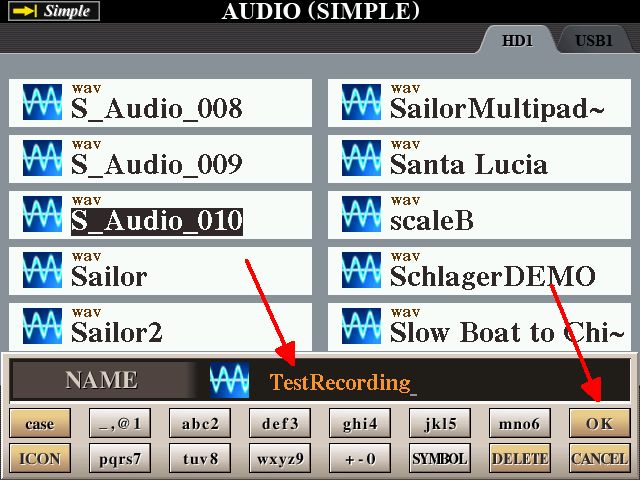
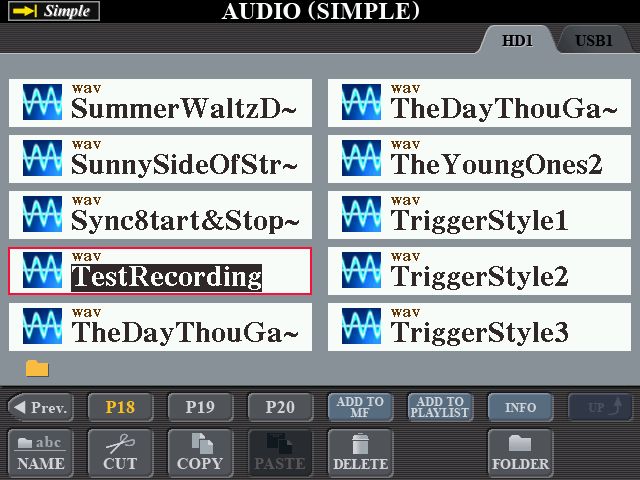
Find the list of recorded songs (as per the above), select the one you want to NAME (presumably the last one) and press NAME.

In the next screen, press the OK.

The ‘default’ name shows, ready for you to put in your own NAME.
Do not just start typing as what you type will be added to the end of what you see.

You must first delete the name showing in that box. If you press the DELETE briefly it will remove the last symbol showing. If you carry on in this way you will be pressing that DELETE 11 times! So instead, press and HOLD the DELETE .. and the whole name will be removed in one go.

Type in the name that you want using UPPER CASE, lower case etc. If you use a SYMBOL, roll the DATA ENTRY wheel until the marker is under the symbol you want, and then press ENTER.

Then press the OK.
 Note about the SYMBOLS:
 There is no question mark ( ?) in the list. Anyone know why not? An upside-down question mark ( ¿) .. yes! From a Google search, an upside-down question mark ¿ is written before the first letter of an interrogative sentence or clause to indicate that a question follows.
More things to come.
It's all about the music!
Posts: 325
Threads: 83
Likes Received: 1,258 in 325 posts
Likes Given: 519
Joined: Apr 2024
What keyboard model(s) do you have ?: Tyros 4
Location: Weston-super-Mare
Bio: I am a 'self taught' home organ and keyboard player. Many years ago I played piano in a couple of 'bands' (one a Scottish Country Dance Band). We all had the chords of the piece we were playing written out in front of us, and as a result I have never felt the need to 'read music'. People say I 'play by ear', but a better description would be that I 'play by chords'.
Gender: Male
Country:
12-22-2024, 12:45 AM
(This post was last modified: 10-10-2025, 07:12 PM by Hugh Wallington.)
3. Recording level when making an AUDIO recording.
When you set up an AUDIO RECORDING, you press the RECORD and STOP buttons together to set up a NEW AUDIO (it does actually tell you that underneath).

You then have to make a choice of which type of AUDIO recording you want to make .. MULTI or SIMPLE. If you choose MULTI you’re heading for a load of trouble, as this option is specifically for doing Audio Multi Tracking .. which I shall be covering in another Topic (Thread) later. I only have one word for going down the MULTI road. It’s brilliant! (Maybe that is two words!) So choose SIMPLE for a ‘normal’ audio recording.
Note: Not all Yamaha keyboards have the MULTI option. The ‘touchscreen’ Yamaha keyboards (Genos and SX series) don’t, so they do SIMPLE recordings by default ( that’s really sad!). Tyros 3 & 4 both have the MULTI option; not sure about the Tyros 5.

The red light on REC will now be flashing, and this message below comes up to tell you that you must click the PLAY/PAUSE button to start recording.

Press the OK.
As soon as you do that you get the screen below.
Note that by ‘default’ the recording level is 90.

You’re not recording yet, so it’s at this point that you can make any alterations to what you have set up eg. press the SYNC START, or change some of the VOLUMES etc.
All set, and ready to go?
Press the PLAY/PAUSE and you’re doing a ‘live’ recording.

The recording levels as you’re playing show as green and yellow bars. What you don’t want to happen is for the recording level to go up one more notch and be ‘in the red’. If you’re anything like me, you are so preoccupied actually playing the piece and trying not to make a mistake, there is no way you would ever look at these recording levels while you’re playing. I always put my recordings into Audacity afterwards and check my recording levels.
A keyboard acquaintance of mine (Michael Clark) has sung in clubs and played for Private Functions ‘up North’ most of his life, accompanying himself on his Tyros 2. I was so taken with the way he sang I asked him if he would record Mack the Knife for me, which he kindly did and sent me the MP3.
Click the below and have a listen to him singing.
https://app.box.com/s/5kwynagleja7v985i2hc8wrgj0zgtsrx
Not what I was hoping to hear!
I put the MP3 he had sent me into Audacity and this is what came up.

He must have had his recording volume far too high.
So I asked him to turn the volume right down and record it again.
Which he did, and sent me the MP3.
Same again! No difference! Took us quite a while to work out what was going on.
When I asked him to ‘turn it down’, that’s exactly what he did. He turned the master volume control for the keyboard right down so he could hardly hear the music .. and then recorded it.
What we discovered was:
The position of the keyboard’s master volume control has no bearing whatsoever on the recording level for recording.
I have checked this out on my Tyros 4, and can confirm that even with the master volume control on zero (ie. I couldn’t hear anything through the headphones), when I made a recording it recorded at full volume. So it’s only the ‘listener’ who is affected by the position of that volume control. I didn’t know that .. but I do now!
So going back to the ‘recording screen’ showing the REC MONITOR, which was set at 90, he eventually had to turn that down to 30 (!) in order to get a recording that was not overmodulated.
Listen to how this has all turned out.
https://app.box.com/s/nvum5j2f13etdbwci483w2dxhwtoid02
The waveform in Audacity is now looking like this. So only just OK!

Just goes to show .. one shouldn’t ‘assume’ things. I’m sure this must be in the handbook somewhere.
Hugh
More things to come.
It's all about the music!
Posts: 20,959
Threads: 16,552
Likes Received: 78,800 in 19,570 posts
Likes Given: 10,412
Joined: Sep 2021
What keyboard model(s) do you have ?: KORG PA5X 76 - KORG OASYS 76 SONDIUS-XG VERSION - KETRON AUDYA 76 - YAMAHA PSR-9000 PRO - KORG KRONOS 1 73
Location: Norway
Bio: Retired Self-employed | CNC Operator | Machine mechanic | Formwork carpenter | Machine carpenter | Student Counselor for the National Immigrant Organization | Advisor for the National Immigrants' Organization | Leader of supervisors | Newspaper CEO editor | Caretaker | Alpha & Betatester for NFS World & Auto Club Revolution
Gender: Male
Country: 
12-22-2024, 02:41 AM
(This post was last modified: 12-22-2024, 03:00 PM by Chello.)
@Hugh
Thanks for bringing this up with recording and volume.
I had the same problems you describe with the Tyros4, and discovered that this was due to the volume being set to 90.
And as you suggest, reducing it to 30 (or less) was necessary to achieve the correct volume.
Your first recording shows -8 to -5dB, which gives a strong distortion.
Also look at the meter under the play functions, which shows full range, with the last 2 bars, which means strong audible distortion.

The second recording is significantly better, but in several places the meter shows -10dB.
I see that it is largely the vocals that do this, and much of it is probably because there is too much reverb on the mic.
The entire frequency range has too much volume, even though your meter is set to show yellow.

I have found that a level that barely shows yellow is safe; it should never be all the way up to yellow (almost red).
In fact, many of the Pa5X's internal styles also have too high an average level, which sometimes gives full effect on the meter I use to control (Foobar).
Result ?
Audible distortion.
The meter on the Tyros4 is also incorrectly calibrated, and probably shows many dB too low.
The Pa5X's meter often shows 8dB too low in the bass range..!
NOTE:
It is extremely important to be aware that when the meter is miscalibrated, this will mean that the actual level of especially low-frequency signals will be many dB higher than what is displayed.
A yellow value of almost red will therefore actually mean red.
Shared knowledge provides increased knowledge
If we all share everything we have, we all have everything
Every theory is only a hypothesis until it is practically proven
KEYBOARDS, SYNTHS & MODULES I HAVE HAD AND HAVE
Casio CTK 811-ex ||| Roland EXR-7 76 ||| Yamaha DGX-620 ||| Yamaha PSR-550 ||| Yamaha PSR-S700 ||| Korg Pa800 ||| Korg Pa3X 61 ||| Deebach XMS-Pro ||| Ketron Ajamsonic ||| Casio WK-7500 ||| Yamaha Tyros5 61 ||| vArranger ||| Ketron Audya5 61 ||| Yamaha PSR S950 ||| Solton X8 Chromatic ||| Yamaha Tyros4 10th Anniversary ||| Korg Pa4X 61 ||| Roland BK-7m ||| Technics KN-6000 ||| Technics KN-7000 ||| Roli Seaboard RISE 49 ||| Deebach MAX Plus ||| Yamaha Genos ||| Korg Pa700 ||| Korg Kronos2 73 ||| Tyros4 61 ||| Deebach BlackBox ||| Korg Pa2X Pro ||| Yamaha A3000 ||| Ghenos Plus ||| Medeli AKX10 ||| Korg Nautilus 73 ||| Yamaha DGX-670 ||| Korg Krome EX-88 ||| Korg OASYS 76 Sondius-XG version ||| Korg Pa5X 76 (Pythagoras Tuned) ||| Yamaha Tyros1 ||| Ketron Audya 76 (Own developed OS) ||| Yamaha PSR-3000 ||| Yamaha 9000 Pro ||| Yamaha MODX M8 ||| Korg Grandstage X ||| Roland Juno-D7 ||| Korg Kronos 1 73 (Pythagoras Tuned)
MY PA EQUIPMENT NON-ACTIVE AND ACTIVE
Aune S6 32 bit/384 kb DAC - connected through Topping USB Isolator ||| MOTU 32 bit Audio Interface ||| TEYUN Q26 32 bit/384 kb Audio Interface ||| FM Acoustics FM 300A Power amp ||| FM Acoustics FM 255 Resolution Series Pre amp ||| MBL 6010 Pre Amp ||| STAX SR-L300 (Lambda) electrostatic headphones with STAX SRM-252S Amplifier ||| beyerdynamic T70 headphones (without pads) ||| Baffle horns equipped with Seas Exotic 8" fullrange units ||| JBL horns with Planar membranes ||| Fountek NeoPro 5i (Special Edition) ribbon tweeters with Planar membranes ||| Hexagonal subwoofer with 12 pieces Push&Pull coupled Seas Prestige 8" units, 1 item 10" slave unit and built-in XTZ power amplifiers & Cambridge Azur 640A as pre amplifier ||| Yamaha HS-5 active monitors connected to all keyboards
Posts: 325
Threads: 83
Likes Received: 1,258 in 325 posts
Likes Given: 519
Joined: Apr 2024
What keyboard model(s) do you have ?: Tyros 4
Location: Weston-super-Mare
Bio: I am a 'self taught' home organ and keyboard player. Many years ago I played piano in a couple of 'bands' (one a Scottish Country Dance Band). We all had the chords of the piece we were playing written out in front of us, and as a result I have never felt the need to 'read music'. People say I 'play by ear', but a better description would be that I 'play by chords'.
Gender: Male
Country:
12-23-2024, 03:17 AM
(This post was last modified: 10-10-2025, 07:28 PM by Hugh Wallington.)
Chello,
Thank you for your analysis of Michael Clarke's recording of Mack the Knife at those two recording levels .. 90 and 30. I'm sure you're right, that it's the reverb on his mic that is causing him the problem. But I have heard him sing with the reverb very much turned down .. and he just doesn't sound the same! I just love listening to him sing with all that reverb .. and will overlook a little bit of distortion!
In my thread on putting a Bass PART into a Style I recorded Red River Rock, the objective here being to have a BASS PART that would blow you to bits in a DISCO. The first time I recorded it the whole of the second part was all in the red, so I had to record it again.
https://app.box.com/s/pl149dpp463jgry3t1p2dgt3lwvi5jx2
Putting the audio file into Audacity I now get this ...

... which has a couple of red spikes in it, but achieves my objective of having a 'disco' bass. And you can see that it's the BASS that is overloading it by all those 'spikes'.
Audacity forms part of my 'recording' package as it enables me to see what is going on as well as hear it.
Hugh
It's all about the music!
Posts: 20,959
Threads: 16,552
Likes Received: 78,800 in 19,570 posts
Likes Given: 10,412
Joined: Sep 2021
What keyboard model(s) do you have ?: KORG PA5X 76 - KORG OASYS 76 SONDIUS-XG VERSION - KETRON AUDYA 76 - YAMAHA PSR-9000 PRO - KORG KRONOS 1 73
Location: Norway
Bio: Retired Self-employed | CNC Operator | Machine mechanic | Formwork carpenter | Machine carpenter | Student Counselor for the National Immigrant Organization | Advisor for the National Immigrants' Organization | Leader of supervisors | Newspaper CEO editor | Caretaker | Alpha & Betatester for NFS World & Auto Club Revolution
Gender: Male
Country:
12-23-2024, 08:05 AM
(This post was last modified: 12-23-2024, 08:06 AM by Chello.)
@Hugh
I understand your enthusiasm for Michael's use of reverb on the mic, because this is in a way part of his signature that suits his voice well.
If he had reduced the volume on the mic a little, the problem with distortion would have been effectively reduced.
From my HiFi point of view, the song dominates too much; it's as if "the soloist is killing the orchestra".
It makes a lot of sense to check the levels with e.g. Audacity along the way, because these meters are reliable, unlike those on the keyboard.
I always do this (every single time), but usually use Foobar and a wave editor for viewing, and Audacity if more precise viewing is required.
Shared knowledge provides increased knowledge
If we all share everything we have, we all have everything
Every theory is only a hypothesis until it is practically proven
KEYBOARDS, SYNTHS & MODULES I HAVE HAD AND HAVE
Casio CTK 811-ex ||| Roland EXR-7 76 ||| Yamaha DGX-620 ||| Yamaha PSR-550 ||| Yamaha PSR-S700 ||| Korg Pa800 ||| Korg Pa3X 61 ||| Deebach XMS-Pro ||| Ketron Ajamsonic ||| Casio WK-7500 ||| Yamaha Tyros5 61 ||| vArranger ||| Ketron Audya5 61 ||| Yamaha PSR S950 ||| Solton X8 Chromatic ||| Yamaha Tyros4 10th Anniversary ||| Korg Pa4X 61 ||| Roland BK-7m ||| Technics KN-6000 ||| Technics KN-7000 ||| Roli Seaboard RISE 49 ||| Deebach MAX Plus ||| Yamaha Genos ||| Korg Pa700 ||| Korg Kronos2 73 ||| Tyros4 61 ||| Deebach BlackBox ||| Korg Pa2X Pro ||| Yamaha A3000 ||| Ghenos Plus ||| Medeli AKX10 ||| Korg Nautilus 73 ||| Yamaha DGX-670 ||| Korg Krome EX-88 ||| Korg OASYS 76 Sondius-XG version ||| Korg Pa5X 76 (Pythagoras Tuned) ||| Yamaha Tyros1 ||| Ketron Audya 76 (Own developed OS) ||| Yamaha PSR-3000 ||| Yamaha 9000 Pro ||| Yamaha MODX M8 ||| Korg Grandstage X ||| Roland Juno-D7 ||| Korg Kronos 1 73 (Pythagoras Tuned)
MY PA EQUIPMENT NON-ACTIVE AND ACTIVE
Aune S6 32 bit/384 kb DAC - connected through Topping USB Isolator ||| MOTU 32 bit Audio Interface ||| TEYUN Q26 32 bit/384 kb Audio Interface ||| FM Acoustics FM 300A Power amp ||| FM Acoustics FM 255 Resolution Series Pre amp ||| MBL 6010 Pre Amp ||| STAX SR-L300 (Lambda) electrostatic headphones with STAX SRM-252S Amplifier ||| beyerdynamic T70 headphones (without pads) ||| Baffle horns equipped with Seas Exotic 8" fullrange units ||| JBL horns with Planar membranes ||| Fountek NeoPro 5i (Special Edition) ribbon tweeters with Planar membranes ||| Hexagonal subwoofer with 12 pieces Push&Pull coupled Seas Prestige 8" units, 1 item 10" slave unit and built-in XTZ power amplifiers & Cambridge Azur 640A as pre amplifier ||| Yamaha HS-5 active monitors connected to all keyboards
Posts: 325
Threads: 83
Likes Received: 1,258 in 325 posts
Likes Given: 519
Joined: Apr 2024
What keyboard model(s) do you have ?: Tyros 4
Location: Weston-super-Mare
Bio: I am a 'self taught' home organ and keyboard player. Many years ago I played piano in a couple of 'bands' (one a Scottish Country Dance Band). We all had the chords of the piece we were playing written out in front of us, and as a result I have never felt the need to 'read music'. People say I 'play by ear', but a better description would be that I 'play by chords'.
Gender: Male
Country:
02-15-2025, 01:29 AM
(This post was last modified: 10-10-2025, 08:01 PM by Hugh Wallington.)
4. Getting a VOICE to play from top to bottom of the keyboard.
When I first turn my keyboard ON it is always set up to play a Concert Grand Piano from top to bottom of the keyboard.


I then probably choose to play a piece using a STYLE .. and then the keyboard is split, with STYLE chords played to the left of the split and melody to the right.
So how do we get the keyboard back to it’s original setup of playing a VOICE from top to bottom of the keyboard?
The answer is to switch the ACMP button to OFF.


I would want a single voice playing from top to bottom of my keyboard when I am doing one of the following. Adding a PART of my own into a STYLE (and if it’s a BASS PART I would particularly want it to run down below the split); creating a MULTIPAD; doing a MULTITRACK with an AUDIO RECORDING. Or just wanting to play something using the same VOICE right across the keyboard. Doesn't have to be Concert Grand Piano. You can change the Voice Category to another one and choose a different voice.
Going back to that PIANO VOICE .. it was hearing Charlie Kunz playing his piano that got me hooked on learning to play the piano in the first place. And this is probably another reason why I have never read music. None of the music books I had gave me the ‘Charlie Kunz’ sound, so I had to learn his technique of ‘dropping tenths’ myself.
It’s all about the music!
Here’s a friend of mine, Paul Dolman, playing my AR80 organ ‘Charlie Kunz’ style. He said to me that he could ‘drop tenths’ more easily on the organ than on a piano, as he would do it between playing a note on the lower manual and playing a foot pedal.
Also in these recordings he set up the foot pedals to play a ‘drum sound with brushes’, which meant he didn’t have to have a ‘fixed rhythm’ but could vary the tempo to suit the music. Every time he played a foot pedal he got the drum sound. Brilliant!
Hope you enjoy his playing as much as I do.
I'll Walk Alone (Medley), played by Paul Dolman on Yamaha AR80 organ.
https://app.box.com/s/lcmjy7jwzj2ssv8kq7lyhxpfyved33mx
What I Did For Love, played by Paul Dolman on Yamaha AR80 organ.
https://app.box.com/s/52vkkbhye77mxckxqgzi91y1tviyilzu
More things to come.
It's all about the music!
Posts: 325
Threads: 83
Likes Received: 1,258 in 325 posts
Likes Given: 519
Joined: Apr 2024
What keyboard model(s) do you have ?: Tyros 4
Location: Weston-super-Mare
Bio: I am a 'self taught' home organ and keyboard player. Many years ago I played piano in a couple of 'bands' (one a Scottish Country Dance Band). We all had the chords of the piece we were playing written out in front of us, and as a result I have never felt the need to 'read music'. People say I 'play by ear', but a better description would be that I 'play by chords'.
Gender: Male
Country:
04-16-2025, 01:04 AM
(This post was last modified: 09-06-2025, 01:08 AM by Hugh Wallington.)
5. Endings.
Here’s a gem from James Tyros (James), who has a Genos 2 keyboard.
He said to me:
“I have been watching a YouTube video on the Genos 2, and here’s something I didn’t know about mine.
When going for an ENDING, you have a choice of I, II, or III. Press the button towards the end of the bar and the selected ending kicks in.
But did you know that if you press it once you just get the normal programmed ending; but if you press it twice .. the ending slows down as it goes along and gets to the end.”
I’ve checked, and it does this with my Tyros 4 too.
Here’s an example of what happens if (a) you press the ENDING once; and (b) twice.
The STYLE is Quickstep (Variation B).
https://app.box.com/s/om35v92d7c5wdflc6wqzs3a8tisnjyxs
Brilliant! Thanks for the tip, James.
Hugh
It's all about the music!
Posts: 20,959
Threads: 16,552
Likes Received: 78,800 in 19,570 posts
Likes Given: 10,412
Joined: Sep 2021
What keyboard model(s) do you have ?: KORG PA5X 76 - KORG OASYS 76 SONDIUS-XG VERSION - KETRON AUDYA 76 - YAMAHA PSR-9000 PRO - KORG KRONOS 1 73
Location: Norway
Bio: Retired Self-employed | CNC Operator | Machine mechanic | Formwork carpenter | Machine carpenter | Student Counselor for the National Immigrant Organization | Advisor for the National Immigrants' Organization | Leader of supervisors | Newspaper CEO editor | Caretaker | Alpha & Betatester for NFS World & Auto Club Revolution
Gender: Male
Country:
04-16-2025, 02:01 AM
(This post was last modified: 10-10-2025, 08:04 PM by Hugh Wallington.)
(04-16-2025, 01:04 AM)Hugh Wallington Wrote: 5. Endings.
Here’s a gem from James Hunter (James), who has a Genos 2 keyboard.
He said to me:
“I have been watching a YouTube video on the Genos 2, and here’s something I didn’t know about mine.
When going for an ENDING, you have a choice of I, II, or III. Press the button towards the end of the bar and the selected ending kicks in.
But did you know that if you press it once you just get the normal programmed ending; but if you press it twice .. the ending slows down as it goes along and gets to the end.”
I’ve checked, and it does this with my Tyros 4 too.
Here’s an example of what happens if (a) you press the ENDING once; and (b) twice.
The STYLE is Quickstep (Variation B).
https://app.box.com/s/om35v92d7c5wdflc6wqzs3a8tisnjyxs
Brilliant! Thanks for the tip, James.
Hugh
⚅Hugh
This actually happens on my PSR-9000 Pro too. 
I discovered it by accident a while ago but forgot about it - thanks for posting this article so I remembered it again !
Shared knowledge provides increased knowledge
If we all share everything we have, we all have everything
Every theory is only a hypothesis until it is practically proven
KEYBOARDS, SYNTHS & MODULES I HAVE HAD AND HAVE
Casio CTK 811-ex ||| Roland EXR-7 76 ||| Yamaha DGX-620 ||| Yamaha PSR-550 ||| Yamaha PSR-S700 ||| Korg Pa800 ||| Korg Pa3X 61 ||| Deebach XMS-Pro ||| Ketron Ajamsonic ||| Casio WK-7500 ||| Yamaha Tyros5 61 ||| vArranger ||| Ketron Audya5 61 ||| Yamaha PSR S950 ||| Solton X8 Chromatic ||| Yamaha Tyros4 10th Anniversary ||| Korg Pa4X 61 ||| Roland BK-7m ||| Technics KN-6000 ||| Technics KN-7000 ||| Roli Seaboard RISE 49 ||| Deebach MAX Plus ||| Yamaha Genos ||| Korg Pa700 ||| Korg Kronos2 73 ||| Tyros4 61 ||| Deebach BlackBox ||| Korg Pa2X Pro ||| Yamaha A3000 ||| Ghenos Plus ||| Medeli AKX10 ||| Korg Nautilus 73 ||| Yamaha DGX-670 ||| Korg Krome EX-88 ||| Korg OASYS 76 Sondius-XG version ||| Korg Pa5X 76 (Pythagoras Tuned) ||| Yamaha Tyros1 ||| Ketron Audya 76 (Own developed OS) ||| Yamaha PSR-3000 ||| Yamaha 9000 Pro ||| Yamaha MODX M8 ||| Korg Grandstage X ||| Roland Juno-D7 ||| Korg Kronos 1 73 (Pythagoras Tuned)
MY PA EQUIPMENT NON-ACTIVE AND ACTIVE
Aune S6 32 bit/384 kb DAC - connected through Topping USB Isolator ||| MOTU 32 bit Audio Interface ||| TEYUN Q26 32 bit/384 kb Audio Interface ||| FM Acoustics FM 300A Power amp ||| FM Acoustics FM 255 Resolution Series Pre amp ||| MBL 6010 Pre Amp ||| STAX SR-L300 (Lambda) electrostatic headphones with STAX SRM-252S Amplifier ||| beyerdynamic T70 headphones (without pads) ||| Baffle horns equipped with Seas Exotic 8" fullrange units ||| JBL horns with Planar membranes ||| Fountek NeoPro 5i (Special Edition) ribbon tweeters with Planar membranes ||| Hexagonal subwoofer with 12 pieces Push&Pull coupled Seas Prestige 8" units, 1 item 10" slave unit and built-in XTZ power amplifiers & Cambridge Azur 640A as pre amplifier ||| Yamaha HS-5 active monitors connected to all keyboards
Posts: 325
Threads: 83
Likes Received: 1,258 in 325 posts
Likes Given: 519
Joined: Apr 2024
What keyboard model(s) do you have ?: Tyros 4
Location: Weston-super-Mare
Bio: I am a 'self taught' home organ and keyboard player. Many years ago I played piano in a couple of 'bands' (one a Scottish Country Dance Band). We all had the chords of the piece we were playing written out in front of us, and as a result I have never felt the need to 'read music'. People say I 'play by ear', but a better description would be that I 'play by chords'.
Gender: Male
Country:
05-07-2025, 01:41 AM
(This post was last modified: 10-10-2025, 08:26 PM by Hugh Wallington.)
6. Split Points.

I like to have my Split Point at G2 (ie. ‘G2’ forms part of the chord I am playing with my left hand). Now I know most people have their Split Point at F#, but I play a lot of songs in G, and this often involves playing an A7. I include that top G in my chord so that when I am using a LEFT HAND VOICE, that G (the 7th note of the chord), being the top note, is predominant. I have also positioned a second Split Point for R3. If R3 is selected, then R1 and R2 sound up to this second Split Point, and R3 sounds on it’s own from that second Split Point to the top of the keyboard.

If R3 is not selected, then R1 and R2 run right up to the top of the keyboard anyway.

And if R2 is not selected either, then R1 runs right up to the top of the keyboard on it’s own.

Note that the second split point position for R3 is showing where I had set it (on A4) .. but it’s not operational until you actually select R3 as a voice you are going to use.
I must admit that I hadn’t realised this for quite some while, and thought that the R1 and R2 voices wouldn’t go higher than A4 because I had allocated from A4 upwards to R3. As my Tyros 4 is a 61 note keyboard I do need sometimes to play notes higher than G, so this feature is important. Don’t have R3 selected unless I know I am wanting to use it!
Topic continued on Page 2 ...
It's all about the music!
|



![[-]](https://chellos-keyboard-players-club.com/images/collapse.png)
