Posts: 368
Threads: 91
Likes Received: 1,417 in 368 posts
Likes Given: 759
Joined: Apr 2024
What keyboard model(s) do you have ?: Tyros 4
Location: Weston-super-Mare
Bio: I am a 'self taught' home organ and keyboard player. Many years ago I played piano in a couple of 'bands' (one a Scottish Country Dance Band). We all had the chords of the piece we were playing written out in front of us, and as a result I have never felt the need to 'read music'. People say I 'play by ear', but a better description would be that I 'play by chords'.
Gender: Male
Country: 
02-16-2025, 01:38 AM
(This post was last modified: 02-19-2025, 10:57 PM by Hugh Wallington.)
I’m not really ‘into’ classical music, but there is some classical music that I just love to listen to. It’s the harmony that I find strikes a chord somewhere, and it’s this that has a profound effect of my appreciation of the music.
If you have an orchestra playing a 'Classical' piece, then each instrument in the orchestra will have it's own music to follow, and all the instruments will be playing together at the same time. If we want to create a similar piece on a keyboard, we are a bit restricted by only having two hands. So here is where 'multitracking' comes into its own. You could start with one of the instruments; then add another while you are listening to the first. You now have two instruments recorded. Whilst playing that back, you could add in a third. And you could do this a number of times. You will end up with all those orchestral instruments playing together, but they weren't all playing at the same time.
A number of years ago I came across this piece on YouTube and thought what a great idea it was to use a video editing program to sync and put all those parts together. Quite a task .. but what an achievement!
G. Caccini - "Ave Maria"
The person who put this together (Mike N) says:
This is a 5 part score which I have arranged from a "free score" site. The voices are: top left - viola; top right - cello, bass & 3rd violin; bottom left - violin 2; and bottom right - violin 1.
For violin 1 (bottom right) I used my Roland electronic accordion connected via midi to my PSR S900. I used my accordion solely because I can create better dynamic volume increases/decreases with the bellows, far better than using a swell pedal. I had to record each part and then with a lot of blood, sweat and tears, edit the video and the audio so it all fitted together "as one".
Isn't that just beautiful? Everything you hear/see is Mike playing. This must be the most innovative example of multitracking that I have ever come across, and illustrates brilliantly how to put together various instruments to make an orchestral piece.
Similar to the "Ave Maria" put together by Mike N above, here is another example of a classical piece that has been multitracked ie. the various melodies that make up the 'whole' piece have been played separately and then put together.
Johann Pachelbel - Canon in D | Keyboard multitrack
Anybody brave enough to have a go at something like this?
Hugh
It's all about the music!
Posts: 21,288
Threads: 16,753
Likes Received: 80,393 in 19,882 posts
Likes Given: 10,750
Joined: Sep 2021
What keyboard model(s) do you have ?: KORG PA5X 76 - KORG OASYS 76 SONDIUS-XG VERSION - KETRON AUDYA 76 - YAMAHA PSR-9000 PRO - KORG KRONOS 1 73
Location: Norway
Bio: Retired Self-employed | CNC Operator | Machine mechanic | Formwork carpenter | Machine carpenter | Student Counselor for the National Immigrant Organization | Advisor for the National Immigrants' Organization | Leader of supervisors | Newspaper CEO editor | Caretaker | Alpha & Betatester for NFS World & Auto Club Revolution
Gender: Male
Country: 
02-16-2025, 02:00 AM
(This post was last modified: 02-16-2025, 02:10 AM by Chello.)
⚅Hugh
Special thanks for this one.
I have a similar relationship to classical music as you.
The finest music ever made is found within this genre.
Multitracking has a special meaning to me, because my father and his brothers did this a lot in the 50s-60s, and also in the 80s.
I made my first multitrack recording when I was 15, where I used 2 cassette recorders and made choirs with my own voice; 1st, 2nd and 3rd voice.
My brother was a semi-professional musician his whole life, and released a CD where he played all the instruments himself using multitracking.
My brother does everything himself here, and I helped with the mixing.
I've never seen the way you demonstrate multitracking like this before, with up to 8 videos in one - WHAT a job !
Shared knowledge provides increased knowledge
If we all share everything we have, we all have everything
Every theory is only a hypothesis until it is practically proven
KEYBOARDS, SYNTHS & MODULES I HAVE HAD AND HAVE
Casio CTK 811-ex ||| Roland EXR-7 76 ||| Yamaha DGX-620 ||| Yamaha PSR-550 ||| Yamaha PSR-S700 ||| Korg Pa800 ||| Korg Pa3X 61 ||| Deebach XMS-Pro ||| Ketron Ajamsonic ||| Casio WK-7500 ||| Yamaha Tyros5 61 ||| vArranger ||| Ketron Audya5 61 ||| Yamaha PSR S950 ||| Solton X8 Chromatic ||| Yamaha Tyros4 10th Anniversary ||| Korg Pa4X 61 ||| Roland BK-7m ||| Technics KN-6000 ||| Technics KN-7000 ||| Roli Seaboard RISE 49 ||| Deebach MAX Plus ||| Yamaha Genos ||| Korg Pa700 ||| Korg Kronos2 73 ||| Tyros4 61 ||| Deebach BlackBox ||| Korg Pa2X Pro ||| Yamaha A3000 ||| Ghenos Plus ||| Medeli AKX10 ||| Korg Nautilus 73 ||| Yamaha DGX-670 ||| Korg Krome EX-88 ||| Korg OASYS 76 Sondius-XG version ||| Korg Pa5X 76 (Pythagoras Tuned) ||| Yamaha Tyros1 ||| Ketron Audya 76 (Own developed OS) ||| Yamaha PSR-3000 ||| Yamaha 9000 Pro ||| Yamaha MODX M8 ||| Korg Grandstage X ||| Roland Juno-D7 ||| Korg Kronos 1 73 (Pythagoras Tuned)
MY PA EQUIPMENT NON-ACTIVE AND ACTIVE
Aune S6 32 bit/384 kb DAC ||| Topping USB Isolator ||| MOTU 32 bit Audio Interface ||| TEYUN Q26 32 bit/384 kb Audio Interface ||| FM Acoustics FM 300A Power amp ||| FM Acoustics FM 255 Resolution Series Pre amp ||| STAX SR-L300 (Lambda) electrostatic headphones with STAX SRM-252S Amplifier ||| beyerdynamic T70 headphones (without pads) ||| Baffle horns equipped with Seas Exotic 8" fullrange units ||| JBL horns with Compression Planar membranes ||| Fountek NeoPro 5i (Special Edition) ribbon tweeters with Compression Planar membranes ||| Audiotek W460S Bullet tweeters ||| Hexagonal subwoofer with 12 pieces Push&Pull coupled Seas Prestige 8" units, 1 item 10" slave unit and built-in XTZ power amplifiers & Cambridge Azur 640A as pre amplifier ||| Yamaha HS-5 active monitors connected to MBL 6010 Pre Amp to all keyboards
Posts: 396
Threads: 12
Likes Received: 1,069 in 401 posts
Likes Given: 2,240
Joined: Nov 2024
What keyboard model(s) do you have ?: PSR S900 & SX720
Location: Ireland
Bio: Style & Midi collector
Gender: Female
Country: 
02-16-2025, 04:10 AM
(This post was last modified: 02-16-2025, 04:12 AM by aprilla.)
(02-16-2025, 01:38 AM)Hugh Wallington Wrote: I’m not really ‘into’ classical music, but there is some classical music that I just love to listen to. It’s the harmony that I find strikes a chord somewhere, and it’s this that has a profound effect of my appreciation of the music.
If you have an orchestra playing a 'Classical' piece, then each instrument in the orchestra will have it's own music to follow, and all the instruments will be playing together at the same time. If we want to create a similar piece on a keyboard, we are a bit restricted by only having two hands. So here is where 'multitracking' comes into its own. You could start with one of the instruments; then add another while you are listening to the first. You now have two instruments recorded. Whilst playing that back, you could add in a third. And you could do this a number of times. You will end up with all those orchestral instruments playing together, but they weren't all playing at the same time.
A number of years ago I came across this piece on YouTube and thought what a great idea it was to use a video editing program to sync and put all those parts together. Quite a task .. but what an achievement!
G. Caccini - "Ave Maria"
The person who put this together (Mike N) says:
This is a 5 part score which I have arranged from a "free score" site. The voices are: top left - viola; top right - cello, bass & 3rd violin; bottom left - violin 2; and bottom right - violin 1.
For violin 1 (bottom right) I used my Roland electronic accordion connected via midi to my PSR S900. I used my accordion solely because I can create better dynamic volume increases/decreases with the bellows, far better than using a swell pedal. I had to record each part and then with a lot of blood, sweat and tears, edit the video and the audio so it all fitted together "as one".
Isn't that just beautiful? Everything you hear/see is Mike playing. This must be the most innovative example of multitracking that I have ever come across, and illustrates brilliantly how to put together various instruments to make an orchestral piece.
Similar to the "Ave Maria" put together by Mike N above, here is another example of a classical piece that has been multitracked ie. the various melodies that make up the 'whole' piece have been played separately and then put together.
Johann Pachelbel - Canon in D | Keyboard multitrack
Anybody brave enough to have a go at something like this?
Hugh
This, at my level (which is hobby, sub-hobby even if I don't start practising) is a real fun thing to do. I enjoyed reading scores when I was learning music, and so getting scores from midi files fit right into playing like this, recording the parts on the 5700. And it doesn't have to be just classical, though they are lovely for it, but many pieces have nice orchestration.
I think with the 720 it should be fun to try it again, thanks for the reminder, though the to-do list is getting overwhelmingly long.
Pachelbel - Canon in D pdf attached in case anyone else fancies having a go.
 Pachelbel - Canon in D.pdf
 (Size: 473.76 KB / Downloads: 72)
Posts: 368
Threads: 91
Likes Received: 1,417 in 368 posts
Likes Given: 759
Joined: Apr 2024
What keyboard model(s) do you have ?: Tyros 4
Location: Weston-super-Mare
Bio: I am a 'self taught' home organ and keyboard player. Many years ago I played piano in a couple of 'bands' (one a Scottish Country Dance Band). We all had the chords of the piece we were playing written out in front of us, and as a result I have never felt the need to 'read music'. People say I 'play by ear', but a better description would be that I 'play by chords'.
Gender: Male
Country:
02-18-2025, 12:15 AM
(This post was last modified: 10-13-2025, 02:00 PM by Hugh Wallington.)
Aprilla,
I have downloaded your music sheet .. and I'm full of admiration for anyone who can read music scores like this!
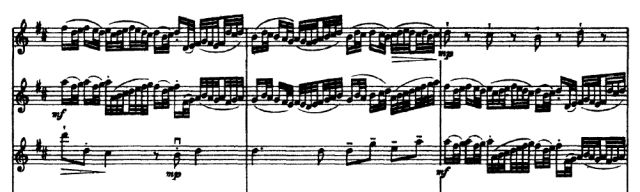
This confirms to me why I have never managed to read music. Way beyond my capability!
Here's another mixing of orchestral instruments done on a Tyros 4 by an acquaintance of mine, Colin Leaney. Colin has multitracked this using the MIDI RECORDER .. playing the piece 'as is' to start with, then changing the voices individually in different parts of the song afterwards. An amazing recording, which I have put to a video using VideoPad by NCH Software. It was quite a challenge to 'sync' the music (sort of) to video clips from pexels.com (which are Royalty Free to use). Very pleased with the result!
Gershwin Medley played by Colin Leaney on Tyros 4.
I have uploaded this piece of music to Box, so you can listen to it / download the mp3 by clicking this LINK below:
https://app.box.com/s/bc7qx19bodzh56icqz39bk547ywb7n6k
Hugh
It's all about the music!
Posts: 396
Threads: 12
Likes Received: 1,069 in 401 posts
Likes Given: 2,240
Joined: Nov 2024
What keyboard model(s) do you have ?: PSR S900 & SX720
Location: Ireland
Bio: Style & Midi collector
Gender: Female
Country:
02-18-2025, 02:19 AM
(This post was last modified: 10-13-2025, 02:02 PM by Hugh Wallington.)
(02-18-2025, 12:15 AM)Hugh Wallington Wrote: Aprilla,
I have downloaded your music sheet .. and I'm full of admiration for anyone who can read music scores like this!
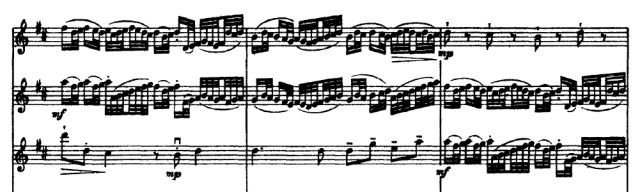
This confirms to me why I have never managed to read music. Way beyond my capability!
Here's another mixing of orchestral instruments done on a Tyros 4 by an acquaintance of mine, Colin Leaney. Colin has multitracked this using the MIDI RECORDER .. playing the piece 'as is' to start with, then changing the voices individually in different parts of the song afterwards. An amazing recording, which I have put to a video using VideoPad by NCH Software. It was quite a challenge to 'sync' the music (sort of) to video clips from pexels.com (which are Royalty Free to use). Very pleased with the result!
Gershwin Medley played by Colin Leaney on Tyros 4.
I have uploaded this piece of music to Box, so you can listen to it / download the mp3 by clicking this LINK below:
https://app.box.com/s/bc7qx19bodzh56icqz39bk547ywb7n6k
Hugh
Wow, that was a lot of work! Great job though, I enjoyed 'seeing' the instruments as they played.
And the music? That's why multi-tracking is such fun, just one line at a time! 
Posts: 368
Threads: 91
Likes Received: 1,417 in 368 posts
Likes Given: 759
Joined: Apr 2024
What keyboard model(s) do you have ?: Tyros 4
Location: Weston-super-Mare
Bio: I am a 'self taught' home organ and keyboard player. Many years ago I played piano in a couple of 'bands' (one a Scottish Country Dance Band). We all had the chords of the piece we were playing written out in front of us, and as a result I have never felt the need to 'read music'. People say I 'play by ear', but a better description would be that I 'play by chords'.
Gender: Male
Country:
02-18-2025, 09:26 PM
(This post was last modified: 02-18-2025, 09:28 PM by Hugh Wallington.)
Aprilla,
Thank you for your appreciation. I do enjoy putting mp3 recordings to videos using photos / video clips from pexels.com (which, as I said, are Royalty Free so are OK to use in videos for YouTube). Mostly I do this with my own music, but I have done a few for other people. It’s fun finding clips that suit either the music or the words, then putting the video together .. and hopefully adding a certain ‘ambience’ to the music. And this one for Colin was particularly taxing as I was ‘syncing’ the video clips to the music he was playing.
Now ...
One thing I had wrong was how Colin had done this recording. I had said that he hadn’t multitracked it, and had chosen the instruments ‘as he went along’. I have found the email he sent me at the time, and he did in fact multitrack it .. using the MIDI RECORDER .. but in a very unusual and unique way! So I have corrected my wording in the posts above to reflect this. And now I have found Colin’s original email I shall be putting more up about how he did his recording .. so watch this space!
Hugh
It's all about the music!
Posts: 368
Threads: 91
Likes Received: 1,417 in 368 posts
Likes Given: 759
Joined: Apr 2024
What keyboard model(s) do you have ?: Tyros 4
Location: Weston-super-Mare
Bio: I am a 'self taught' home organ and keyboard player. Many years ago I played piano in a couple of 'bands' (one a Scottish Country Dance Band). We all had the chords of the piece we were playing written out in front of us, and as a result I have never felt the need to 'read music'. People say I 'play by ear', but a better description would be that I 'play by chords'.
Gender: Male
Country:
02-19-2025, 11:09 PM
(This post was last modified: 09-07-2025, 08:05 PM by Hugh Wallington.)
When doing a MIDI RECORDING one can add extra tracks afterwards to MULTITRACK it. When completing any adjustments to this MIDI file, I always regard the resulting file as a ‘completed work’ .. which then has to be ‘played back’ through the AUDIO RECORDER to get it as an AUDIO file (WAV or MP3) for others to listen to.
Read the email below, from Colin Leaney. What he does is to do some multitracking in the normal way ... then also change the voices during the process of recording from MIDI to AUDIO using the VOICE PANEL .. something that would not have occurred to me to do!
With the VOICES I choose I always end up with having one instrument playing a whole Verse .. and then another for the next Verse, or the Chorus. With Colin’s way you can get your piece to sound more like an orchestra, with one instrument playing a few bars .. and then another taking over.
HOW I RECORD SONGS ON MY TYROS4 KEYBOARD
---------------------------------------------------------------------------------
Colin Leaney – 13th July 2022
I have little doubt that all players use the keyboard differently when recording any songs etc. We do this differently from each other, mainly because of a combination of:-
Musical playing ability.
The ability to understand what our keyboard will do.
Both the above, mixed with our ‘taste’ in music.
There is also a 4th reason, which is:- Whether a player is solely an ‘ear player’ or a trained ‘music reader’. There can be an enormous difference of ‘method of recording’, between an ear-player and a music reader.
All of which means, that because I’m a total 100% ear player, what I do when making any recording is not necessarily a guide to what trained readers will do. So, this point must be borne in mind when reading the following.
What I write here, is purely and only related to the Yamaha Tyros4 keyboard. I have no idea as to whether any of this can be applied to any other keyboards. Just the Tyros4.
So, away we go. This is what I do, in the fond hope that my finished recording can be considered as worthy of listening to. After I’ve chosen the song I want to record, I then decide as to whether I need to play it twice through, or just once with a ‘middle 8’ played twice. Whatever my choice is, I like to think that the entire finished recording will not be too lengthy. I now need to choose as to whether I use a pre-set intro, or play my own intro. ? Likewise, the ‘ending’. Usually, I prefer to compose my own intro and endings. But all this is purely a personal choice.
I now set up a ‘voice’ for my left hand. This is pure choice, and it might be that a player doesn’t actually want an extra voice on their left hand.
This will differ from player to player. However, if I need a left hand voice, I’ll save such a voice in the ‘Registration Memory Bank’. I am now fully set up to sit down and play the entire song, with both hands, just as if I was doing an actual ‘live’ performance. For purposes which will become clearer later on, it’s convenient to ensure that the main melody line is recorded onto ‘Track 1’.
This is not imperative, but certainly useful. You will understand why later in this write up. Also, when recording your melody line onto Track 1, it doesn’t have to be as a single note. You can if you wish, play it as a ‘harmony/play’.
When finished, what I’ve recorded should be good enough to post anywhere as a ‘sit’n play’ piece. However, I like to ‘multi-track’, so what I’ve done thus far is merely a basis for what I want to do.
At this stage all we’ve got for our money is a complete ‘MIDI’ recording of all that we want to do, except that certain voices may now need to be changed. So, I now select the voices I want for each section of my recording, and save these under their respective buttons on the ‘Voice Panel’. Let’s just say I want to use – (as the main melody line) the following:-
‘Concert Grand Piano’ – ‘Allegro Strings’ – ‘Golden Trumpet’ – ‘Chorus Solid Guitar’.
These will now be set-up and saved under their respective buttons.
I now want to ‘multi-track, because I want to back up the main melody line with various voice passages, to act purely as backing. Just like an orchestra. This is achieved by using the ‘Song Creator’ and the ‘Mixing Console’. The song creator will give you 16 tracks to work with. In practice however, only an average of 6 of these would be available to use, because of other factors such as ‘style’ tracks taking up a number of tracks.
So, on any of the available tracks, I can now play what I hope will be various ‘harmonic’ single-noted accompaniments to the main melody as I play it back.
Such tracks come automatically from my mind, and as such, they are not always correct or indeed ‘harmonious’. !! However, 90% of the time, most of these ‘harmonics’ are OK, and ‘in tune’ with the main melody. So, I proceed as follows:-
Each extra track I record will need to be ‘balanced’ against the main melody recording. This is done by one of two ways. --- I can go into the ‘Mixing Console’ and adjust the volume level, and this is very straightforward to do. The same task can also be carried out via the ‘Song Creator’. Obviously, I then test my adjusted level, and re-adjust should I need to do so. Once I think that this extra track is satisfactory, I save this, and the entire saving is now the main melody and one track of additional single-noted accompaniment. At this juncture, ‘EVERYTHING’ you’ve recorded can be adjusted to suit your taste. Mainly via the ‘Mixing Console’.
I now proceed to play and record onto any unused tracks, further bits of accompaniment. These can be anything I choose, because apart from all else, anything can be changed. Voices can be changed (more later), volume levels can be changed, or anything can be completely deleted. All via the ‘Mixing Console’ and the ‘Song Creator’.
I’ve now come to the final action to be taken. Which is:- To convert what I’ve done in MIDI to WAV files. This is done via the ‘Audio recorder/player’. Whilst I’m actually in the process of recording this conversion, I will also change any voices I wish to change. There are in fact, 3 different ways of changing voices. But I prefer to do it as follows:-I’ve previously saved the voices I wish to use into the ‘voice panel’. So, whilst I’m actually recording the MIDI from the ‘Song recorder’ into the ‘Audio recorder’, I merely press the appropriate voice button on the voice panel, and this will be the voice that will be recorded as a WAV file. !! Obviously, I change voices as I go along, via the Voice Panel.
I appreciate that this sounds a bit complicated, but in reality it’s very straightforward. It’s only this written explanation that’s somewhat difficult. !!!
Hopefully, we have now finished up (in the audio recorder) with the finished recording that we hoped will be OK. If it is OK, save it in the ‘Audio Recorder’, and later convert it to MP3 via normal computer processes.
There we are, finished.
Cheers, --- Colin.
Here below are another two of Colin’s recordings that I have put to video using VideoPad and clips from pexels.com. Just listen to how the audio changes it’s sound as it moves along. A unique way of doing music, and I just love listening to it!
Tea for Two played by Colin Leaney on Tyros 4.
This is All I Ask played by Colin Leaney on Tyros 4.
Hugh
It's all about the music!
|


![[-]](https://chellos-keyboard-players-club.com/images/collapse.png)

