


09-28-2024, 08:26 PM
(This post was last modified: 10-09-2025, 01:53 AM by Hugh Wallington.)
The Metronome and Free Play Styles
Setting up the 'defaults' for the Metronome
My comments below apply specifically to my Tyros 4 keyboard, but they apply equally to any Yamaha keyboard. On the SX series or Genos you will have to find the relevant pages by touching the screen rather than pressing buttons.
There are situations when you will need to use the METRONOME. This could be when switching from a FreePlay STYLE to a Normal Style; or when creating a PART in a STYLE; or creating a MULTI PAD. ie. Any situation where you need to play the notes 'to a beat'. The Metronome puts out a beat, and you hear it, but the sound of the Metronome is not recorded. It is just there to help you 'keep to the beat'.
Basically, if you want to use the Metronome to help you 'keep to the beat', you can't use it when playing 'live' .. as everyone will hear it! If you are using the Metronome to help you get a recording perfectly 'on the beat' then using it will be fine .. as the metronome is not picked up by the in-built recorder.
You can check out your Settings for the METRONOME by pressing it and listening to what you've got.
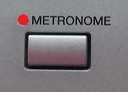
Is this what you hear?
Sound of the METRONOME
https://app.box.com/s/srmzn8c371xf4gilajjbih7tbf0jpyav
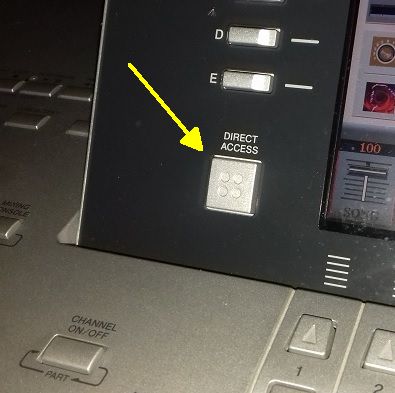
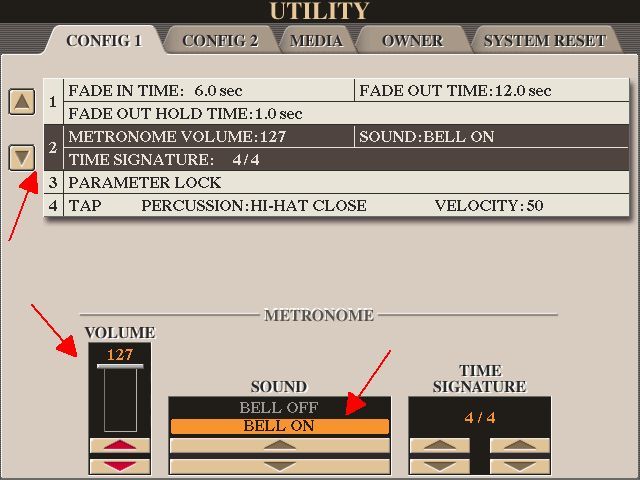
You need to hear the 'beat', with a 'BELL' sound emphasising the first beat of the bar. If you haven't got that, you need to make some changes to the settings. The Metronome 'settings' are in MENU, FUNCTION, UTILITY .. and the CONFIG 1 Tab. The quickest way to get to that is to press the DIRECT ACCESS button followed by the METRONOME button. The DIRECT ACCESS route is the quickest way to get to any of the 'set-up' pages.
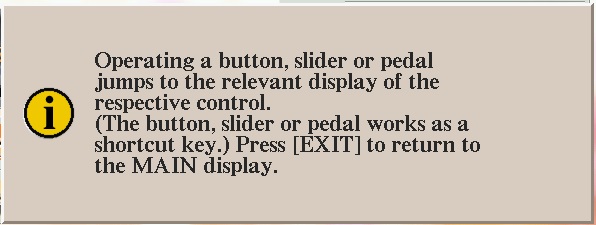
Pressing the METRONOME button after seeing the message above gets you to the Display Page where the Metronome is.
To get to the page showing the METRONOME, move down to "2" on the left. This is how the METRONOME should be set up. VOLUME = 127; SOUND = BELL ON. You will see the TIME SIGNATURE displayed in the third box.
I always use the METRONOME when recording a MULTI PAD. While the rhythm is going I hum the tune I am playing in my head in order to play the little Multipad 'counter-note' melodies in the right place. The Metronome 'beat' is not recorded into the Multipad.
When creating a PART in a STYLE to replace an existing one it isn't really necessary to use the Metronome as the Style itself has it's own 'rhythm' with drums/guitars etc. which you can hear. But adding the METRONOME to the mix can just make that beat a little bit stronger for you to follow it.
I thought that Freeplay STYLES didn't have a rhythm associated with them .. but they do! You can't hear any rhythm, but the Freeplay STYLE does follow beats in bars. If you only use a Freeplay STYLE then this isn't a problem. But if you want to 'mix' a Freeplay STYLE with a normal one that has a rhythm .. this is where things come unstuck. When you bring the normal Style in it won't start until the first beat of the bar. By having the METRONOME 'ON' you can play the Freeplay Style part 'to the beat' .. and change the REGISTRATION enabling the normal Style to come in on the first beat of the bar.
Here's an example of this.
Feelings
First, have a listen to how it all turned out in the end. I started with the FreePlay STYLE EtherealVoices from MOVIE & SHOW. This was followed by a STYLE with a Rhythm, Danzon from LATIN. I had the METRONOME playing all the way through this so I could get the changes of STYLE in the right place. If I played this to you 'live', either you would hear the METRONOME sounding all the way through; or if I turned it OFF .. then, when I did that run up with the strings the rhythm would be all over the place when it came in. I could, of course, have kept an eye on the '1, 2, 3, 4' beats in the bar showing on the screen, but to me, 'rhythm' is a 'feel' for the music and not a 'visual' thing.
Click the below to play 'Feelings'
https://app.box.com/s/or34gn5gkqgriay98adrts98gkqw2k5e
As I said, I had the METRONOME ON all the way through this .. but the METRONOME doesn't come out in the recording.
So you can hear what I was actually listening to while I was playing this piece I have made a 'live' recording from my Tyros 4 the same way I used to do it from my AR80 organ .. via an Audio Interface and into Audacity via a USB Port. Being an 'external' recording, the sound of the METRONOME is recorded as well.
DEMO of playing FEELINGS with the METRONOME sounding
https://app.box.com/s/s8mss7m8b394e5hkz0syvysac2nqtlf4
Hugh
Setting up the 'defaults' for the Metronome
My comments below apply specifically to my Tyros 4 keyboard, but they apply equally to any Yamaha keyboard. On the SX series or Genos you will have to find the relevant pages by touching the screen rather than pressing buttons.
There are situations when you will need to use the METRONOME. This could be when switching from a FreePlay STYLE to a Normal Style; or when creating a PART in a STYLE; or creating a MULTI PAD. ie. Any situation where you need to play the notes 'to a beat'. The Metronome puts out a beat, and you hear it, but the sound of the Metronome is not recorded. It is just there to help you 'keep to the beat'.
Basically, if you want to use the Metronome to help you 'keep to the beat', you can't use it when playing 'live' .. as everyone will hear it! If you are using the Metronome to help you get a recording perfectly 'on the beat' then using it will be fine .. as the metronome is not picked up by the in-built recorder.
You can check out your Settings for the METRONOME by pressing it and listening to what you've got.
Is this what you hear?
Sound of the METRONOME
https://app.box.com/s/srmzn8c371xf4gilajjbih7tbf0jpyav
You need to hear the 'beat', with a 'BELL' sound emphasising the first beat of the bar. If you haven't got that, you need to make some changes to the settings. The Metronome 'settings' are in MENU, FUNCTION, UTILITY .. and the CONFIG 1 Tab. The quickest way to get to that is to press the DIRECT ACCESS button followed by the METRONOME button. The DIRECT ACCESS route is the quickest way to get to any of the 'set-up' pages.
Pressing the METRONOME button after seeing the message above gets you to the Display Page where the Metronome is.
To get to the page showing the METRONOME, move down to "2" on the left. This is how the METRONOME should be set up. VOLUME = 127; SOUND = BELL ON. You will see the TIME SIGNATURE displayed in the third box.
I always use the METRONOME when recording a MULTI PAD. While the rhythm is going I hum the tune I am playing in my head in order to play the little Multipad 'counter-note' melodies in the right place. The Metronome 'beat' is not recorded into the Multipad.
When creating a PART in a STYLE to replace an existing one it isn't really necessary to use the Metronome as the Style itself has it's own 'rhythm' with drums/guitars etc. which you can hear. But adding the METRONOME to the mix can just make that beat a little bit stronger for you to follow it.
I thought that Freeplay STYLES didn't have a rhythm associated with them .. but they do! You can't hear any rhythm, but the Freeplay STYLE does follow beats in bars. If you only use a Freeplay STYLE then this isn't a problem. But if you want to 'mix' a Freeplay STYLE with a normal one that has a rhythm .. this is where things come unstuck. When you bring the normal Style in it won't start until the first beat of the bar. By having the METRONOME 'ON' you can play the Freeplay Style part 'to the beat' .. and change the REGISTRATION enabling the normal Style to come in on the first beat of the bar.
Here's an example of this.
Feelings
First, have a listen to how it all turned out in the end. I started with the FreePlay STYLE EtherealVoices from MOVIE & SHOW. This was followed by a STYLE with a Rhythm, Danzon from LATIN. I had the METRONOME playing all the way through this so I could get the changes of STYLE in the right place. If I played this to you 'live', either you would hear the METRONOME sounding all the way through; or if I turned it OFF .. then, when I did that run up with the strings the rhythm would be all over the place when it came in. I could, of course, have kept an eye on the '1, 2, 3, 4' beats in the bar showing on the screen, but to me, 'rhythm' is a 'feel' for the music and not a 'visual' thing.
Click the below to play 'Feelings'
https://app.box.com/s/or34gn5gkqgriay98adrts98gkqw2k5e
As I said, I had the METRONOME ON all the way through this .. but the METRONOME doesn't come out in the recording.
So you can hear what I was actually listening to while I was playing this piece I have made a 'live' recording from my Tyros 4 the same way I used to do it from my AR80 organ .. via an Audio Interface and into Audacity via a USB Port. Being an 'external' recording, the sound of the METRONOME is recorded as well.
DEMO of playing FEELINGS with the METRONOME sounding
https://app.box.com/s/s8mss7m8b394e5hkz0syvysac2nqtlf4
Hugh
It's all about the music!
![[-]](https://chellos-keyboard-players-club.com/images/collapse.png)