


04-06-2026, 08:03 PM
(This post was last modified: 04-06-2026, 10:50 PM by Hugh Wallington.)
Extracting individual songs from an Album posted in the Forum
When an individual music sheet is posted up in the Forum you can view it by clicking on the LINK given. When the sheet music appears, look up at the top of the screen and you will see the ‘download’ symbol to click on to Download the file. And a PRINT symbol should you wish to print it.

You will have to specify where you want the download to go. Create a FOLDER to put these song sheets into .. and your computer will put them in there and automatically sort them into Alphabetical Order. So next time you are looking for a song you will know where to go to find it.
But when Albums are posted in the Forum, what you get is the name of the Album and you have no idea which songs are in it. So the only way to find out is to open up the album (which is in the form of a PDF file), scroll down to the Index (which may or may not be in alphabetical order), make a note of the Page numbers your song is on, and scroll down to those page numbers so you can view them and print the individual pages out.
Now what Fikke did with his Busker Albums was to extract each song from the album and have it as a ‘stand alone’ PDF file, with its File Name the Name of the Song. By putting these into a FOLDER the computer automatically puts them into Alphabetical Order .. and any further Song Titles you add to the list are automatically inserted into their correct place alphabetically.
To EXTRACT the songs from an Album you need a PDF program .. and I have one from NCH Software called PicoPDF.
When I view an album I am wanting to keep I make a note of the Song Names, the Keys the songs are played in, and the Page Numbers where to find them. My purpose in doing this is so I can extract each song as a ‘stand alone’ PDF file (containing however many pages makes up the song).
A brief summary of how one does this is as follows.
1. Create a FOLDER to work in, and where extracted PDFs will be put.
2. Run the PDF program and load the Album (PDF File) into the program.
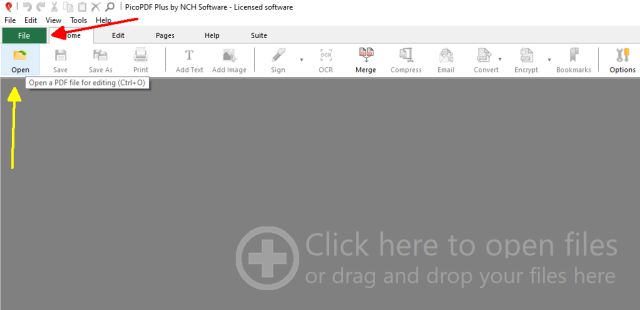
Scroll down through the album and make a note of the Song Names, the Keys the songs are played in, and which Page Numbers are allocated to each song.
3. Split the Pages up so that each one you have been looking at above is a ‘stand alone’ PDF (ie. split all pages. The one I am doing has 48 pages, so I will get 48 Numbered PDFs).
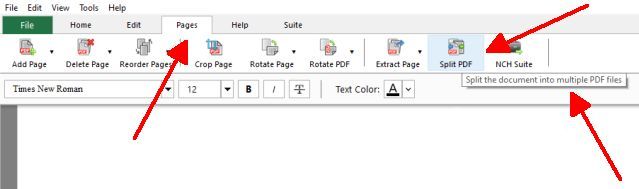
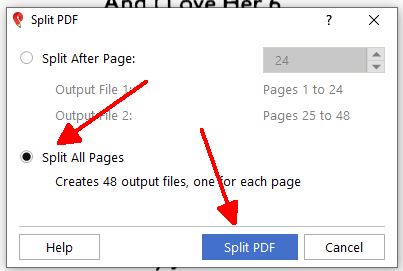
When you click on Split PDF you will be asked where you want the ‘Split PDFs’ to be put. This will be the FOLDER you created at the start.
4. Look for a Merge to merge two or more PDFs into one PDF.

5. Using this, merge the Pages of a song so it’s one PDF; NAME it ie. give it the name of the song and SAVE it into your newly created FOLDER.
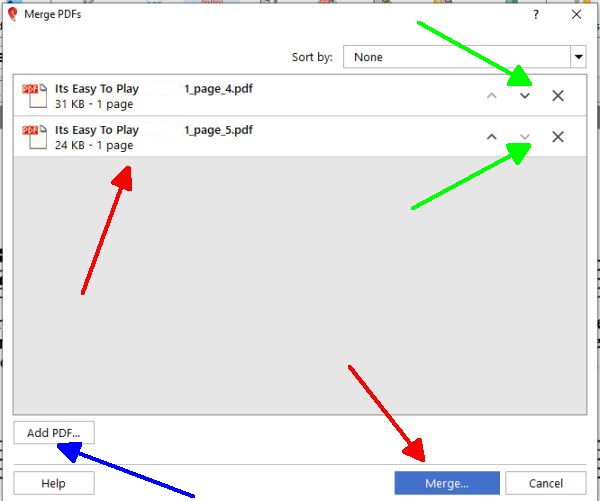
You can Add a PDF into the mix by clicking Add PDF...; or remove a PDF that shouldn’t be there by clicking the ‘X’ by it’s name.
6. Merge Pages that make up another song, give it the name of the song, and SAVE it. You will end up with a FOLDER with all the Song Titles in it (with all the Pages making up each one) .. and all in Alphabetical Order.
I have been doing this with an Album put up by jucami.
If anyone would like an Album extracted in this way, send me an email and I'll do it for you.
Hugh
When an individual music sheet is posted up in the Forum you can view it by clicking on the LINK given. When the sheet music appears, look up at the top of the screen and you will see the ‘download’ symbol to click on to Download the file. And a PRINT symbol should you wish to print it.
You will have to specify where you want the download to go. Create a FOLDER to put these song sheets into .. and your computer will put them in there and automatically sort them into Alphabetical Order. So next time you are looking for a song you will know where to go to find it.
But when Albums are posted in the Forum, what you get is the name of the Album and you have no idea which songs are in it. So the only way to find out is to open up the album (which is in the form of a PDF file), scroll down to the Index (which may or may not be in alphabetical order), make a note of the Page numbers your song is on, and scroll down to those page numbers so you can view them and print the individual pages out.
Now what Fikke did with his Busker Albums was to extract each song from the album and have it as a ‘stand alone’ PDF file, with its File Name the Name of the Song. By putting these into a FOLDER the computer automatically puts them into Alphabetical Order .. and any further Song Titles you add to the list are automatically inserted into their correct place alphabetically.
To EXTRACT the songs from an Album you need a PDF program .. and I have one from NCH Software called PicoPDF.
When I view an album I am wanting to keep I make a note of the Song Names, the Keys the songs are played in, and the Page Numbers where to find them. My purpose in doing this is so I can extract each song as a ‘stand alone’ PDF file (containing however many pages makes up the song).
A brief summary of how one does this is as follows.
1. Create a FOLDER to work in, and where extracted PDFs will be put.
2. Run the PDF program and load the Album (PDF File) into the program.
Scroll down through the album and make a note of the Song Names, the Keys the songs are played in, and which Page Numbers are allocated to each song.
3. Split the Pages up so that each one you have been looking at above is a ‘stand alone’ PDF (ie. split all pages. The one I am doing has 48 pages, so I will get 48 Numbered PDFs).
When you click on Split PDF you will be asked where you want the ‘Split PDFs’ to be put. This will be the FOLDER you created at the start.
4. Look for a Merge to merge two or more PDFs into one PDF.
5. Using this, merge the Pages of a song so it’s one PDF; NAME it ie. give it the name of the song and SAVE it into your newly created FOLDER.
You can Add a PDF into the mix by clicking Add PDF...; or remove a PDF that shouldn’t be there by clicking the ‘X’ by it’s name.
6. Merge Pages that make up another song, give it the name of the song, and SAVE it. You will end up with a FOLDER with all the Song Titles in it (with all the Pages making up each one) .. and all in Alphabetical Order.
I have been doing this with an Album put up by jucami.
If anyone would like an Album extracted in this way, send me an email and I'll do it for you.
Hugh
It's all about the music!
![[-]](https://chellos-keyboard-players-club.com/images/collapse.png)