


03-24-2025, 03:26 AM
(This post was last modified: 10-13-2025, 02:50 PM by Hugh Wallington.)
Choosing STYLES for a song
One song I have already put up in the Forum is Ob-La-Di, Ob-La-Da, when discussing putting INTROS into the middle of songs. The STYLE I used for this was one I picked from the PRESET STYLES of my Tyros 4 as being one that would suit the song .. Schlager Pop from ENTERTAINER. I always have my keyboard with my STYLE SETTING on TEMPO HOLD ...
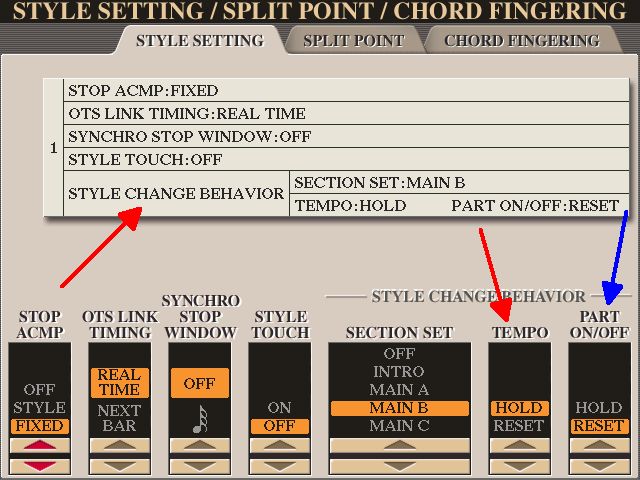
... so I can quickly skip through other STYLES (which will then play at the same TEMPO) to see (sorry, hear!) if any other STYLES could be incorporated into the song. This way, rather than just having the choice of VARIATION A, B, C and D of one particular STYLE, I can bring other suitable STYLES into the song.
There are times when I get really excited about doing something with my keyboard, but need some inspiration from somewhere for this to happen. In this instance, I was looking through some of the LARGE SHEETS put up by Chris .. and realised that he was including STYLES that would be suitable for the songs he was putting up. And one of them was Ob-La-Di, Ob-La-Da. So I downloaded his MUSIC SHEET and STYLE to see what Chris would suggest for playing this song.
Ob-La-Di, Ob-La-Da
https://chellos-keyboard-players-club.co...l#pid28301
Chris’s sheet music is in Bb, and I play it in C. As I ‘play by ear’ and don’t ‘read the dots’ for the melody .. but do need the chords for the harmony, it’s a simple matter to put all those chords ‘up’ two semitones. These are the chords to play it in C.
Ob-La-Di, Ob-La-Da
VERSE
/ C - - - / G7 - - - / G7 - - - / C - - - /
/ C – C7 - / F - - - / C – G7 - / C - - - /
CHORUS
/ C - - - / Em - Am - / C – G7 - / C - - - /
/ C - - - / Em - Am - / C – G7 - / C - - - /
BRIDGE
/ F - -- / F - - - / C - - - / C - - - /
/ F – - - / F - - - / C – - - / G7 - - - /
Chris’s STYLE
I have loaded this into USER and by pressing the CHANNEL ON/OFF button have had a brief look at the PARTS of the Style.
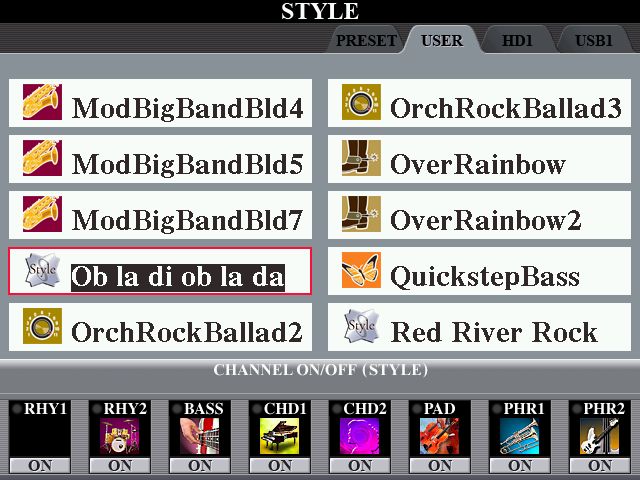
By holding down (and then releasing) the buttons corresponding to ON I am able to listen to what is in each PART. And whilst listening to any one of them I can switch the MAIN VARIATION between A, B, C and D to see what the difference is. There are basically only two VARIATIONS in this STYLE. A and B are the same; and C and D are the same. I rather like the BASS and CHORD1 parts in A/B so will use VARIATION B for playing this song.
Now whenever you set up a REGISTRATION and play/record something, there is one thing that is of paramount importance .. and that is the BALANCE between the various parts of the song. This is what a ‘recording engineer’ would do, so in some respects we all have to be ‘recording engineers’ when we are setting up our keyboards to play a song.
On a Yamaha keyboard there are two areas where we have to check the ‘balance’ .. and if it doesn’t sound right, change the VOLUMES so the sound is more like what you are trying to achieve.
The first (obvious) area is the BALANCE between the STYLE; MULTI PAD; RIGHT 1; RIGHT 2; RIGHT 3; and LEFT. And (dare I say it?) the VOLUME of the INTRO and ENDING. I often find that the volume of the INTRO is way too loud, so put that into a Memory Slot all on it’s own with a reduced STYLE volume. You can see all these VOLUMES under the MAIN screen by pressing the BALANCE button ..
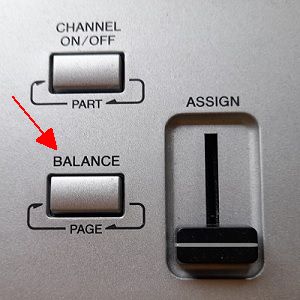
... and then adjust them accordingly.
But the other area where one should check the BALANCE is between the PARTS of the STYLE itself. Is the drummer drowning everybody else out? If he is, have a word with him and get him to quieten down. And then there’s the BASS player; and the guitarists. Do they fit in with the overall sound? I like to hear what the bass player is doing .. so often have to turn him UP.
Below are the VOLUMES for Chris’s Ob La Di Ob La Da STYLE, VARIATION B. You get to these by pressing the MIXING CONSOLE.
One press will give you the overall volumes; and two presses will give you the volumes of the STYLE PARTS.
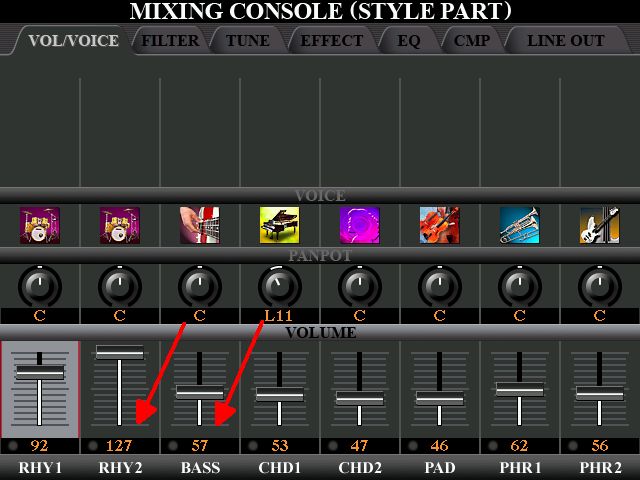
The volumes of RHY1, CHD2, PHR1 and PHR2 are not relevant as nothing is playing in these PARTS.
However .. our drummer is at MAXIMUM volume! So have had a word with him! I also would like to hear more from the BASS player. So I have adjusted the VOLUMES as below.
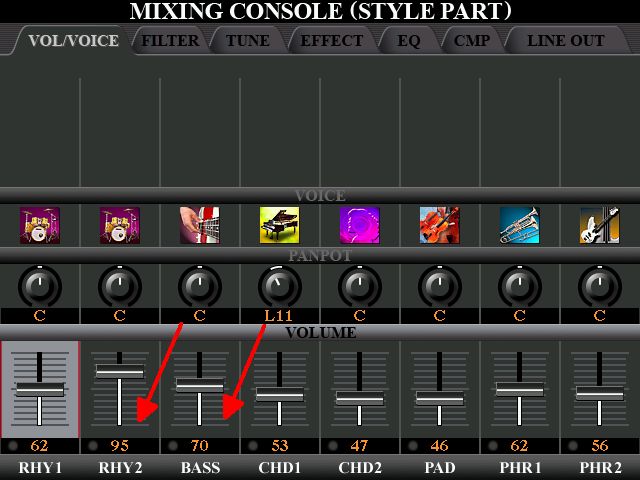
As I often like to use more than one STYLE for playing a piece, I thought I would look round for another one.
If you’re stuck for finding a suitable STYLE for a song, another good place to look is in the Music Finder.
So I have done this ...
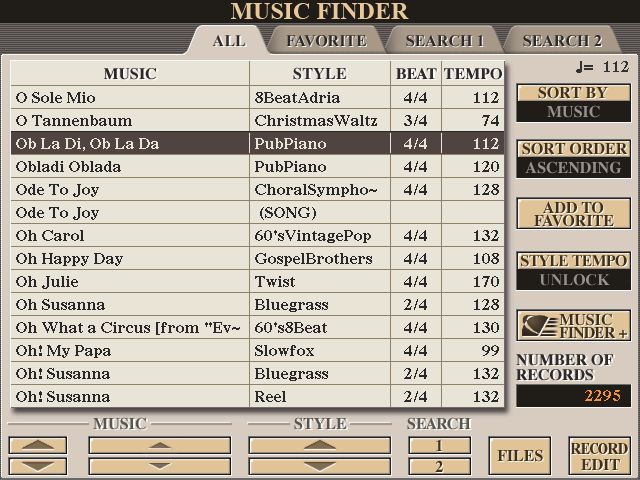
Yamaha suggest PubPiano as the STYLE to use for this song, at a Tempo of 112. That’s too slow for me. They do have this song showing at 120 bpm underneath .. and as this is the ‘default’ Tempo for Chris’s Style too, that is the Tempo I shall play it at.
My plan is to incorporate these two STYLES into the song. PubPiano has two VARIATIONS I really like .. B and D. So shall use both of these.
For this song I have decided to have my Expression Pedal (Volume Pedal .. Pedal 3) set up to control the whole keyboard (not just the Melody Voices). I have used this as I am playing.
The MULTI PAD is used only for that little ‘run-down’ in the BRIDGE. When I set it up I called it ObLaDiPAD. I START and STOP this manually.
RIGHT3 is not used at all.
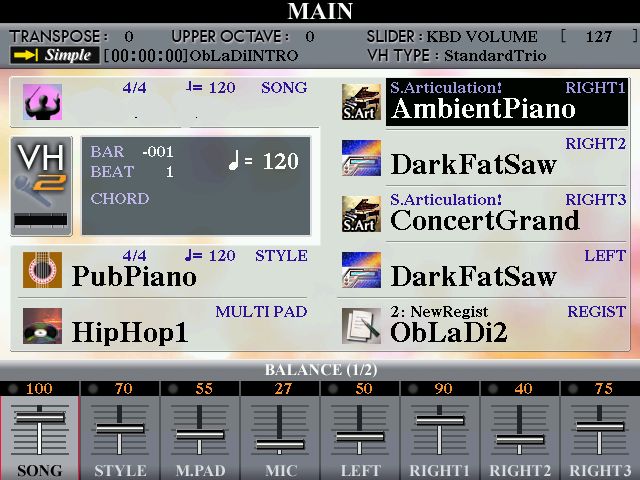
Have shown the ‘general’ BALANCE settings underneath
REGISTRATION MEMORY 1&2
PubPiano, VARIATION B.
No LEFT HAND VOICE in MEMORY 1.
The LEFT HAND VOICE is activated when switching to MEMORY 2 for the CHORUS .. and remains ON for the rest of the song.
REGISTRATION MEMORY 3
This is for playing the BRIDGE.
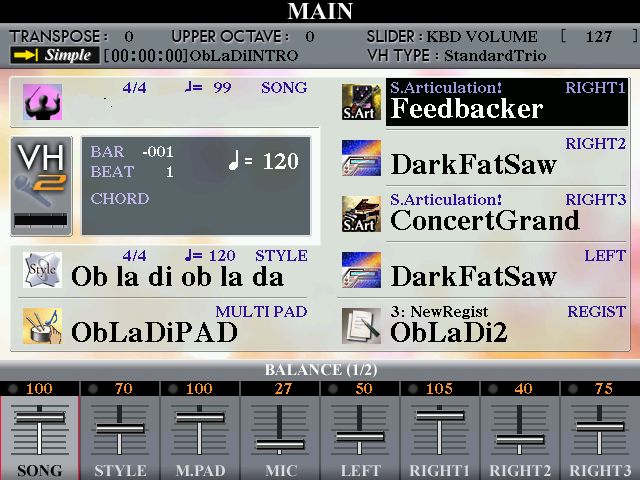
REGISTRATION MEMORY 4
This is set for PubPiano, INTROIII .. and VARIATION B is ‘flashing’. SYNC START is activated (so the START/STOP is flashing). What all this means is that as soon as I press REGISTRATION MEMORY 4 the INTRO comes in, which will be in the middle of the song.
REGISTRATION MEMORY 5
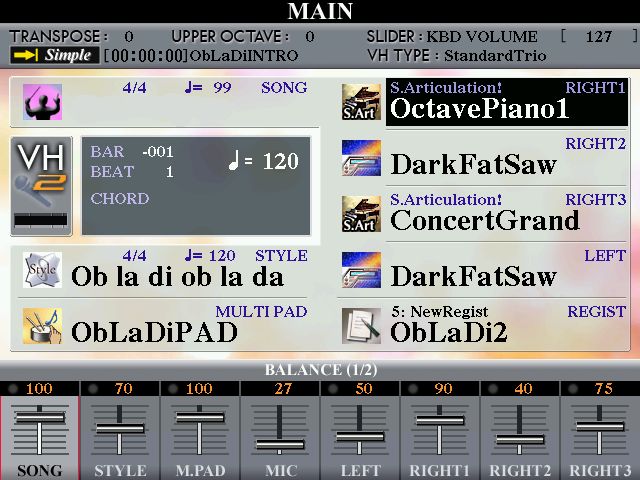
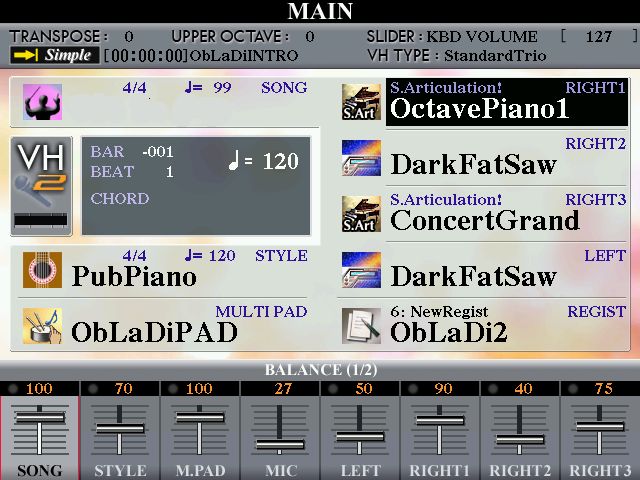
REGISTRATION MEMORY 6
Back to PubPiano, but this time with VARIATION D (with the ‘repeating piano’).
REGISTRATION MEMORY 7
This Registration Memory is set up with PubPiano VARIATION D, with ENDINGIII ‘flashing’ .. so as soon as I press this button .. that’s the end!
Note: I have activated REGISTRATION MEMORY 4 directly after the BRIDGE has played for the second time. This brings PubPiano INTROIII as an ‘interlude’ in the middle of the song. But more than that ...
I had noticed that the end of the BRIDGE has a G7 chord .. as it is leading back to the VERSE in C. So I thought to myself, as we are already on a G chord, why not activate that REGISTRATION MEMORY 4 staying on the G chord. This gives an INTRO leading you back to G. But as soon as I get to the VERSE I play it in C, as normal. If you listen carefully, this gives a sort of ‘key change’ at this point.
Have a listen to how all this has turned out.
https://app.box.com/s/lkdtdornr98lakkg0zfaki5eiywz5q0p
What do you reckon?
It was fun doing all that! Kept me thinking for quite a few hours! So thank you Chris for giving me the inspiration to try something different with my music.
Hugh
One song I have already put up in the Forum is Ob-La-Di, Ob-La-Da, when discussing putting INTROS into the middle of songs. The STYLE I used for this was one I picked from the PRESET STYLES of my Tyros 4 as being one that would suit the song .. Schlager Pop from ENTERTAINER. I always have my keyboard with my STYLE SETTING on TEMPO HOLD ...
... so I can quickly skip through other STYLES (which will then play at the same TEMPO) to see (sorry, hear!) if any other STYLES could be incorporated into the song. This way, rather than just having the choice of VARIATION A, B, C and D of one particular STYLE, I can bring other suitable STYLES into the song.
There are times when I get really excited about doing something with my keyboard, but need some inspiration from somewhere for this to happen. In this instance, I was looking through some of the LARGE SHEETS put up by Chris .. and realised that he was including STYLES that would be suitable for the songs he was putting up. And one of them was Ob-La-Di, Ob-La-Da. So I downloaded his MUSIC SHEET and STYLE to see what Chris would suggest for playing this song.
Ob-La-Di, Ob-La-Da
https://chellos-keyboard-players-club.co...l#pid28301
Chris’s sheet music is in Bb, and I play it in C. As I ‘play by ear’ and don’t ‘read the dots’ for the melody .. but do need the chords for the harmony, it’s a simple matter to put all those chords ‘up’ two semitones. These are the chords to play it in C.
Ob-La-Di, Ob-La-Da
VERSE
/ C - - - / G7 - - - / G7 - - - / C - - - /
/ C – C7 - / F - - - / C – G7 - / C - - - /
CHORUS
/ C - - - / Em - Am - / C – G7 - / C - - - /
/ C - - - / Em - Am - / C – G7 - / C - - - /
BRIDGE
/ F - -- / F - - - / C - - - / C - - - /
/ F – - - / F - - - / C – - - / G7 - - - /
Chris’s STYLE
I have loaded this into USER and by pressing the CHANNEL ON/OFF button have had a brief look at the PARTS of the Style.
By holding down (and then releasing) the buttons corresponding to ON I am able to listen to what is in each PART. And whilst listening to any one of them I can switch the MAIN VARIATION between A, B, C and D to see what the difference is. There are basically only two VARIATIONS in this STYLE. A and B are the same; and C and D are the same. I rather like the BASS and CHORD1 parts in A/B so will use VARIATION B for playing this song.
Now whenever you set up a REGISTRATION and play/record something, there is one thing that is of paramount importance .. and that is the BALANCE between the various parts of the song. This is what a ‘recording engineer’ would do, so in some respects we all have to be ‘recording engineers’ when we are setting up our keyboards to play a song.
On a Yamaha keyboard there are two areas where we have to check the ‘balance’ .. and if it doesn’t sound right, change the VOLUMES so the sound is more like what you are trying to achieve.
The first (obvious) area is the BALANCE between the STYLE; MULTI PAD; RIGHT 1; RIGHT 2; RIGHT 3; and LEFT. And (dare I say it?) the VOLUME of the INTRO and ENDING. I often find that the volume of the INTRO is way too loud, so put that into a Memory Slot all on it’s own with a reduced STYLE volume. You can see all these VOLUMES under the MAIN screen by pressing the BALANCE button ..
... and then adjust them accordingly.
But the other area where one should check the BALANCE is between the PARTS of the STYLE itself. Is the drummer drowning everybody else out? If he is, have a word with him and get him to quieten down. And then there’s the BASS player; and the guitarists. Do they fit in with the overall sound? I like to hear what the bass player is doing .. so often have to turn him UP.
Below are the VOLUMES for Chris’s Ob La Di Ob La Da STYLE, VARIATION B. You get to these by pressing the MIXING CONSOLE.
One press will give you the overall volumes; and two presses will give you the volumes of the STYLE PARTS.
The volumes of RHY1, CHD2, PHR1 and PHR2 are not relevant as nothing is playing in these PARTS.
However .. our drummer is at MAXIMUM volume! So have had a word with him! I also would like to hear more from the BASS player. So I have adjusted the VOLUMES as below.
As I often like to use more than one STYLE for playing a piece, I thought I would look round for another one.
If you’re stuck for finding a suitable STYLE for a song, another good place to look is in the Music Finder.
So I have done this ...
Yamaha suggest PubPiano as the STYLE to use for this song, at a Tempo of 112. That’s too slow for me. They do have this song showing at 120 bpm underneath .. and as this is the ‘default’ Tempo for Chris’s Style too, that is the Tempo I shall play it at.
My plan is to incorporate these two STYLES into the song. PubPiano has two VARIATIONS I really like .. B and D. So shall use both of these.
For this song I have decided to have my Expression Pedal (Volume Pedal .. Pedal 3) set up to control the whole keyboard (not just the Melody Voices). I have used this as I am playing.
The MULTI PAD is used only for that little ‘run-down’ in the BRIDGE. When I set it up I called it ObLaDiPAD. I START and STOP this manually.
RIGHT3 is not used at all.
Have shown the ‘general’ BALANCE settings underneath
REGISTRATION MEMORY 1&2
PubPiano, VARIATION B.
No LEFT HAND VOICE in MEMORY 1.
The LEFT HAND VOICE is activated when switching to MEMORY 2 for the CHORUS .. and remains ON for the rest of the song.
REGISTRATION MEMORY 3
This is for playing the BRIDGE.
REGISTRATION MEMORY 4
This is set for PubPiano, INTROIII .. and VARIATION B is ‘flashing’. SYNC START is activated (so the START/STOP is flashing). What all this means is that as soon as I press REGISTRATION MEMORY 4 the INTRO comes in, which will be in the middle of the song.
REGISTRATION MEMORY 5
REGISTRATION MEMORY 6
Back to PubPiano, but this time with VARIATION D (with the ‘repeating piano’).
REGISTRATION MEMORY 7
This Registration Memory is set up with PubPiano VARIATION D, with ENDINGIII ‘flashing’ .. so as soon as I press this button .. that’s the end!
Note: I have activated REGISTRATION MEMORY 4 directly after the BRIDGE has played for the second time. This brings PubPiano INTROIII as an ‘interlude’ in the middle of the song. But more than that ...
I had noticed that the end of the BRIDGE has a G7 chord .. as it is leading back to the VERSE in C. So I thought to myself, as we are already on a G chord, why not activate that REGISTRATION MEMORY 4 staying on the G chord. This gives an INTRO leading you back to G. But as soon as I get to the VERSE I play it in C, as normal. If you listen carefully, this gives a sort of ‘key change’ at this point.
Have a listen to how all this has turned out.
https://app.box.com/s/lkdtdornr98lakkg0zfaki5eiywz5q0p
What do you reckon?
It was fun doing all that! Kept me thinking for quite a few hours! So thank you Chris for giving me the inspiration to try something different with my music.
Hugh
It's all about the music!
![[-]](https://chellos-keyboard-players-club.com/images/collapse.png)

